AG-UI Overview ↗
noOriginal Documentation
Documentation Index#
Fetch the complete documentation index at: https://docs.ag-ui.com/llms.txt Use this file to discover all available pages before exploring further.
The Agent–User Interaction (AG-UI) Protocol#
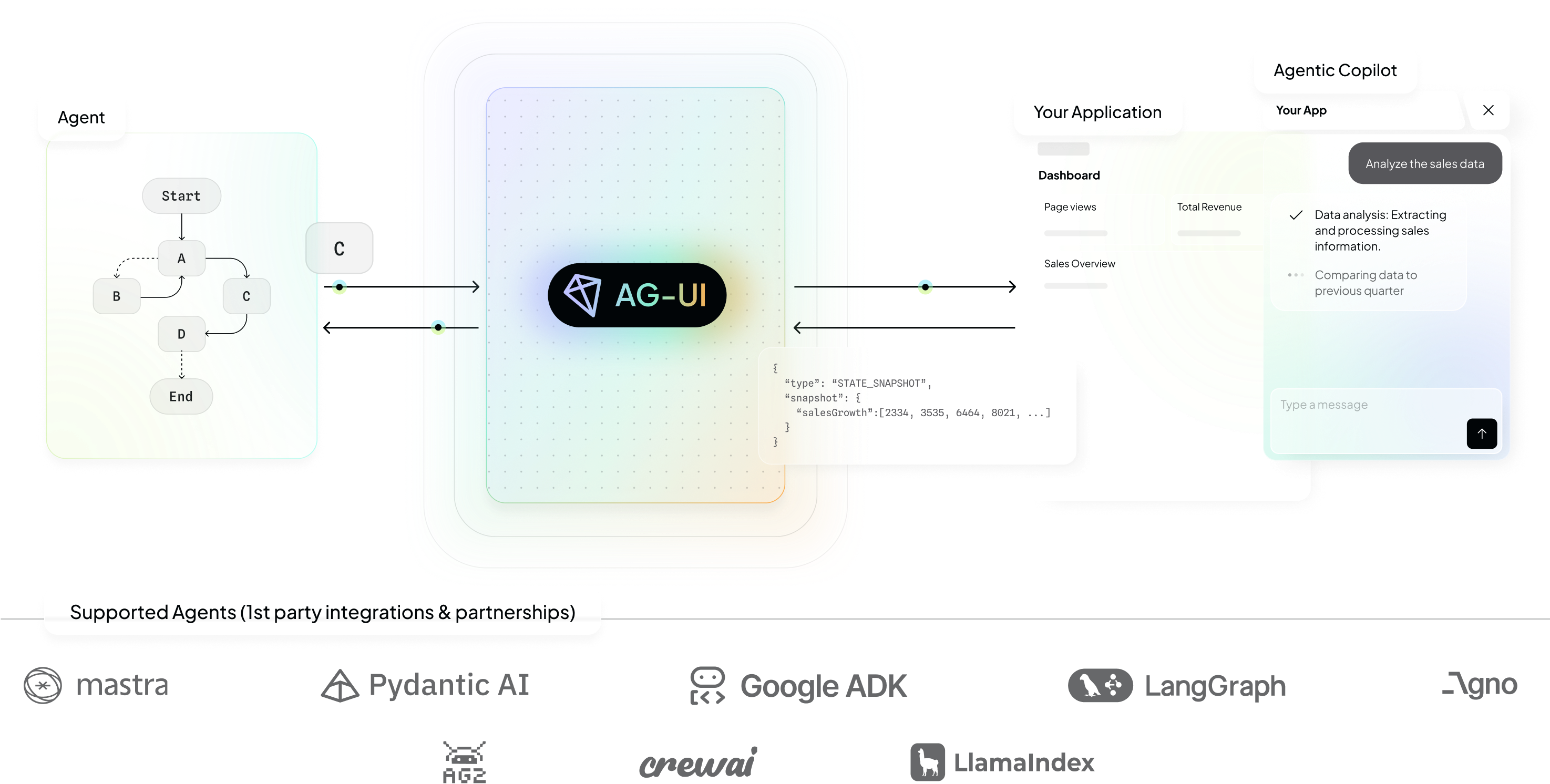
AG-UI is an open, lightweight, event-based protocol that standardizes how AI agents connect to user-facing applications.
AG-UI is designed to be the general-purpose, bi-directional connection between a user-facing application and any agentic backend.
Built for simplicity and flexibility, it standardizes how agent state, UI intents, and user interactions flow between your model/agent runtime and user-facing frontend applications—to allow application developers to ship reliable, debuggable, user‑friendly agentic features fast while focusing on application needs and avoiding complex ad-hoc wiring.
Agentic Protocols#
Confused about “A2UI” and “AG-UI”? That’s understandable! Despite the naming similarities, they are quite different and work well together. A2UI is a generative UI specification - allowing agents to deliver UI widgets, where AG-UI is the Agent↔User Interaction protocol - which connects an agentic frontend to any agentic backend. Learn more
AG-UI is one of three prominent open agentic protocols.
| Layer | Protocol / Example | Purpose |
|---|---|---|
| Agent ↔ User Interaction | AG-UI (Agent–User Interaction Protocol) | The open, event-based standard that connects agents to user-facing applications — enabling real-time, multimodal, interactive experiences. |
| Agent ↔ Tools & Data | MCP (Model Context Protocol) | Open standard (originated by Anthropic) that lets agents securely connect to external systems — tools, workflows, and data sources. |
| Agent ↔ Agent | A2A (Agent to Agent) | Open standard (originated by Google) which defines how agents coordinate and share work across distributed agentic systems. |
Building blocks (today & upcoming)#
{ e.currentTarget.querySelector(’.content’).style.maxHeight = ‘200px’; e.currentTarget.querySelector(’.content’).style.opacity = ‘1’; }} onMouseLeave={(e) => { e.currentTarget.querySelector(’.content’).style.maxHeight = ‘0px’; e.currentTarget.querySelector(’.content’).style.opacity = ‘0’; }}>
Streaming chat
Live token and event streaming for responsive multi turn sessions, with cancel and resume.
{ e.currentTarget.querySelector(’.content’).style.maxHeight = ‘200px’; e.currentTarget.querySelector(’.content’).style.opacity = ‘1’; }} onMouseLeave={(e) => { e.currentTarget.querySelector(’.content’).style.maxHeight = ‘0px’; e.currentTarget.querySelector(’.content’).style.opacity = ‘0’; }}>
Multimodality
Typed attachments and real time media (files, images, audio, transcripts); supports voice, previews, annotations, provenance.
{ e.currentTarget.querySelector(’.content’).style.maxHeight = ‘200px’; e.currentTarget.querySelector(’.content’).style.opacity = ‘1’; }} onMouseLeave={(e) => { e.currentTarget.querySelector(’.content’).style.maxHeight = ‘0px’; e.currentTarget.querySelector(’.content’).style.opacity = ‘0’; }}>
Generative UI, static
Render model output as stable, typed components under app control.
{ e.currentTarget.querySelector(’.content’).style.maxHeight = ‘200px’; e.currentTarget.querySelector(’.content’).style.opacity = ‘1’; }} onMouseLeave={(e) => { e.currentTarget.querySelector(’.content’).style.maxHeight = ‘0px’; e.currentTarget.querySelector(’.content’).style.opacity = ‘0’; }}>
Generative UI, declarative
Small declarative language for constrained yet open-ended agent UIs; agents propose trees and constraints, the app validates and mounts.
{ e.currentTarget.querySelector(’.content’).style.maxHeight = ‘200px’; e.currentTarget.querySelector(’.content’).style.opacity = ‘1’; }} onMouseLeave={(e) => { e.currentTarget.querySelector(’.content’).style.maxHeight = ‘0px’; e.currentTarget.querySelector(’.content’).style.opacity = ‘0’; }}>
Shared state
(Read-only & read-write). Typed store shared between agent and app, with streamed event-sourced diffs and conflict resolution for snappy collaboration.
{ e.currentTarget.querySelector(’.content’).style.maxHeight = ‘200px’; e.currentTarget.querySelector(’.content’).style.opacity = ‘1’; }} onMouseLeave={(e) => { e.currentTarget.querySelector(’.content’).style.maxHeight = ‘0px’; e.currentTarget.querySelector(’.content’).style.opacity = ‘0’; }}>
Thinking steps
Visualize intermediate reasoning from traces and tool events; no raw chain of thought.
{ e.currentTarget.querySelector(’.content’).style.maxHeight = ‘200px’; e.currentTarget.querySelector(’.content’).style.opacity = ‘1’; }} onMouseLeave={(e) => { e.currentTarget.querySelector(’.content’).style.maxHeight = ‘0px’; e.currentTarget.querySelector(’.content’).style.opacity = ‘0’; }}>
Frontend tool calls
Typed handoffs from agent to frontend-executed actions, and back.
{ e.currentTarget.querySelector(’.content’).style.maxHeight = ‘200px’; e.currentTarget.querySelector(’.content’).style.opacity = ‘1’; }} onMouseLeave={(e) => { e.currentTarget.querySelector(’.content’).style.maxHeight = ‘0px’; e.currentTarget.querySelector(’.content’).style.opacity = ‘0’; }}>
Backend tool rendering
Visualize backend tool outputs in app and chat, emit side effects as first-class events.
{ e.currentTarget.querySelector(’.content’).style.maxHeight = ‘200px’; e.currentTarget.querySelector(’.content’).style.opacity = ‘1’; }} onMouseLeave={(e) => { e.currentTarget.querySelector(’.content’).style.maxHeight = ‘0px’; e.currentTarget.querySelector(’.content’).style.opacity = ‘0’; }}>
Interrupts (human in the loop)
Pause, approve, edit, retry, or escalate mid flow without losing state.
{ e.currentTarget.querySelector(’.content’).style.maxHeight = ‘200px’; e.currentTarget.querySelector(’.content’).style.opacity = ‘1’; }} onMouseLeave={(e) => { e.currentTarget.querySelector(’.content’).style.maxHeight = ‘0px’; e.currentTarget.querySelector(’.content’).style.opacity = ‘0’; }}>
Sub-agents and composition
Nested delegation with scoped state, tracing, and cancellation.
{ e.currentTarget.querySelector(’.content’).style.maxHeight = ‘200px’; e.currentTarget.querySelector(’.content’).style.opacity = ‘1’; }} onMouseLeave={(e) => { e.currentTarget.querySelector(’.content’).style.maxHeight = ‘0px’; e.currentTarget.querySelector(’.content’).style.opacity = ‘0’; }}>
Agent steering
Dynamically redirect agent execution with real-time user input to guide behavior and outcomes.
{ e.currentTarget.querySelector(’.content’).style.maxHeight = ‘200px’; e.currentTarget.querySelector(’.content’).style.opacity = ‘1’; }} onMouseLeave={(e) => { e.currentTarget.querySelector(’.content’).style.maxHeight = ‘0px’; e.currentTarget.querySelector(’.content’).style.opacity = ‘0’; }}>
Tool output streaming
Stream tool results and logs so UIs can render long-running effects in real time.
{ e.currentTarget.querySelector(’.content’).style.maxHeight = ‘200px’; e.currentTarget.querySelector(’.content’).style.opacity = ‘1’; }} onMouseLeave={(e) => { e.currentTarget.querySelector(’.content’).style.maxHeight = ‘0px’; e.currentTarget.querySelector(’.content’).style.opacity = ‘0’; }}>
Custom events
Open-ended data exchange for needs not covered by the protocol.
Why Agentic Apps need AG-UI#
Agentic applications break the simple request/response model that dominated frontend-backend development in the pre-agentic era: a client makes a request, the server returns data, the client renders it, and the interaction ends.
The requirements of user‑facing agents#
While agents are just software, they exhibit characteristics that make them challenging to serve behind traditional REST/GraphQL APIs:
- Agents are long‑running and stream intermediate work—often across multi‑turn sessions.
- Agents are nondeterministic and can control application UI nondeterministically.
- Agents simultanously mix structured + unstructured IO (e.g. text & voice, alongside tool calls and state updates).
- Agents need user-interactive composition: e.g. they may call sub‑agents, often recursively.
- And more…
AG-UI is an event-based protocol that enables dynamic communication between agentic frontends and backends. It builds on top of the foundational protocols of the web (HTTP, WebSockets) as an abstraction layer designed for the agentic age—bridging the gap between traditional client-server architectures and the dynamic, stateful nature of AI agents.
AG-UI in Action#
You can see demo apps of the AG-UI features with the framework of your choice, with preview, code, and walkthrough docs in the AG-UI Dojo
Supported Integrations#
AG-UI was born from CopilotKit’s initial partnership with LangGraph and CrewAI - and brings the incredibly popular agent-user-interactivity infrastructure to the wider agentic ecosystem.
1st party = the platforms that have AG‑UI built in and provide documentation for guidance.
Direct to LLM#
| Framework | Status | AG-UI Resources |
|---|---|---|
| Direct to LLM | Supported | Docs |
Agent Framework - Partnerships#
| Framework | Status | AG-UI Resources |
|---|---|---|
| LangGraph | Supported | Docs, Demos |
| CrewAI | Supported | Docs, Demos |
Agent Framework - 1st Party#
| Framework | Status | AG-UI Resources |
|---|---|---|
| Microsoft Agent Framework | Supported | Docs, Demos |
| Google ADK | Supported | Docs, Demos |
| AWS Strands Agents | Supported | Docs, Demos |
| Mastra | Supported | Docs, Demos |
| Pydantic AI | Supported | Docs, Demos |
| Agno | Supported | Docs, Demos |
| LlamaIndex | Supported | Docs, Demos |
| AG2 | Supported | Docs Demos |
| AWS Bedrock Agents | In Progress | – |
Agent Framework - Community#
| Framework | Status | AG-UI Resources |
|---|---|---|
| OpenAI Agent SDK | In Progress | – |
| Cloudflare Agents | In Progress | – |
Agent Interaction Protocols#
| Protocol | Status | AG-UI Resources | Integrations |
|---|---|---|---|
| A2A Middleware | Supported | Docs | Partnership |
Specification (standard)#
| Framework | Status | AG-UI Resources |
|---|---|---|
| Oracle Agent Spec | Supported | Docs, Demos |
SDKs#
| SDK | Status | AG-UI Resources | Integrations |
|---|---|---|---|
| Kotlin | Supported | Getting Started | Community |
| Golang | Supported | Getting Started | Community |
| Dart | Supported | Getting Started | Community |
| Java | Supported | Getting Started | Community |
| Rust | Supported | Getting Started | Community |
| .NET | In Progress | PR | Community |
| Nim | In Progress | PR | Community |
| Flowise | In Progress | GitHub Source | Community |
| Langflow | In Progress | GitHub Source | Community |
Clients#
| Client | Status | AG-UI Resources | Integrations |
|---|---|---|---|
| CopilotKit | Supported | Getting Started | 1st Party |
| Terminal + Agent | Supported | Getting Started | Community |
| React Native | Help Wanted | GitHub Source | Community |
Quick Start#
Choose the path that fits your needs:
Build agentic applications powered by AG-UI compatible agents.
Build integrations for new agent frameworks, custom in-house solutions, or use AG-UI without any agent framework.
Build new clients for AG-UI-compatible agents (web, mobile, slack, messaging, etc.)
Explore AG-UI#
Dive deeper into AG-UI’s core concepts and capabilities:
<span class=“card-start” data-card-raw=“title=“Core architecture” icon=“sitemap” iconType=“light” color="#3B82F6” href="/concepts/architecture""> Understand how AG-UI connects agents, protocols, and front-ends
<span class=“card-start” data-card-raw=“title=“Events” icon=“bolt” iconType=“light” color="#3B82F6” href="/concepts/events""> Learn about AG-UI’s event-driven protocol
Resources#
Explore guides, tools, and integrations to help you build, optimize, and extend your AG-UI implementation. These resources cover everything from practical development workflows to debugging techniques.
<span class=“card-start” data-card-raw=“title=“Developing with Cursor” icon=“rocket” iconType=“light” color="#3B82F6” href="/tutorials/cursor""> Use Cursor to build AG-UI implementations faster
<span class=“card-start” data-card-raw=“title=“Troubleshooting AG-UI” icon=“bug” iconType=“light” color="#3B82F6” href="/tutorials/debugging""> Fix common issues when working with AG-UI servers and clients
Contributing#
Want to contribute? Check out our Contributing Guide to learn how you can help improve AG-UI.
Support and Feedback#
Here’s how to get help or provide feedback:
- For bug reports and feature requests related to the AG-UI specification, SDKs, or documentation (open source), please create a GitHub issue
- For discussions or Q&A about AG-UI, please join the Discord community