Prompts ↗
yesEditorial Notes
Prompts are the least commonly used of the three MCP primitives, but they fill an important niche: reusable, parameterized templates that help users invoke common workflows. Think of them as saved recipes that combine a specific prompt structure with dynamic arguments. Unlike tools and resources, prompts are user-initiated – the user explicitly selects a prompt from a menu rather than the model discovering it automatically. This makes them ideal for standardizing repetitive interactions like “summarize this codebase” or “review this PR.”
Original Documentation
Documentation Index#
Fetch the complete documentation index at: https://modelcontextprotocol.io/llms.txt Use this file to discover all available pages before exploring further.
Protocol Revision: 2025-11-25
The Model Context Protocol (MCP) provides a standardized way for servers to expose prompt templates to clients. Prompts allow servers to provide structured messages and instructions for interacting with language models. Clients can discover available prompts, retrieve their contents, and provide arguments to customize them.
User Interaction Model#
Prompts are designed to be user-controlled, meaning they are exposed from servers to clients with the intention of the user being able to explicitly select them for use.
Typically, prompts would be triggered through user-initiated commands in the user interface, which allows users to naturally discover and invoke available prompts.
For example, as slash commands:
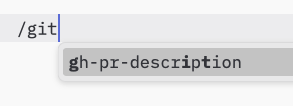
However, implementors are free to expose prompts through any interface pattern that suits their needs—the protocol itself does not mandate any specific user interaction model.
Capabilities#
Servers that support prompts MUST declare the prompts capability during
initialization:
{
  "capabilities": {
    "prompts": {
      "listChanged": true
    }
  }
}
listChanged indicates whether the server will emit notifications when the list of
available prompts changes.
Protocol Messages#
Listing Prompts#
To retrieve available prompts, clients send a prompts/list request. This operation
supports pagination.
Request:
{
  "jsonrpc": "2.0",
  "id": 1,
  "method": "prompts/list",
  "params": {
    "cursor": "optional-cursor-value"
  }
}
Response:
{
  "jsonrpc": "2.0",
  "id": 1,
  "result": {
    "prompts": [
      {
        "name": "code_review",
        "title": "Request Code Review",
        "description": "Asks the LLM to analyze code quality and suggest improvements",
        "arguments": [
          {
            "name": "code",
            "description": "The code to review",
            "required": true
          }
        ],
        "icons": [
          {
            "src": "https://example.com/review-icon.svg",
            "mimeType": "image/svg+xml",
            "sizes": ["any"]
          }
        ]
      }
    ],
    "nextCursor": "next-page-cursor"
  }
}
Getting a Prompt#
To retrieve a specific prompt, clients send a prompts/get request. Arguments may be
auto-completed through the completion API.
Request:
{
  "jsonrpc": "2.0",
  "id": 2,
  "method": "prompts/get",
  "params": {
    "name": "code_review",
    "arguments": {
      "code": "def hello():\n    print('world')"
    }
  }
}
Response:
{
  "jsonrpc": "2.0",
  "id": 2,
  "result": {
    "description": "Code review prompt",
    "messages": [
      {
        "role": "user",
        "content": {
          "type": "text",
          "text": "Please review this Python code:\ndef hello():\n    print('world')"
        }
      }
    ]
  }
}
List Changed Notification#
When the list of available prompts changes, servers that declared the listChanged
capability SHOULD send a notification:
{
  "jsonrpc": "2.0",
  "method": "notifications/prompts/list_changed"
}
Message Flow#
sequenceDiagram
    participant Client
    participant Server

    Note over Client,Server: Discovery
    Client->>Server: prompts/list
    Server-->>Client: List of prompts

    Note over Client,Server: Usage
    Client->>Server: prompts/get
    Server-->>Client: Prompt content

    opt listChanged
      Note over Client,Server: Changes
      Server--)Client: prompts/list_changed
      Client->>Server: prompts/list
      Server-->>Client: Updated prompts
    end
Data Types#
Prompt#
A prompt definition includes:
name: Unique identifier for the prompttitle: Optional human-readable name of the prompt for display purposes.description: Optional human-readable descriptionicons: Optional array of icons for display in user interfacesarguments: Optional list of arguments for customization
PromptMessage#
Messages in a prompt can contain:
role: Either “user” or “assistant” to indicate the speakercontent: One of the following content types:
All content types in prompt messages support optional annotations for metadata about audience, priority, and modification times.
Text Content#
Text content represents plain text messages:
{
  "type": "text",
  "text": "The text content of the message"
}
This is the most common content type used for natural language interactions.
Image Content#
Image content allows including visual information in messages:
{
  "type": "image",
  "data": "base64-encoded-image-data",
  "mimeType": "image/png"
}
The image data MUST be base64-encoded and include a valid MIME type. This enables multi-modal interactions where visual context is important.
Audio Content#
Audio content allows including audio information in messages:
{
  "type": "audio",
  "data": "base64-encoded-audio-data",
  "mimeType": "audio/wav"
}
The audio data MUST be base64-encoded and include a valid MIME type. This enables multi-modal interactions where audio context is important.
Embedded Resources#
Embedded resources allow referencing server-side resources directly in messages:
{
  "type": "resource",
  "resource": {
    "uri": "resource://example",
    "mimeType": "text/plain",
    "text": "Resource content"
  }
}
Resources can contain either text or binary (blob) data and MUST include:
- A valid resource URI
- The appropriate MIME type
- Either text content or base64-encoded blob data
Embedded resources enable prompts to seamlessly incorporate server-managed content like documentation, code samples, or other reference materials directly into the conversation flow.
Error Handling#
Servers SHOULD return standard JSON-RPC errors for common failure cases:
- Invalid prompt name:
-32602(Invalid params) - Missing required arguments:
-32602(Invalid params) - Internal errors:
-32603(Internal error)
Implementation Considerations#
- Servers SHOULD validate prompt arguments before processing
- Clients SHOULD handle pagination for large prompt lists
- Both parties SHOULD respect capability negotiation
Security#
Implementations MUST carefully validate all prompt inputs and outputs to prevent injection attacks or unauthorized access to resources.