Flow HITL Management ↗
noOriginal Documentation
Documentation Index#
Fetch the complete documentation index at: https://docs.crewai.com/llms.txt Use this file to discover all available pages before exploring further.
Enterprise-grade human review for Flows with email-first notifications, routing rules, and auto-response capabilities
Flow HITL Management features require the @human_feedback decorator, available in CrewAI version 1.8.0 or higher. These features apply specifically to Flows, not Crews.
CrewAI Enterprise provides a comprehensive Human-in-the-Loop (HITL) management system for Flows that transforms AI workflows into collaborative human-AI processes. The platform uses an email-first architecture that enables anyone with an email address to respond to review requests—no platform account required.
Overview#
<span class=“card-start” data-card-raw=“title=“Email-First Design” icon=“envelope”"> Responders can reply directly to notification emails to provide feedback
<span class=“card-start” data-card-raw=“title=“Flexible Routing” icon=“route”"> Route requests to specific emails based on method patterns or flow state
<span class=“card-start” data-card-raw=“title=“Auto-Response” icon=“clock”"> Configure automatic fallback responses when no human replies in time
Key Benefits#
- Simple mental model: Email addresses are universal; no need to manage platform users or roles
- External responders: Anyone with an email can respond, even non-platform users
- Dynamic assignment: Pull assignee email directly from flow state (e.g.,
sales_rep_email) - Reduced configuration: Fewer settings to configure, faster time to value
- Email as primary channel: Most users prefer responding via email over logging into a dashboard
Setting Up Human Review Points in Flows#
Configure human review checkpoints within your Flows using the @human_feedback decorator. When execution reaches a review point, the system pauses, notifies the assignee via email, and waits for a response.
from crewai.flow.flow import Flow, start, listen, or_
from crewai.flow.human_feedback import human_feedback, HumanFeedbackResult

class ContentApprovalFlow(Flow):
    @start()
    def generate_content(self):
        return "Generated marketing copy for Q1 campaign..."

    @human_feedback(
        message="Please review this content for brand compliance:",
        emit=["approved", "rejected", "needs_revision"],
    )
    @listen(or_("generate_content", "needs_revision"))
    def review_content(self):
        return "Marketing copy for review..."

    @listen("approved")
    def publish_content(self, result: HumanFeedbackResult):
        print(f"Publishing approved content. Reviewer notes: {result.feedback}")

    @listen("rejected")
    def archive_content(self, result: HumanFeedbackResult):
        print(f"Content rejected. Reason: {result.feedback}")
For complete implementation details, see the Human Feedback in Flows guide.
Decorator Parameters#
| Parameter | Type | Description |
|---|---|---|
message | str | The message displayed to the human reviewer |
emit | list[str] | Valid response options (displayed as buttons in UI) |
Platform Configuration#
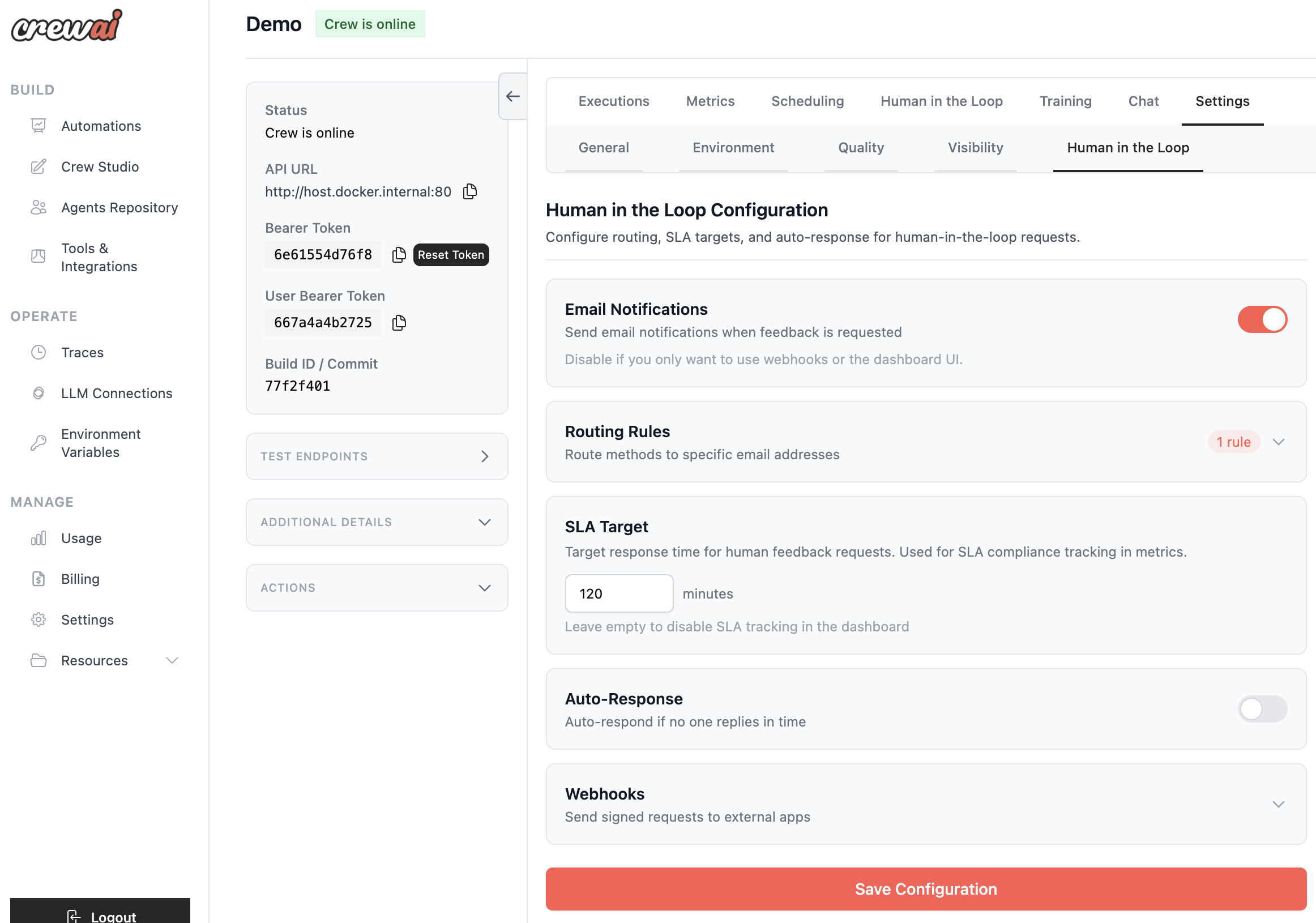
Access HITL configuration from: Deployment → Settings → Human in the Loop Configuration
Email Notifications#
Toggle to enable or disable email notifications for HITL requests.
| Setting | Default | Description |
|---|---|---|
| Email Notifications | Enabled | Send emails when feedback is requested |
When disabled, responders must use the dashboard UI or you must configure webhooks for custom notification systems.
SLA Target#
Set a target response time for tracking and metrics purposes.
| Setting | Description |
|---|---|
| SLA Target (minutes) | Target response time. Used for dashboard metrics and SLA tracking |
Leave empty to disable SLA tracking.
Email Notifications & Responses#
The HITL system uses an email-first architecture where responders can reply directly to notification emails.
How Email Responses Work#
When a HITL request is created, an email is sent to the assigned responder with the review content and context.
The email includes a special reply-to address with a signed token for authentication.
The responder simply replies to the email with their feedback—no login required.
The platform receives the reply, verifies the signed token, and matches the sender email.
The feedback is recorded and the flow continues with the human’s input.
Response Format#
Responders can reply with:
- Emit option: If the reply matches an
emitoption (e.g., “approved”), it’s used directly - Free-form text: Any text response is passed to the flow as feedback
- Plain text: The first line of the reply body is used as feedback
Confirmation Emails#
After processing a reply, the responder receives a confirmation email indicating whether the feedback was successfully submitted or if an error occurred.
Email Token Security#
- Tokens are cryptographically signed for security
- Tokens expire after 7 days
- Sender email must match the token’s authorized email
- Confirmation/error emails are sent after processing
Routing Rules#
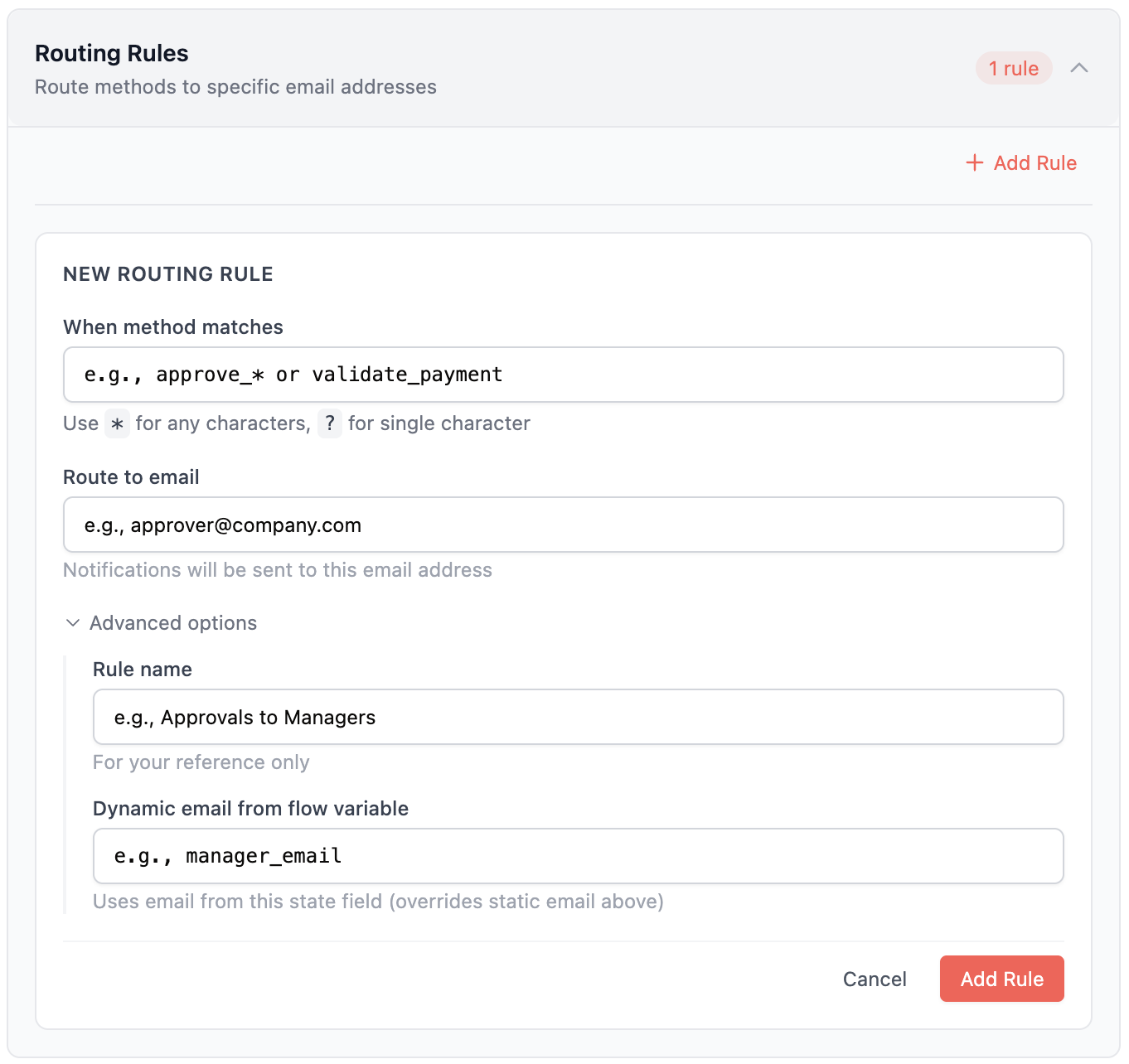
Route HITL requests to specific email addresses based on method patterns.
Rule Structure#
{
  "name": "Approvals to Finance",
  "match": {
    "method_name": "approve_*"
  },
  "assign_to_email": "finance@company.com",
  "assign_from_input": "manager_email"
}
Matching Patterns#
| Pattern | Description | Example Match |
|---|---|---|
approve_* | Wildcard (any chars) | approve_payment, approve_vendor |
review_? | Single char | review_a, review_1 |
validate_payment | Exact match | validate_payment only |
Assignment Priority#
- Dynamic assignment (
assign_from_input): If configured, pulls email from flow state - Static email (
assign_to_email): Falls back to configured email - Deployment creator: If no rule matches, the deployment creator’s email is used
Dynamic Assignment Example#
If your flow state contains {"sales_rep_email": "alice@company.com"}, configure:
{
  "name": "Route to Sales Rep",
  "match": {
    "method_name": "review_*"
  },
  "assign_from_input": "sales_rep_email"
}
The request will be assigned to alice@company.com automatically.
Use Case: Pull the assignee from your CRM, database, or previous flow step to dynamically route reviews to the right person.
Auto-Response#
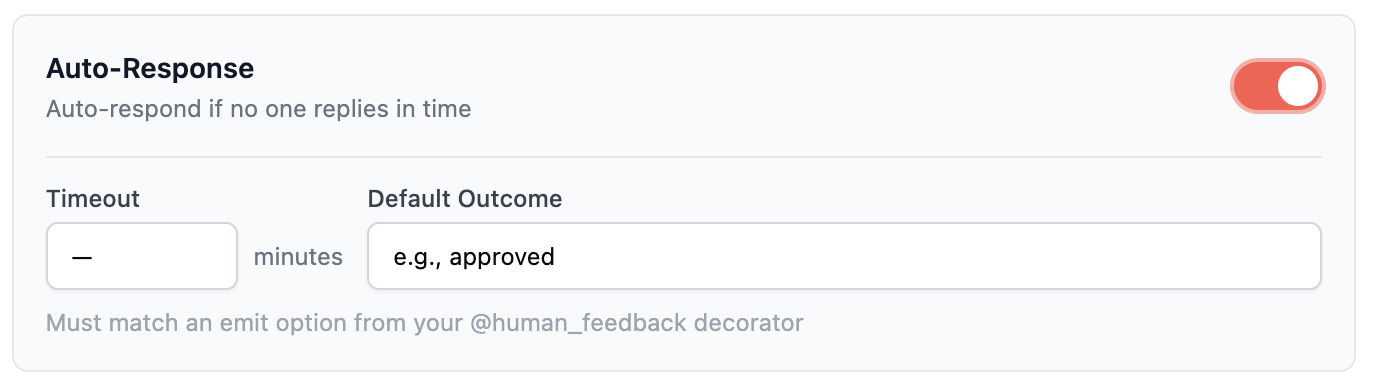
Automatically respond to HITL requests if no human responds within a timeout. This ensures flows don’t hang indefinitely.
Configuration#
| Setting | Description |
|---|---|
| Enabled | Toggle to enable auto-response |
| Timeout (minutes) | Time to wait before auto-responding |
| Default Outcome | The response value (must match an emit option) |
Use Cases#
- SLA compliance: Ensure flows don’t hang indefinitely
- Default approval: Auto-approve low-risk requests after timeout
- Graceful degradation: Continue with a safe default when reviewers are unavailable
Use auto-response carefully. Only enable it for non-critical reviews where a default response is acceptable.
Review Process#
Dashboard Interface#
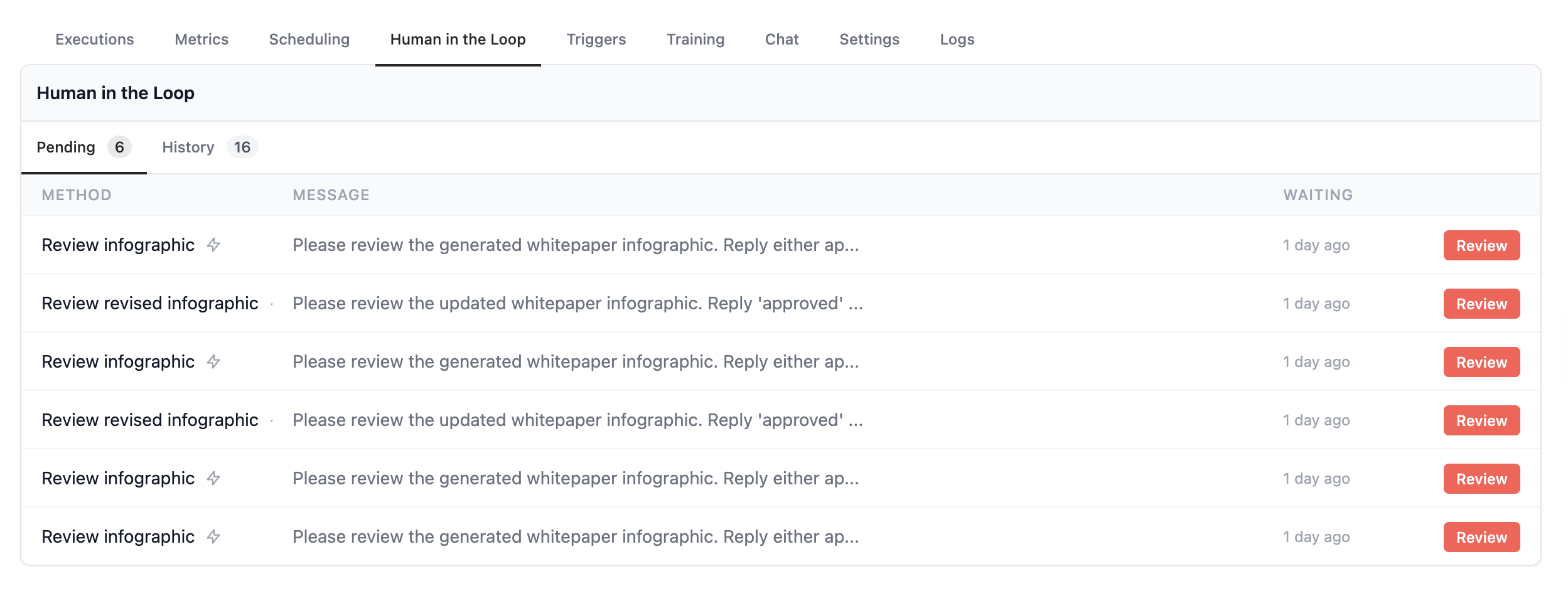
The HITL review interface provides a clean, focused experience for reviewers:
Markdown Rendering: Rich formatting for review content with syntax highlighting
Context Panel: View flow state, execution history, and related information
Feedback Input: Provide detailed feedback and comments with your decision
Quick Actions: One-click emit option buttons with optional comments
Response Methods#
Reviewers can respond via three channels:
| Method | Description |
|---|---|
| Email Reply | Reply directly to the notification email |
| Dashboard | Use the Enterprise dashboard UI |
| API/Webhook | Programmatic response via API |
History & Audit Trail#
Every HITL interaction is tracked with a complete timeline:
- Decision history (approve/reject/revise)
- Reviewer identity and timestamp
- Feedback and comments provided
- Response method (email/dashboard/API)
- Response time metrics
Analytics & Monitoring#
Track HITL performance with comprehensive analytics.
Performance Dashboard#
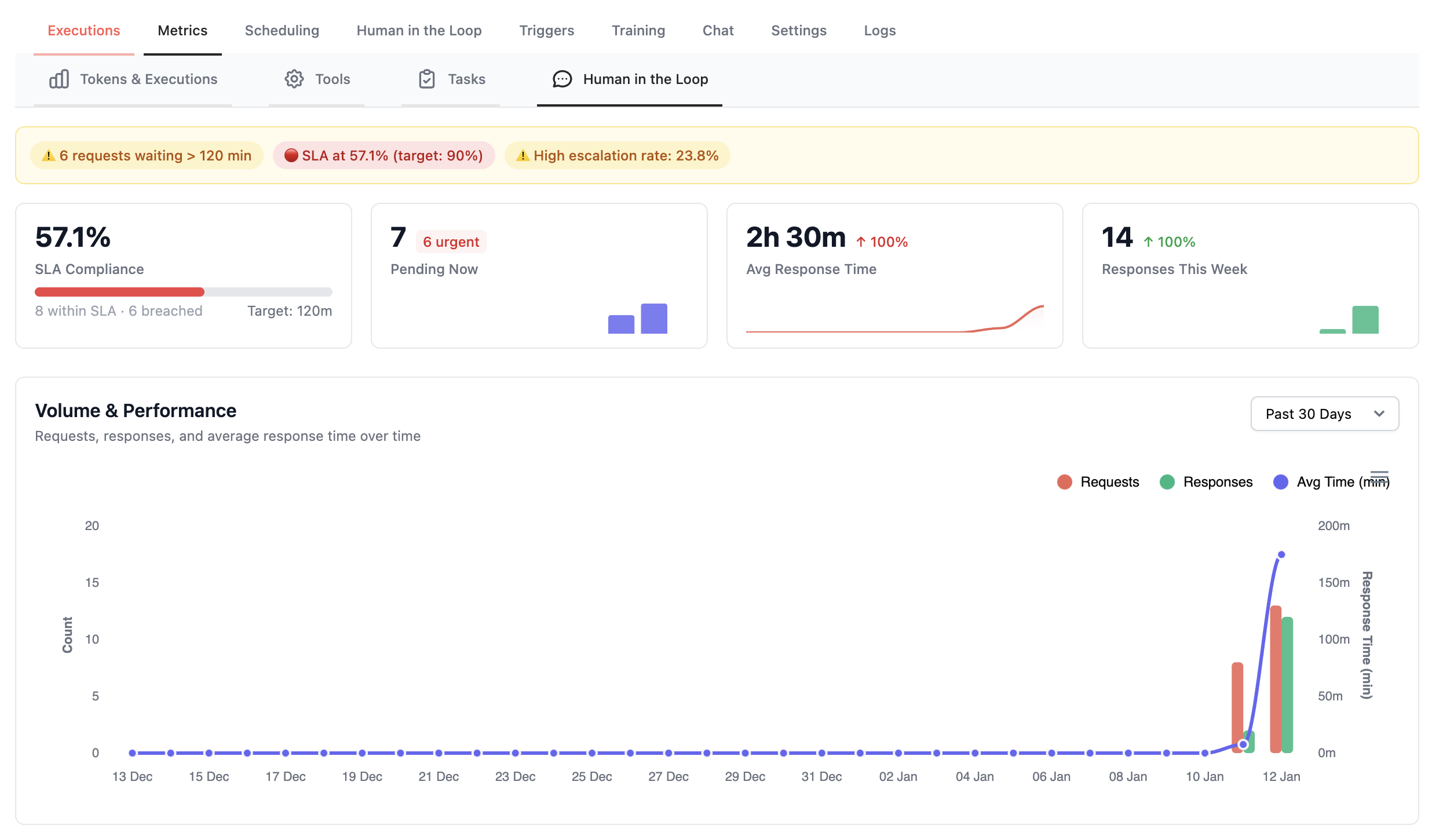
<span class=“card-start” data-card-raw=“title=“Response Times” icon=“stopwatch”"> Monitor average and median response times by reviewer or flow.
<span class=“card-start” data-card-raw=“title=“Volume Trends” icon=“chart-bar”"> Analyze review volume patterns to optimize team capacity.
<span class=“card-start” data-card-raw=“title=“Decision Distribution” icon=“chart-pie”"> View approval/rejection rates across different review types.
<span class=“card-start” data-card-raw=“title=“SLA Tracking” icon=“chart-line”"> Track percentage of reviews completed within SLA targets.
Audit & Compliance#
Enterprise-ready audit capabilities for regulatory requirements:
- Complete decision history with timestamps
- Reviewer identity verification
- Immutable audit logs
- Export capabilities for compliance reporting
Common Use Cases#
AI generates responses to security questionnaires
Security team reviews and validates accuracy via email
Approved responses are compiled into final submission
Full audit trail for compliance
Use Case: Marketing content requiring legal/brand review
AI generates marketing copy or social media content
Route to brand team email for voice/tone review
Automatic publishing upon approval
Use Case: Expense reports, contract terms, budget allocations
AI pre-processes and categorizes financial requests
Route based on amount thresholds using dynamic assignment
Maintain complete audit trail for financial compliance
Use Case: Route reviews to account owners from your CRM
Flow fetches account owner email from CRM
Store email in flow state (e.g.,
account_owner_email)Use
assign_from_inputto route to the right person automatically
Use Case: AI output validation before customer delivery
- AI generates customer-facing content or responses
- QA team reviews via email notification
- Feedback loops improve AI performance over time
Webhooks API#
When your Flows pause for human feedback, you can configure webhooks to send request data to your own application. This enables:
Building custom approval UIs
Integrating with internal tools (Jira, ServiceNow, custom dashboards)
Routing approvals to third-party systems
Mobile app notifications
Automated decision systems
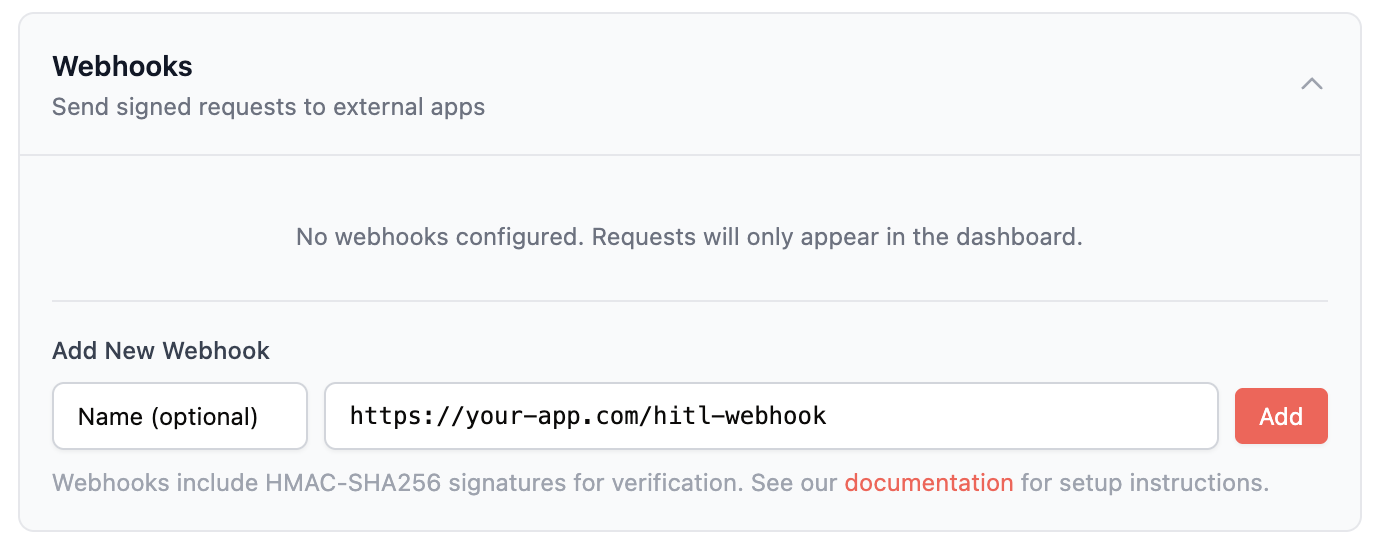
Configuring Webhooks#
Go to your Deployment → Settings → Human in the Loop
Click to expand the Webhooks configuration
Enter your webhook URL (must be HTTPS in production)
Click Save Configuration to activate
You can configure multiple webhooks. Each active webhook receives all HITL events.
Webhook Events#
Your endpoint will receive HTTP POST requests for these events:
| Event Type | When Triggered |
|---|---|
new_request | A flow pauses and requests human feedback |
Webhook Payload#
All webhooks receive a JSON payload with this structure:
{
  "event": "new_request",
  "request": {
    "id": "550e8400-e29b-41d4-a716-446655440000",
    "flow_id": "flow_abc123",
    "method_name": "review_article",
    "message": "Please review this article for publication.",
    "emit_options": ["approved", "rejected", "request_changes"],
    "state": {
      "article_id": 12345,
      "author": "john@example.com",
      "category": "technology"
    },
    "metadata": {},
    "created_at": "2026-01-14T12:00:00Z"
  },
  "deployment": {
    "id": 456,
    "name": "Content Review Flow",
    "organization_id": 789
  },
  "callback_url": "https://api.crewai.com/...",
  "assigned_to_email": "reviewer@company.com"
}
Responding to Requests#
To submit feedback, POST to the callback_url included in the webhook payload.
POST {callback_url}
Content-Type: application/json

{
  "feedback": "Approved. Great article!",
  "source": "my_custom_app"
}Security#
All webhook requests are cryptographically signed using HMAC-SHA256 to ensure authenticity and prevent tampering.
Webhook Security#
- HMAC-SHA256 signatures: Every webhook includes a cryptographic signature
- Per-webhook secrets: Each webhook has its own unique signing secret
- Encrypted at rest: Signing secrets are encrypted in our database
- Timestamp verification: Prevents replay attacks
Signature Headers#
Each webhook request includes these headers:
| Header | Description |
|---|---|
X-Signature | HMAC-SHA256 signature: sha256=<hex_digest> |
X-Timestamp | Unix timestamp when the request was signed |
Verification#
Verify by computing:
import hmac
import hashlib

expected = hmac.new(
    signing_secret.encode(),
    f"{timestamp}.{payload}".encode(),
    hashlib.sha256
).hexdigest()

if hmac.compare_digest(expected, signature):
    # Valid signature
Error Handling#
Your webhook endpoint should return a 2xx status code to acknowledge receipt:
| Your Response | Our Behavior |
|---|---|
| 2xx | Webhook delivered successfully |
| 4xx/5xx | Logged as failed, no retry |
| Timeout (30s) | Logged as failed, no retry |
Security & RBAC#
Dashboard Access#
HITL access is controlled at the deployment level:
| Permission | Capability |
|---|---|
manage_human_feedback | Configure HITL settings, view all requests |
respond_to_human_feedback | Respond to requests, view assigned requests |
Email Response Authorization#
For email replies:
- The reply-to token encodes the authorized email
- Sender email must match the token’s email
- Token must not be expired (7-day default)
- Request must still be pending
Audit Trail#
All HITL actions are logged:
- Request creation
- Assignment changes
- Response submission (with source: dashboard/email/API)
- Flow resume status
Troubleshooting#
Emails Not Sending#
- Check “Email Notifications” is enabled in configuration
- Verify routing rules match the method name
- Verify assignee email is valid
- Check deployment creator fallback if no routing rules match
Email Replies Not Processing#
- Check token hasn’t expired (7-day default)
- Verify sender email matches assigned email
- Ensure request is still pending (not already responded)
Flow Not Resuming#
- Check request status in dashboard
- Verify callback URL is accessible
- Ensure deployment is still running
Best Practices#
Start Simple: Begin with email notifications to deployment creator, then add routing rules as your workflows mature.
Use Dynamic Assignment: Pull assignee emails from your flow state for flexible routing.
Configure Auto-Response: Set up a fallback for non-critical reviews to prevent flows from hanging.
Monitor Response Times: Use analytics to identify bottlenecks and optimize your review process.
Keep Review Messages Clear: Write clear, actionable messages in the
@human_feedbackdecorator.Test Email Flow: Send test requests to verify email delivery before going to production.
Related Resources#
Implementation guide for the @human_feedback decorator
Step-by-step guide for setting up HITL workflows
Configure role-based access control for your organization
Set up real-time event notifications