HITL Workflows ↗
noOriginal Documentation
Documentation Index#
Fetch the complete documentation index at: https://docs.crewai.com/llms.txt Use this file to discover all available pages before exploring further.
Learn how to implement Human-In-The-Loop workflows in CrewAI for enhanced decision-making
Human-In-The-Loop (HITL) is a powerful approach that combines artificial intelligence with human expertise to enhance decision-making and improve task outcomes. This guide shows you how to implement HITL within CrewAI Enterprise.
HITL Approaches in CrewAI#
CrewAI offers two approaches for implementing human-in-the-loop workflows:
| Approach | Best For | Version |
|---|---|---|
Flow-based (@human_feedback decorator) | Production with Enterprise UI, email-first workflows, full platform features | 1.8.0+ |
| Webhook-based | Custom integrations, external systems (Slack, Teams, etc.), legacy setups | All versions |
Flow-Based HITL with Enterprise Platform#
The @human_feedback decorator requires CrewAI version 1.8.0 or higher.
When using the @human_feedback decorator in your Flows, CrewAI Enterprise provides an email-first HITL system that enables anyone with an email address to respond to review requests:
<span class=“card-start” data-card-raw=“title=“Email-First Design” icon=“envelope”"> Responders receive email notifications and can reply directly—no login required.
<span class=“card-start” data-card-raw=“title=“Dashboard Review” icon=“desktop”"> Review and respond to HITL requests in the Enterprise dashboard when preferred.
<span class=“card-start” data-card-raw=“title=“Flexible Routing” icon=“route”"> Route requests to specific emails based on method patterns or pull from flow state.
<span class=“card-start” data-card-raw=“title=“Auto-Response” icon=“clock”"> Configure automatic fallback responses when no human replies within the timeout.
Key Benefits#
- External responders: Anyone with an email can respond, even non-platform users
- Dynamic assignment: Pull assignee email from flow state (e.g.,
account_owner_email) - Simple configuration: Email-based routing is easier to set up than user/role management
- Deployment creator fallback: If no routing rule matches, the deployment creator is notified
For implementation details on the @human_feedback decorator, see the Human Feedback in Flows guide.
Setting Up Webhook-Based HITL Workflows#
For custom integrations with external systems like Slack, Microsoft Teams, or your own applications, you can use the webhook-based approach:
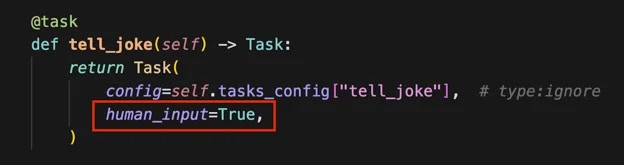
Set up your task with human input enabled:
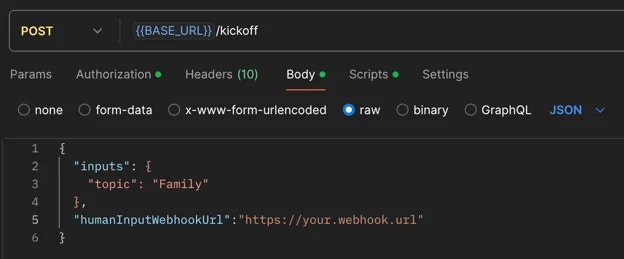
When kicking off your crew, include a webhook URL for human input:
Once the crew completes the task requiring human input, you’ll receive a webhook notification containing:
Execution ID
Task ID
Task output
The system will pause in the
Pending Human Inputstate. Review the task output carefully.Call the resume endpoint of your crew with the following information:
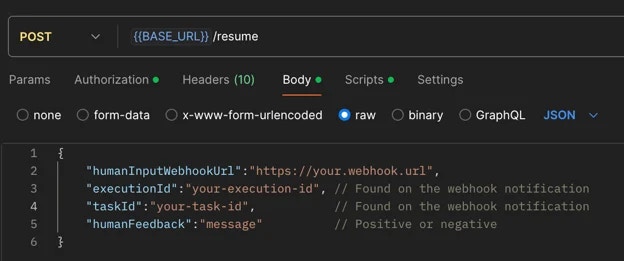
Critical: Webhook URLs Must Be Provided Again:
You must provide the same webhook URLs (taskWebhookUrl, stepWebhookUrl, crewWebhookUrl) in the resume call that you used in the kickoff call. Webhook configurations are NOT automatically carried over from kickoff - they must be explicitly included in the resume request to continue receiving notifications for task completion, agent steps, and crew completion.
Example resume call with webhooks:
    curl -X POST {BASE_URL}/resume \
      -H "Authorization: Bearer YOUR_API_TOKEN" \
      -H "Content-Type: application/json" \
      -d '{
        "execution_id": "abcd1234-5678-90ef-ghij-klmnopqrstuv",
        "task_id": "research_task",
        "human_feedback": "Great work! Please add more details.",
        "is_approve": true,
        "taskWebhookUrl": "https://your-server.com/webhooks/task",
        "stepWebhookUrl": "https://your-server.com/webhooks/step",
        "crewWebhookUrl": "https://your-server.com/webhooks/crew"
      }'
    ```

<span class="callout-start" data-callout-type="warning"></span>
  **Feedback Impact on Task Execution**:
  It's crucial to exercise care when providing feedback, as the entire feedback content will be incorporated as additional context for further task executions.
<span class="callout-end"></span>

This means:

* All information in your feedback becomes part of the task's context.
* Irrelevant details may negatively influence it.
* Concise, relevant feedback helps maintain task focus and efficiency.
* Always review your feedback carefully before submission to ensure it contains only pertinent information that will positively guide the task's execution.
  <span class="step-end"></span>

  <span class="step-marker" data-step-title="Handle Negative Feedback"></span>
If you provide negative feedback:

* The crew will retry the task with added context from your feedback.
* You'll receive another webhook notification for further review.
* Repeat steps 4-6 until satisfied.
  <span class="step-end"></span>

  <span class="step-marker" data-step-title="Execution Continuation"></span>
When you submit positive feedback, the execution will proceed to the next steps.
  <span class="step-end"></span>
<span class="steps-end"></span>

## Best Practices

* **Be Specific**: Provide clear, actionable feedback that directly addresses the task at hand
* **Stay Relevant**: Only include information that will help improve the task execution
* **Be Timely**: Respond to HITL prompts promptly to avoid workflow delays
* **Review Carefully**: Double-check your feedback before submitting to ensure accuracy

## Common Use Cases

HITL workflows are particularly valuable for:

* Quality assurance and validation
* Complex decision-making scenarios
* Sensitive or high-stakes operations
* Creative tasks requiring human judgment
* Compliance and regulatory reviews

## Learn More

<span class="card-group-start" data-cols="2"></span>
  <span class="card-start" data-card-title="Flow HITL Management" data-card-icon="users-gear" data-card-href="/en/enterprise/features/flow-hitl-management"></span>
Explore the full Enterprise Flow HITL platform capabilities including email notifications, routing rules, auto-response, and analytics.
  <span class="card-end"></span>

  <span class="card-start" data-card-title="Human Feedback in Flows" data-card-icon="code" data-card-href="/en/learn/human-feedback-in-flows"></span>
Implementation guide for the `@human_feedback` decorator in your Flows.
  <span class="card-end"></span>
<span class="card-group-end"></span>