Opik Integration ↗
noOriginal Documentation
Documentation Index#
Fetch the complete documentation index at: https://docs.crewai.com/llms.txt Use this file to discover all available pages before exploring further.
Learn how to use Comet Opik to debug, evaluate, and monitor your CrewAI applications with comprehensive tracing, automated evaluations, and production-ready dashboards.
Opik Overview#
With Comet Opik, debug, evaluate, and monitor your LLM applications, RAG systems, and agentic workflows with comprehensive tracing, automated evaluations, and production-ready dashboards.
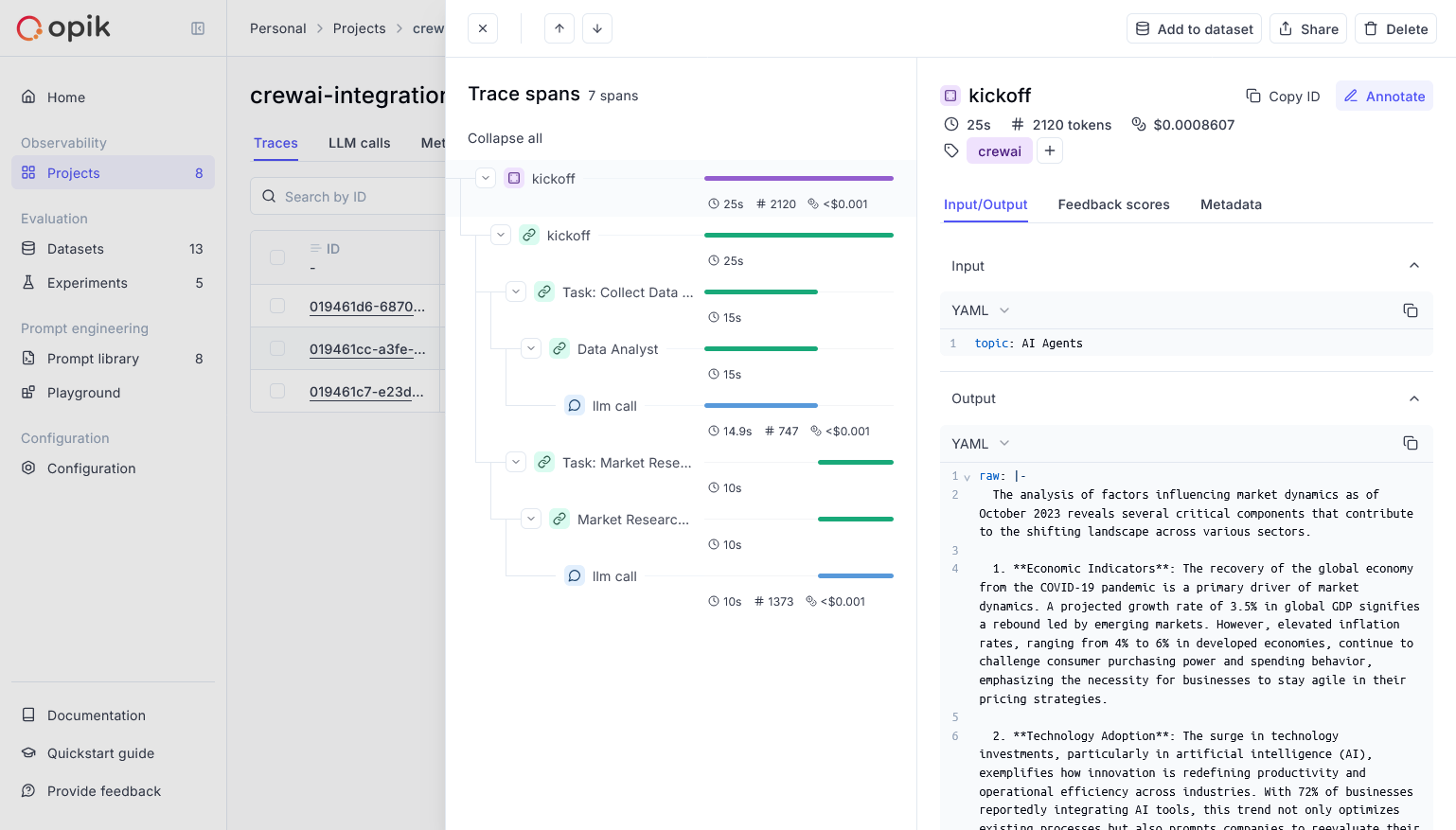
Opik provides comprehensive support for every stage of your CrewAI application development:
- Log Traces and Spans: Automatically track LLM calls and application logic to debug and analyze development and production systems. Manually or programmatically annotate, view, and compare responses across projects.
- Evaluate Your LLM Application’s Performance: Evaluate against a custom test set and run built-in evaluation metrics or define your own metrics in the SDK or UI.
- Test Within Your CI/CD Pipeline: Establish reliable performance baselines with Opik’s LLM unit tests, built on PyTest. Run online evaluations for continuous monitoring in production.
- Monitor & Analyze Production Data: Understand your models’ performance on unseen data in production and generate datasets for new dev iterations.
Setup#
Comet provides a hosted version of the Opik platform, or you can run the platform locally.
To use the hosted version, simply create a free Comet account and grab you API Key.
To run the Opik platform locally, see our installation guide for more information.
For this guide we will use CrewAI’s quickstart example.
    pip install crewai crewai-tools opik --upgrade
    ```
  <span class="step-end"></span>

  <span class="step-marker" data-step-title="Configure Opik"></span>
```python
    import opik
    opik.configure(use_local=False)
    ```
  <span class="step-end"></span>

  <span class="step-marker" data-step-title="Prepare environment"></span>
First, we set up our API keys for our LLM-provider as environment variables:

```python
    import os
    import getpass

    if "OPENAI_API_KEY" not in os.environ:
    os.environ["OPENAI_API_KEY"] = getpass.getpass("Enter your OpenAI API key: ")
    ```
  <span class="step-end"></span>

  <span class="step-marker" data-step-title="Using CrewAI"></span>
The first step is to create our project. We will use an example from CrewAI’s documentation:

```python
    from crewai import Agent, Crew, Task, Process


    class YourCrewName:
        def agent_one(self) -> Agent:
            return Agent(
                role="Data Analyst",
                goal="Analyze data trends in the market",
                backstory="An experienced data analyst with a background in economics",
                verbose=True,
            )

        def agent_two(self) -> Agent:
            return Agent(
                role="Market Researcher",
                goal="Gather information on market dynamics",
                backstory="A diligent researcher with a keen eye for detail",
                verbose=True,
            )

        def task_one(self) -> Task:
            return Task(
                name="Collect Data Task",
                description="Collect recent market data and identify trends.",
                expected_output="A report summarizing key trends in the market.",
                agent=self.agent_one(),
            )

        def task_two(self) -> Task:
            return Task(
                name="Market Research Task",
                description="Research factors affecting market dynamics.",
                expected_output="An analysis of factors influencing the market.",
                agent=self.agent_two(),
            )

        def crew(self) -> Crew:
            return Crew(
                agents=[self.agent_one(), self.agent_two()],
                tasks=[self.task_one(), self.task_two()],
                process=Process.sequential,
                verbose=True,
            )

    ```

Now we can import Opik’s tracker and run our crew:

```python
    from opik.integrations.crewai import track_crewai

    track_crewai(project_name="crewai-integration-demo")

    my_crew = YourCrewName().crew()
    result = my_crew.kickoff()

    print(result)
    ```

After running your CrewAI application, visit the Opik app to view:

* LLM traces, spans, and their metadata
* Agent interactions and task execution flow
* Performance metrics like latency and token usage
* Evaluation metrics (built-in or custom)
  <span class="step-end"></span>
<span class="steps-end"></span>

## Resources

* [🦉 Opik Documentation](https://www.comet.com/docs/opik/)
* [👉 Opik + CrewAI Colab](https://colab.research.google.com/github/comet-ml/opik/blob/main/apps/opik-documentation/documentation/docs/cookbook/crewai.ipynb)
* [🐦 X](https://x.com/cometml)
* [💬 Slack](https://slack.comet.com/)