Serverless Rate Limits ↗
noOriginal Documentation
Documentation Index#
Fetch the complete documentation index at: https://docs.fireworks.ai/llms.txt Use this file to discover all available pages before exploring further.
Adaptive rate limits grow and shrink with your usage
When using Serverless, you may experience 429 Too Many Requests or 503 Service Overloaded. To avoid 429s, you need to stay below our adaptive rate limits. To reduce the likelihood of 503s, you can upgrade to Priority tier.
What are your rate limits?#
There are three metrics we use to rate limit accounts:
- Total Prompt TPM — input tokens per minute (cached + uncached).
- Uncached Prompt TPM — uncached input tokens per minute.
- Generated TPM — output tokens per minute.
Starting limits: 3.6M Total Prompt TPM, 900k Uncached Prompt TPM, 36k Generated TPM (~60k / ~15k / ~600 TPS). Enforcement uses TPM, not TPS.
Based on your usage, your adaptive limits will grow and shrink. If your traffic ramps up too quickly, you will get 429s.
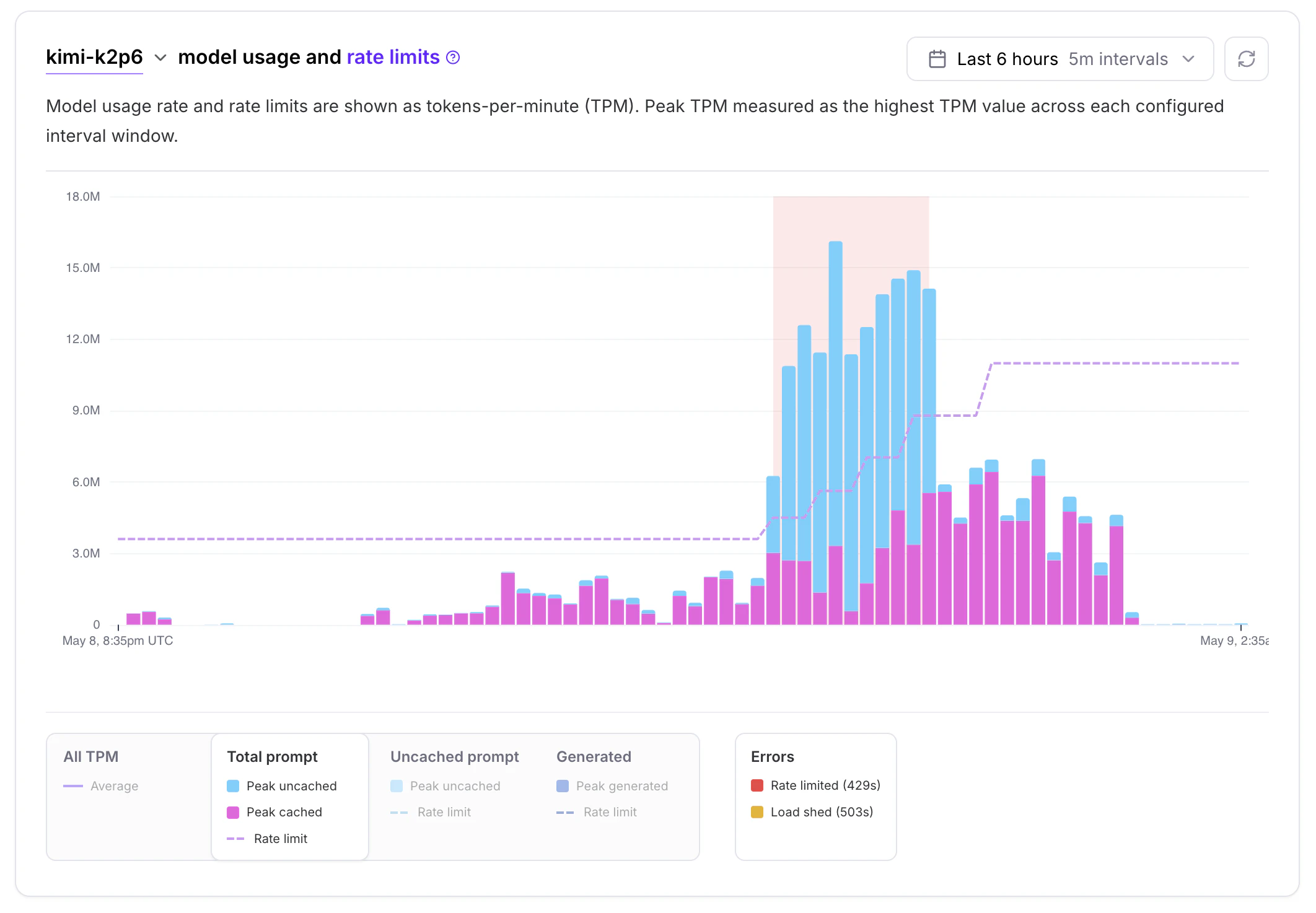
Your current effective rate limits (described in tokens per second) are in the response headers X-Ratelimit-Limit-Tokens-Prompt, X-Ratelimit-Limit-Tokens-Cache-Adjusted-Prompt, and X-Ratelimit-Limit-Tokens-Generated.
Adaptive rate limits have an upper and lower bound. A higher account Spending Tier correlates with higher upper bound rate limits; enterprise accounts get higher upper bounds automatically.
FAQ#
- You need higher than the defaults from day one. Your launch traffic exceeds the starting limit and you can’t wait for the adaptive ramp.
- You’re ramping past the highest upper bound. You are already at the highest account Spending Tier and the adaptive rate limits are not growing.