Cost tracking ↗
noOriginal Documentation
Documentation Index#
Fetch the complete documentation index at: https://docs.langchain.com/llms.txt Use this file to discover all available pages before exploring further.
Building agents at scale introduces non-trivial, usage-based costs that can be difficult to track. LangSmith automatically records LLM token usage and costs for major providers, and also allows you to submit custom cost data for any additional components.
This gives you a single, unified view of costs across your entire application, which makes it easy to monitor, understand, and debug your spend.
This guide covers:
Viewing costs in the LangSmith UI#
In the LangSmith UI, you can explore usage and spend in three main ways: first by understanding how tokens and costs are broken down, then by viewing those details within individual traces, and finally by inspecting aggregated metrics in project stats and dashboards.
Token and cost breakdowns#
Token usage and costs are broken down into three categories:
- Input: Tokens in the prompt sent to the model. Subtypes include: cache reads, text tokens, image tokens, etc
- Output: Tokens generated in the response from the model. Subtypes include: reasoning tokens, text tokens, image tokens, etc
- Other: Costs from tool calls, retrieval steps or any custom runs.
You can view detailed breakdowns by hovering over cost sections in the UI. When available, each section is further categorized by subtype.
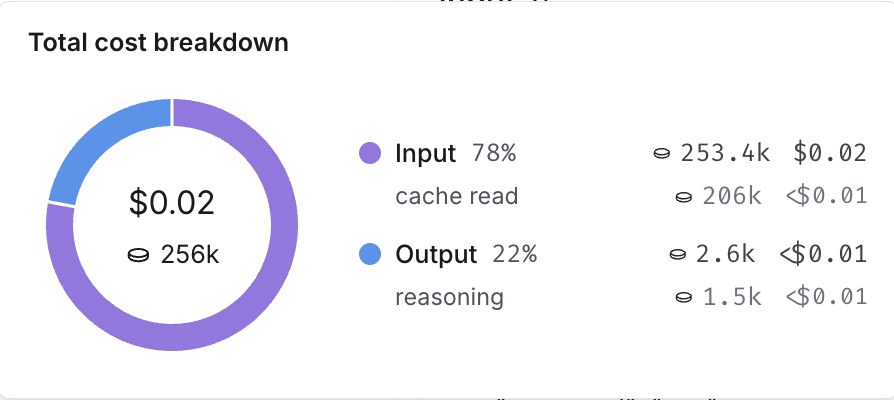
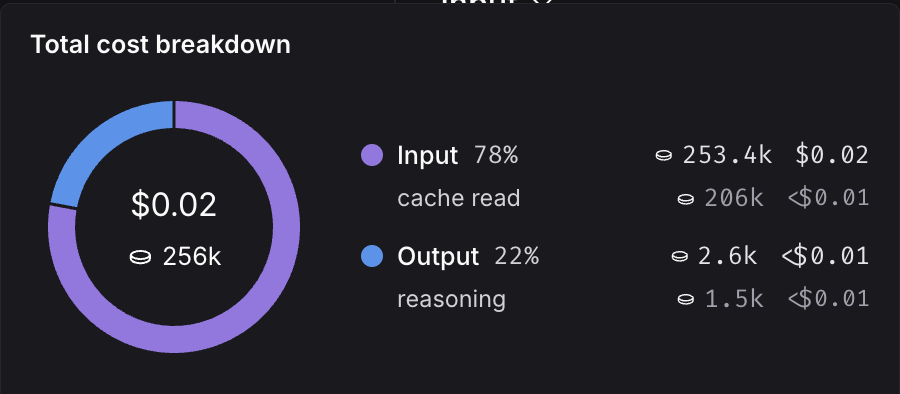
You can inspect these breakdowns throughout the LangSmith UI, described in the following section.
Where to view token and cost breakdowns#
Open any run inside a tracing project to view its trace tree.
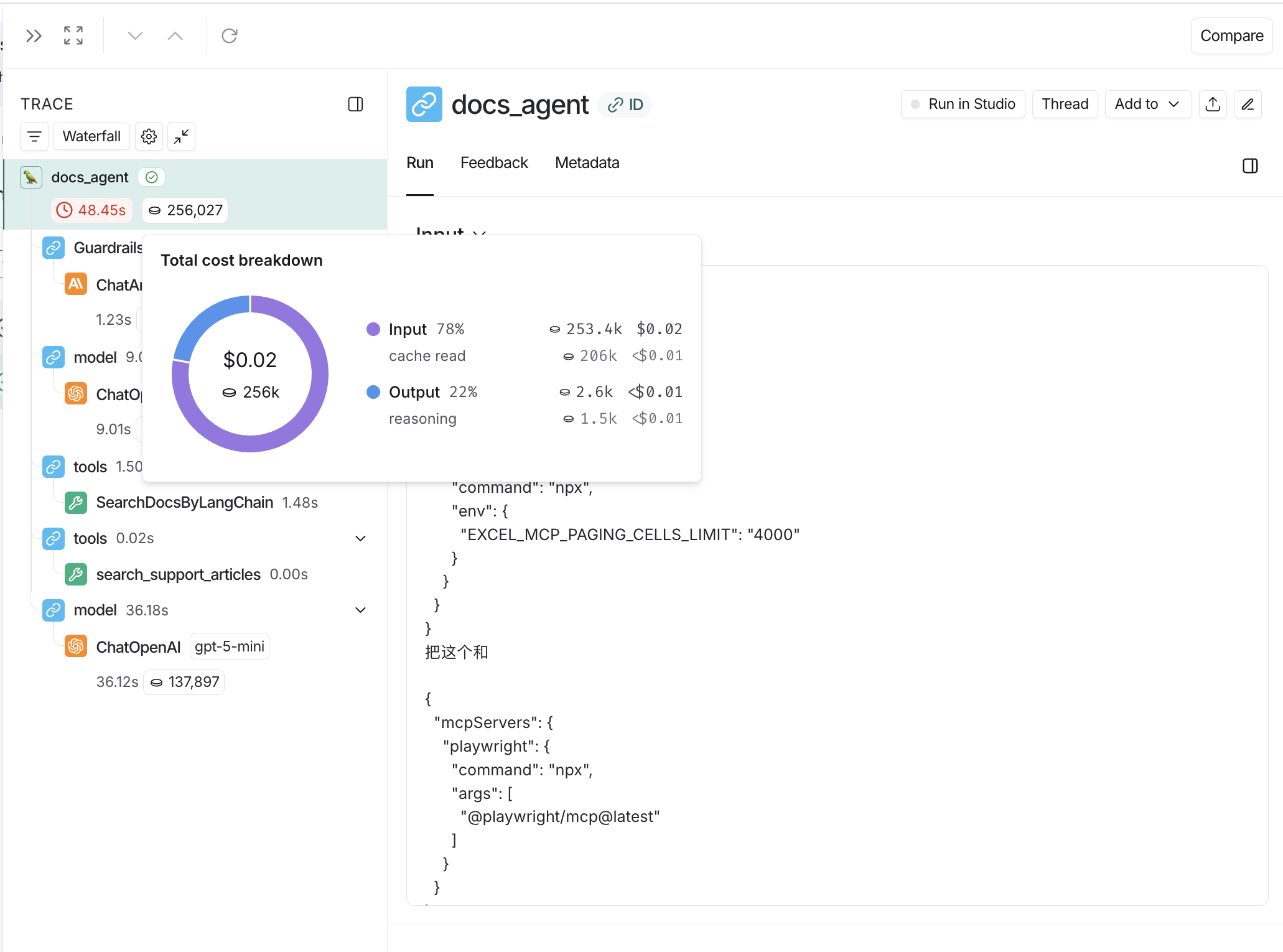
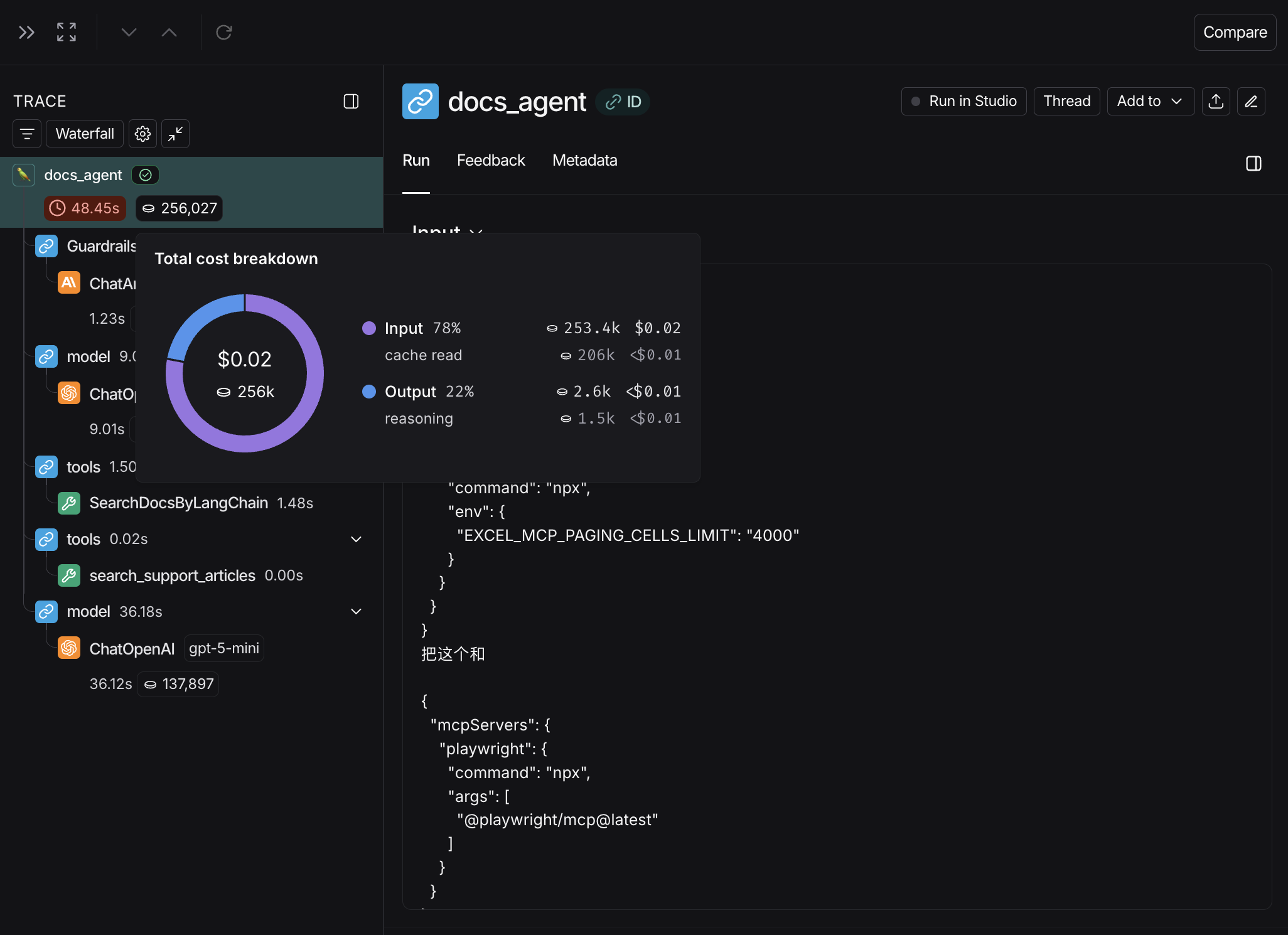
When tracking costs across threads, ensure that all child runs include the thread metadata (session_id, thread_id, or conversation_id). Without thread metadata on child runs, token counts and costs from those runs won’t be included in thread-level aggregations. Refer to configuring threads for details on setting thread metadata.
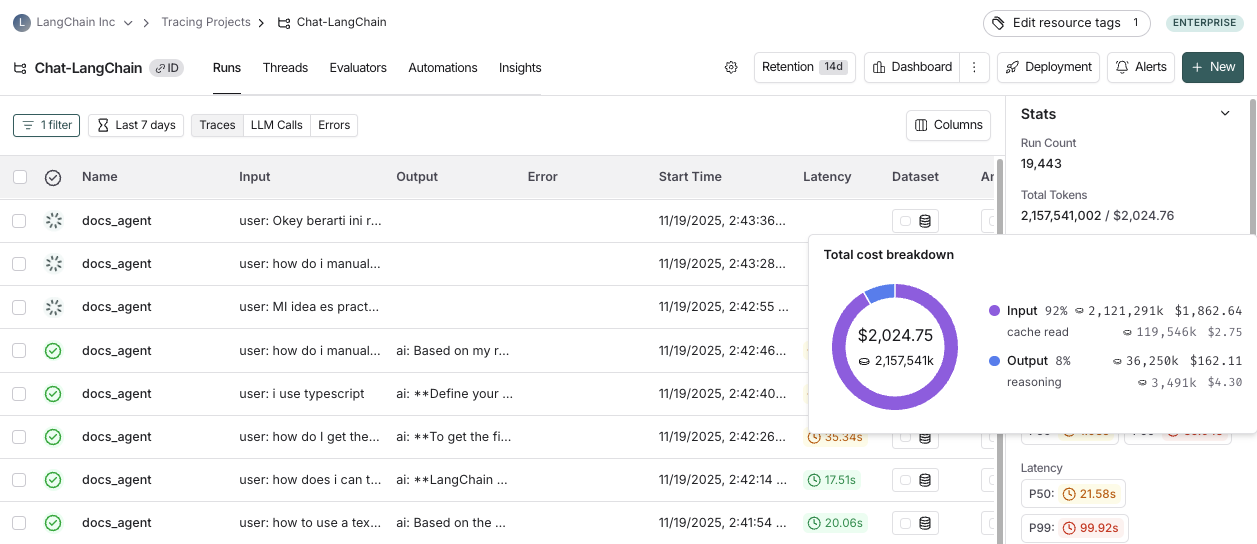
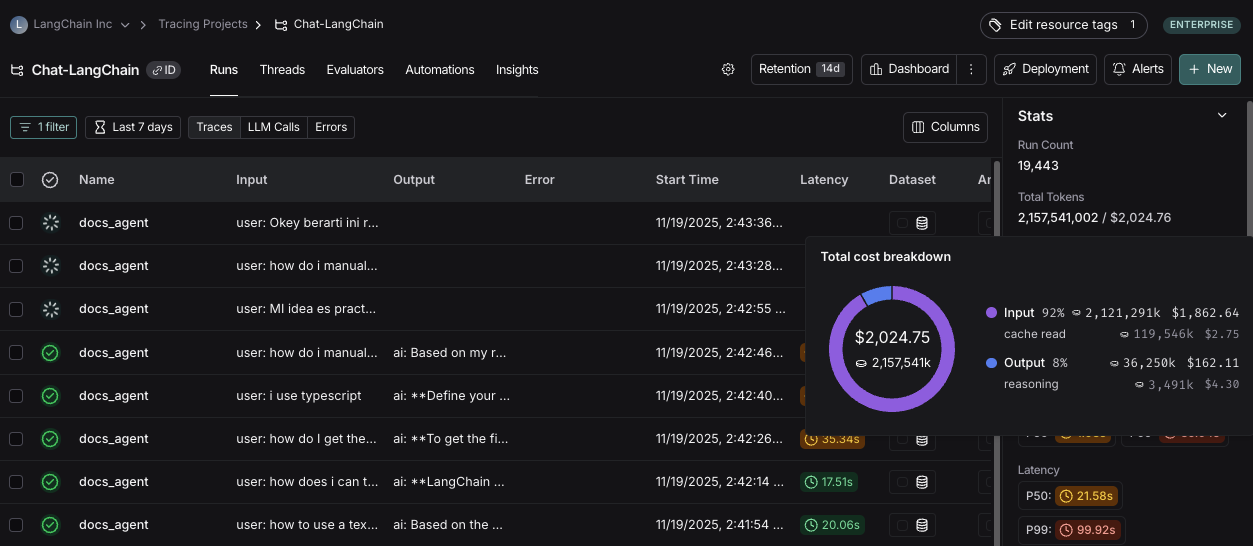
You may also configure custom cost tracking charts in custom dashboards.
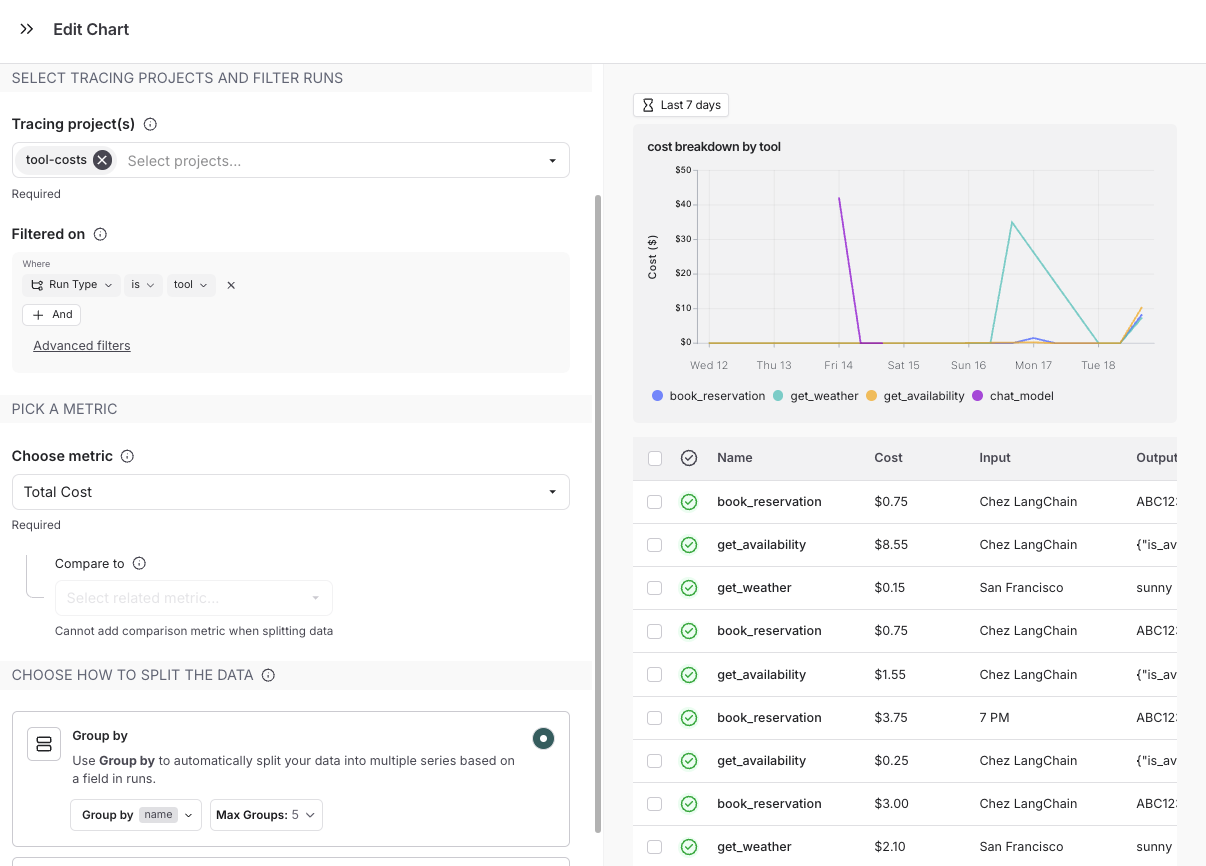
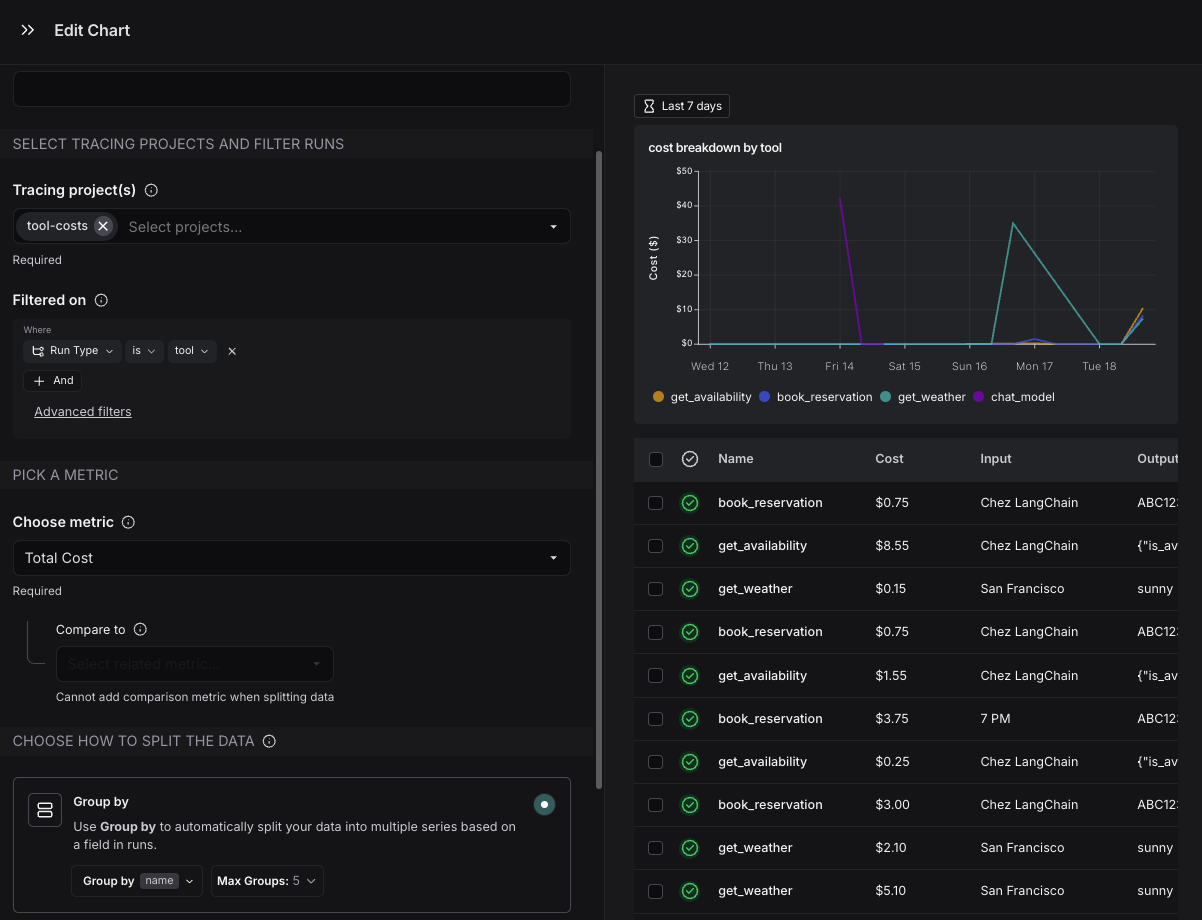
Cost tracking#
You can track costs in two ways:
- Costs for LLM calls can be automatically derived from token counts and model prices
- Cost for LLM calls or any other run type can be manually specified as part of the run data
The approach you use will depend on on what you’re tracking and how your model pricing is structured:
| Method | Run type: LLM | Run type: Other |
|---|---|---|
| Automatically |
| Not applicable. |
| Manually | If LLM call costs are non-linear (eg. follow a custom cost function) | Send costs for any run types, e.g. tool calls, retrieval steps |
LLM calls: Automatically track costs based on token counts#
To compute cost automatically from token usage, you need to provide token counts, the model and provider and the model price.
Follow the instructions below if you’re using model providers whose responses don’t follow the same patterns as one of OpenAI or Anthropic.
These steps are only required if you are not:
- Calling LLMs with LangChain
- Using
@traceableto trace LLM calls to OpenAI, Anthropic or models that follow an OpenAI-compliant format - Using LangSmith wrappers for OpenAI or Anthropic.
1. Send token counts
Many models include token counts as part of the response. You must extract this information and include it in your run using one of the following methods:
    from langsmith import traceable, get_current_run_tree

    inputs = [
        {"role": "system", "content": "You are a helpful assistant."},
        {"role": "user", "content": "I'd like to book a table for two."},
    ]

    @traceable(
        run_type="llm",
        metadata={"ls_provider": "my_provider", "ls_model_name": "my_model"}
    )
    def chat_model(messages: list):
        # Imagine this is the real model output format your application expects
        assistant_message = {
            "role": "assistant",
            "content": "Sure, what time would you like to book the table for?"
        }

        # Token usage you compute or receive from the provider
        token_usage = {
            "input_tokens": 27,
            "output_tokens": 13,
            "total_tokens": 40,
            "input_token_details": {"cache_read": 10}
        }

        # Attach token usage to the LangSmith run
        run = get_current_run_tree()
        run.set(usage_metadata=token_usage)

        return assistant_message

    chat_model(inputs)
    ```

```typescript
    import { traceable, getCurrentRunTree } from "langsmith/traceable";

    const inputs = [
      { role: "system", content: "You are a helpful assistant." },
      { role: "user", content: "I'd like to book a table for two." },
    ];

    const chatModel = traceable(
      async ({ messages }) => {
        // The output your application expects
        const assistantMessage = {
          role: "assistant",
          content: "Sure, what time would you like to book the table for?",
        };

        // Token usage you compute or receive from the provider
        const tokenUsage = {
          input_tokens: 27,
          output_tokens: 13,
          total_tokens: 40,
          input_token_details: { cache_read: 10 },
        };

        // Attach usage to the LangSmith run
        const runTree = getCurrentRunTree();
        runTree.metadata.usage_metadata = tokenUsage;

        return assistantMessage;
      },
      {
        run_type: "llm",
        name: "chat_model",
        metadata: {
          ls_provider: "my_provider",
          ls_model_name: "my_model",
        },
      }
    );

    await chatModel({ messages: inputs });
    ```

</Accordion>

<Accordion title="B. Return a `usage_metadata` field in your traced function's outputs.">
  Include the `usage_metadata` key directly within the object returned by your traced function. LangSmith will extract it from the output.


```python
    from langsmith import traceable

    inputs = [
        {"role": "system", "content": "You are a helpful assistant."},
        {"role": "user", "content": "I'd like to book a table for two."},
    ]
    output = {
        "choices": [
            {
                "message": {
                    "role": "assistant",
                    "content": "Sure, what time would you like to book the table for?"
                }
            }
        ],
        "usage_metadata": {
            "input_tokens": 27,
            "output_tokens": 13,
            "total_tokens": 40,
            "input_token_details": {"cache_read": 10}
        },
    }

    @traceable(
        run_type="llm",
        metadata={"ls_provider": "my_provider", "ls_model_name": "my_model"}
    )
    def chat_model(messages: list):
        return output

    chat_model(inputs)
    ```

```typescript
    import { traceable } from "langsmith/traceable";

    const messages = [
        { role: "system", content: "You are a helpful assistant." },
        { role: "user", content: "I'd like to book a table for two." }
    ];
    const output = {
        choices: [
            {
                message: {
                    role: "assistant",
                    content: "Sure, what time would you like to book the table for?",
                },
            },
        ],
        usage_metadata: {
            input_tokens: 27,
            output_tokens: 13,
            total_tokens: 40,
        },
    };

    const chatModel = traceable(
        async ({
            messages,
        }: {
            messages: { role: string; content: string }[];
            model: string;
        }) => {
            return output;
        },
        {
            run_type: "llm",
            name: "chat_model",
            metadata: {
                ls_provider: "my_provider",
                ls_model_name: "my_model"
            }
        }
    );

    await chatModel({ messages });
    ```

</Accordion>

In either case, the usage metadata should contain a subset of the following LangSmith-recognized fields:

<Accordion title="Usage Metadata Schema and Cost Calculation">
  The following fields in the `usage_metadata` dict are recognized by LangSmith. You can view the full [Python types](https://github.com/langchain-ai/langsmith-sdk/blob/e705fbd362be69dd70229f94bc09651ef8056a61/python/langsmith/schemas.py#L1196-L1227) or [TypeScript interfaces](https://github.com/langchain-ai/langsmith-sdk/blob/e705fbd362be69dd70229f94bc09651ef8056a61/js/src/schemas.ts#L637-L689) directly.

  <ParamField path="input_tokens" type="number">
Number of tokens used in the model input. Sum of all input token types.
  </ParamField>

  <ParamField path="output_tokens" type="number">
Number of tokens used in the model response. Sum of all output token types.
  </ParamField>

  <ParamField path="total_tokens" type="number">
Number of tokens used in the input and output. Optional, can be inferred. Sum of input\_tokens + output\_tokens.
  </ParamField>

  <ParamField path="input_token_details" type="object">
Breakdown of input token types. Keys are token-type strings, values are counts. Example `{"cache_read": 5}`.

Known fields include: `audio`, `text`, `image`, `cache_read`, `cache_creation`. Additional fields are possible depending on the model or provider.
  </ParamField>

  <ParamField path="output_token_details" type="object">
Breakdown of output token types. Keys are token-type strings, values are counts. Example `{"reasoning": 5}`.

Known fields include: `audio`, `text`, `image`, `reasoning`. Additional fields are possible depending on the model or provider.
  </ParamField>

  <ParamField path="input_cost" type="number">
Cost of the input tokens.
  </ParamField>

  <ParamField path="output_cost" type="number">
Cost of the output tokens.
  </ParamField>

  <ParamField path="total_cost" type="number">
Cost of the tokens. Optional, can be inferred.  Sum of input\_cost + output\_cost.
  </ParamField>

  <ParamField path="input_cost_details" type="object">
Details of the input cost. Keys are token-type strings, values are cost amounts.
  </ParamField>

  <ParamField path="output_cost_details" type="object">
Details of the output cost. Keys are token-type strings, values are cost amounts.
  </ParamField>

  **Cost Calculations**

  The cost for a run is computed greedily from most-to-least specific token type. Suppose you set a price of \$2 per 1M input tokens with a detailed price of \$1 per 1M `cache_read` input tokens, and \$3 per 1M output tokens. If you uploaded the following usage metadata:

  ```python
  {
    "input_tokens": 20,
    "input_token_details": {"cache_read": 5},
    "output_tokens": 10,
    "total_tokens": 30,
  }
Then, the token costs would be computed as follows:
# Notice that LangSmith computes the cache_read cost and then for any
# remaining input_tokens, the default input price is applied.
input_cost = 5 * 1e-6 + (20 - 5) * 2e-6  # 3.5e-5
output_cost = 10 * 3e-6  # 3e-5
total_cost = input_cost + output_cost  # 6.5e-5
2. Specify model name
When using a custom model, the following fields need to be specified in a run’s metadata in order to associate token counts with costs. It’s also helpful to provide these metadata fields to identify the model when viewing traces and when filtering.
ls_provider: The provider of the model, e.g., “openai”, “anthropic”ls_model_name: The name of the model, e.g., “gpt-4.1-mini”, “claude-3-opus-20240229”
3. Set model prices
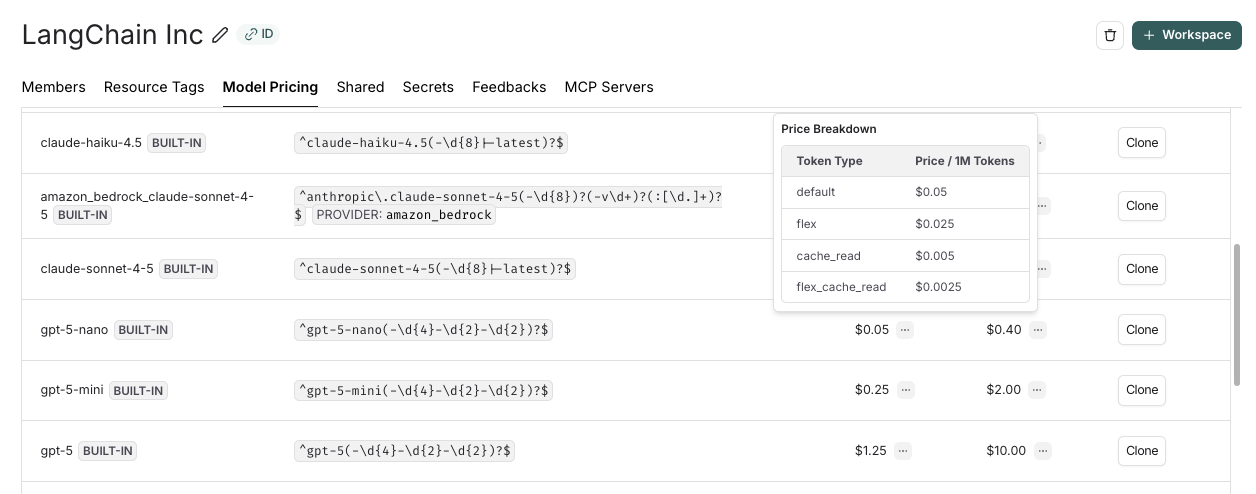
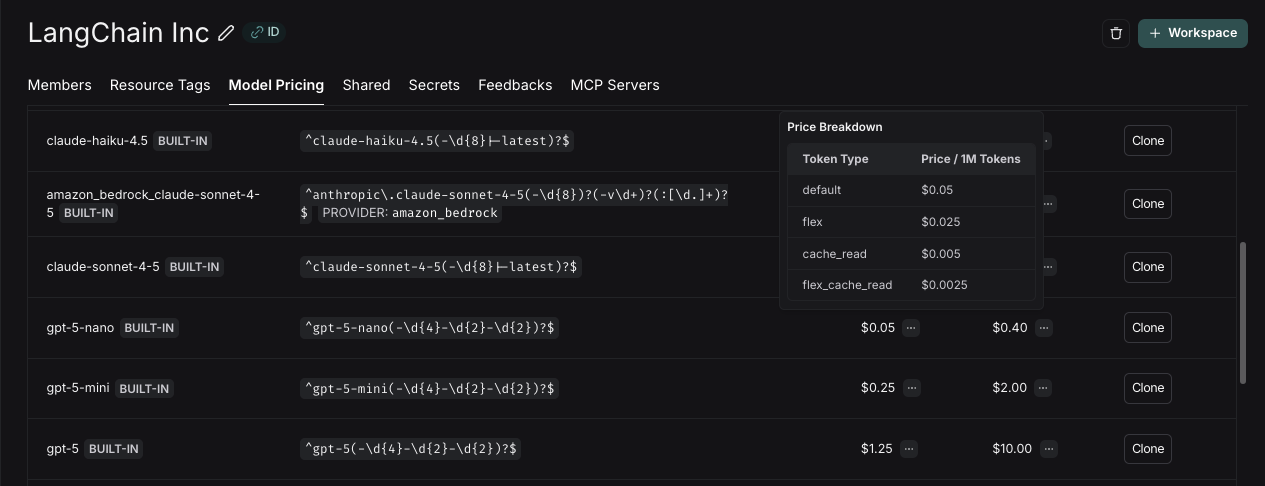
A model pricing map is used to map model names to their per-token prices to compute costs from token counts. LangSmith’s model pricing table is used for this.
The table comes with pricing information for most OpenAI, Anthropic, and Gemini models. You can add prices for other models, or overwrite pricing for default models if you have custom pricing.
For models that have different pricing for different token types (e.g., multimodal or cached tokens), you can specify a breakdown of prices for each token type. Hovering over the ... next to the input/output prices shows you the price breakdown by token type.
Updates to the model pricing map are not reflected in the costs for traces already logged. We do not currently support backfilling model pricing changes.
To create a new entry in the model pricing map, click on the + Model button in the top right corner.
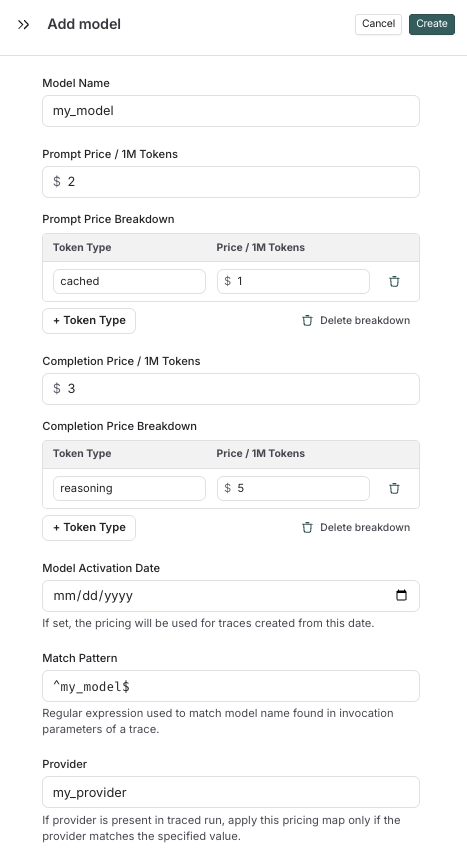
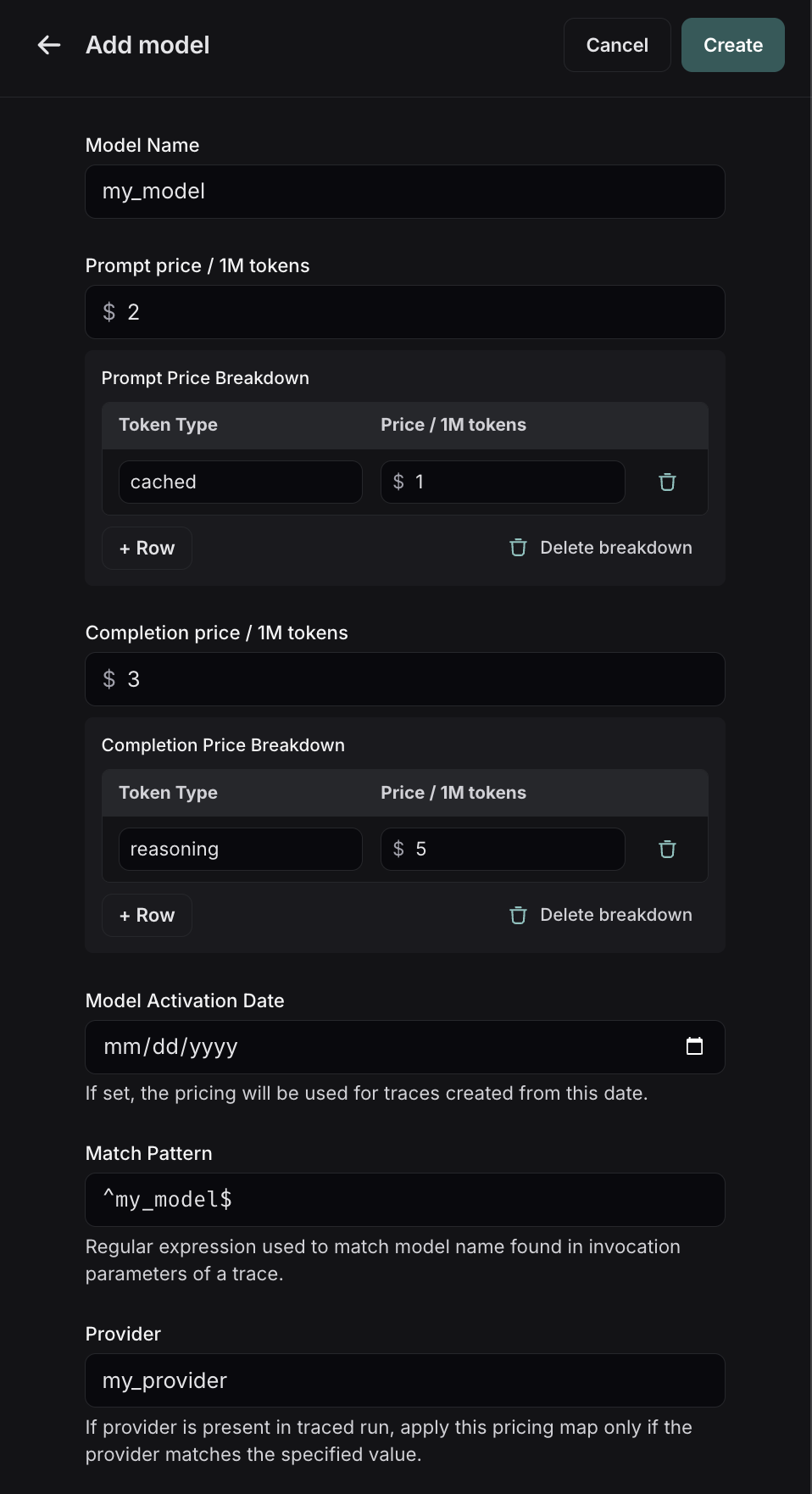
Here, you can specify the following fields:
- Model Name: The human-readable name of the model.
- Input Price: The cost per 1M input tokens for the model. This number is multiplied by the number of tokens in the prompt to calculate the prompt cost.
- Input Price Breakdown (Optional): The breakdown of price for each different type of input token, e.g.
cache_read,video,audio - Output Price: The cost per 1M output tokens for the model. This number is multiplied by the number of tokens in the completion to calculate the completion cost.
- Output Price Breakdown (Optional): The breakdown of price for each different type of output token, e.g.
reasoning,image, etc. - Model Activation Date (Optional): The date from which the pricing is applicable. Only runs after this date will apply this model price.
- Match Pattern: A regex pattern to match the model name. This is used to match the value for
ls_model_namein the run metadata. - Provider (Optional): The provider of the model. If specified, this is matched against
ls_providerin the run metadata.
Once you have set up the model pricing map, LangSmith will automatically calculate and aggregate the token-based costs for traces based on the token counts provided in the LLM invocations.
LLM calls: Sending costs directly#
If your model follows a non-linear pricing scheme, we recommend calculating costs client-side and sending them to LangSmith as usage_metadata.
Gemini 3.1 Pro Preview and Gemini 2.5 Pro follow a pricing scheme with a stepwise cost function. We support this pricing scheme for Gemini by default. For any other models with non-linear pricing, you will need to follow these instructions to calculate costs.
from langsmith import traceable, get_current_run_tree

inputs = [
    {"role": "system", "content": "You are a helpful assistant."},
    {"role": "user", "content": "I'd like to book a table for two."},
]

@traceable(
    run_type="llm",
    metadata={"ls_provider": "my_provider", "ls_model_name": "my_model"}
)
def chat_model(messages: list):
    llm_output = {
        "choices": [
            {
                "message": {
                    "role": "assistant",
                    "content": "Sure, what time would you like to book the table for?"
                }
            }
        ],
        "usage_metadata": {
            # Specify cost (in dollars) for the inputs and outputs
            "input_cost": 1.1e-6,
            "input_cost_details": {"cache_read": 2.3e-7},
            "output_cost": 5.0e-6,
        },
    }
    run = get_current_run_tree()
    run.set(usage_metadata=llm_output["usage_metadata"])
    return llm_output["choices"][0]["message"]

chat_model(inputs)
import { traceable, getCurrentRunTree } from "langsmith/traceable";
const messages = [
{ role: "system", content: "You are a helpful assistant." },
{ role: "user", content: "I'd like to book a table for two." }
];
const chatModel = traceable(
async (messages: { role: string; content: string }[]) => {
const llmOutput = {
choices: [
{
message: {
role: "assistant",
content: "Sure, what time would you like to book the table for?",
},
},
],
// Specify cost (in dollars) for the inputs and outputs
usage_metadata: {
input_cost: 1.1e-6,
input_cost_details: { cache_read: 2.3e-7 },
output_cost: 5.0e-6,
},
};
// Attach usage metadata to the run
const runTree = getCurrentRunTree();
runTree.metadata.usage_metadata = llmOutput.usage_metadata;
// Return only the assistant message
return llmOutput.choices[0].message;
},
{
run_type: "llm",
name: "chat_model",
metadata: {
ls_provider: "my_provider",
ls_model_name: "my_model",
},
}
);
await chatModel(messages);Other runs: Sending costs#
You can also send cost information for any non-LLM runs, such as tool calls.The cost must be specified in the total_cost field under the runs usage_metadata.
    from langsmith import traceable, get_current_run_tree

    # Example tool: get_weather
    @traceable(run_type="tool", name="get_weather")
    def get_weather(city: str):
        # Your tool logic goes here
        result = {
            "temperature_f": 68,
            "condition": "sunny",
            "city": city,
        }

        # Cost for this tool call (computed however you like)
        tool_cost = 0.0015

        # Attach usage metadata to the LangSmith run
        run = get_current_run_tree()
        run.set(usage_metadata={"total_cost": tool_cost})

        # Return only the actual tool result (no usage info)
        return result

    tool_response = get_weather("San Francisco")
    ```

```typescript
    import { traceable, getCurrentRunTree } from "langsmith/traceable";

    // Example tool: get_weather
    const getWeather = traceable(
      async ({ city }) => {
        // Your tool logic goes here
        const result = {
          temperature_f: 68,
          condition: "sunny",
          city,
        };

        // Cost for this tool call (computed however you like)
        const toolCost = 0.0015;

        // Attach usage metadata to the LangSmith run
        const runTree = getCurrentRunTree();
        runTree.metadata.usage_metadata = {
          total_cost: toolCost,
        };

        // Return only the actual tool result (no usage info)
        return result;
      },
      {
        run_type: "tool",
        name: "get_weather",
      }
    );

    const toolResponse = await getWeather({ city: "San Francisco" });
    ```

</Accordion>

<Accordion title="B. Return a `total_cost` field in your traced function's outputs.">
  Include the `usage_metadata` key directly within the object returned by your traced function. LangSmith will extract it from the output.


```python
    from langsmith import traceable

    # Example tool: get_weather
    @traceable(run_type="tool", name="get_weather")
    def get_weather(city: str):
        # Your tool logic goes here
        result = {
            "temperature_f": 68,
            "condition": "sunny",
            "city": city,
        }

        # Attach tool call costs here
        return {
            **result,
            "usage_metadata": {
                "total_cost": 0.0015,   # <-- cost for this tool call
            },
        }

    tool_response = get_weather("San Francisco")
    ```

```typescript
    import { traceable } from "langsmith/traceable";

    // Example tool: get_weather
    const getWeather = traceable(
      async ({ city }) => {
        // Your tool logic goes here
        const result = {
          temperature_f: 68,
          condition: "sunny",
          city,
        };

        // Attach tool call costs here
        return {
          ...result,
          usage_metadata: {
            total_cost: 0.0015,  // <-- cost for this tool call
          },
        };
      },
      {
        run_type: "tool",
        name: "get_weather",
      }
    );

    const toolResponse = await getWeather({ city: "San Francisco" });
    ```

</Accordion>

***


  <span class="callout-start" data-callout-type="note"></span>
[Edit this page on GitHub](https://github.com/langchain-ai/docs/edit/main/src/langsmith/cost-tracking.mdx) or [file an issue](https://github.com/langchain-ai/docs/issues/new/choose).
  <span class="callout-end"></span>

  <span class="callout-start" data-callout-type="note"></span>
[Connect these docs](/use-these-docs) to Claude, VSCode, and more via MCP for real-time answers.
  <span class="callout-end"></span>