Connect to a custom model ↗
noOriginal Documentation
Documentation Index#
Fetch the complete documentation index at: https://docs.langchain.com/llms.txt Use this file to discover all available pages before exploring further.
The LangSmith playground allows you to use your own custom models. You can deploy a model server that exposes your model’s API via LangServe, an open source library for serving LangChain applications. Behind the scenes, the playground will interact with your model server to generate responses.
Deploy a custom model server#
For your convenience, we have provided a sample model server that you can use as a reference. You can find the sample model server here We highly recommend using the sample model server as a starting point.
Depending on your model is an instruct-style or chat-style model, you will need to implement either custom_model.py or custom_chat_model.py respectively.
Adding configurable fields#
It is often useful to configure your model with different parameters. These might include temperature, model_name, max_tokens, etc.
To make your model configurable in the LangSmith playground, you need to add configurable fields to your model server. These fields can be used to change model parameters from the playground.
You can add configurable fields by implementing the with_configurable_fields function in the config.py file. You can
def with_configurable_fields(self) -> Runnable:
    """Expose fields you want to be configurable in the playground. We will automatically expose these to the
    playground. If you don't want to expose any fields, you can remove this method."""
    return self.configurable_fields(n=ConfigurableField(
        id="n",
        name="Num Characters",
        description="Number of characters to return from the input prompt.",
    ))
Use the model in the LangSmith Playground#
Once you have deployed a model server, you can use it in the LangSmith Playground. Enter the playground and select either the ChatCustomModel or the CustomModel provider for chat-style model or instruct-style models.
Enter the URL. The playground will automatically detect the available endpoints and configurable fields. You can then invoke the model with the desired parameters.
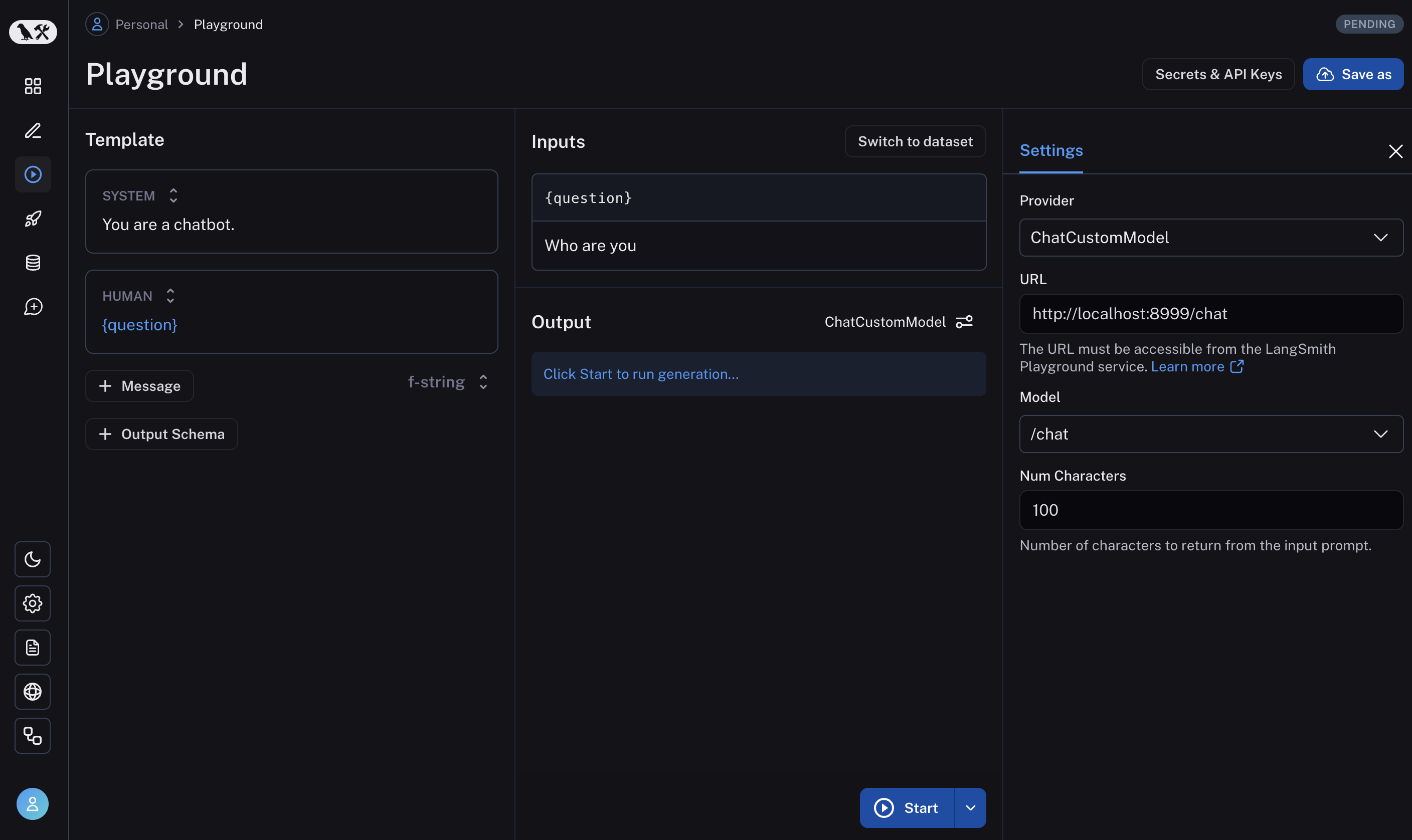
If everything is set up correctly, you should see the model’s response in the playground as well as the configurable fields specified in the with_configurable_fields.
See how to store your model configuration for later use here.
Edit this page on GitHub or file an issue.
Connect these docs to Claude, VSCode, and more via MCP for real-time answers.