Evaluation quickstart ↗
yesEditorial Notes
This is the fastest path into LangSmith evaluation and the right starting point before the deeper evaluator guides. The key takeaway is the dataset to target-function to evaluator to run loop, which is the mental model every other LangSmith eval feature builds on. Pay attention to how examples and the evaluation client are wired up, since that boilerplate carries over to LLM-as-judge work. A common beginner mistake is evaluating against a dataset that does not represent production traffic, which produces reassuring but meaningless scores.
Original Documentation
Documentation Index#
Fetch the complete documentation index at: https://docs.langchain.com/llms.txt Use this file to discover all available pages before exploring further.
Evaluations are a quantitative way to measure the performance of LLM applications. LLMs can behave unpredictably, even small changes to prompts, models, or inputs can significantly affect results. Evaluations provide a structured way to identify failures, compare versions, and build more reliable AI applications.
Running an evaluation in LangSmith requires three key components:
- Dataset: A set of test inputs (and optionally, expected outputs).
- Target function: The part of your application you want to test—this might be a single LLM call with a new prompt, one module, or your entire workflow.
- Evaluators: Functions that score your target function’s outputs.
This quickstart guides you through running a starter evaluation that checks the correctness of LLM responses, using either the LangSmith SDK or UI.
Prerequisites#
Before you begin, make sure you have:
- A LangSmith account: Sign up or log in at smith.langchain.com.
- A LangSmith API key: Follow the Create an API key guide.
- An OpenAI API key: Generate this from the OpenAI dashboard.
Select the UI or SDK filter for instructions:
1. Set workspace secrets#
In the LangSmith UI, ensure that your API key is set as a workspace secret.
- Navigate to
Settings and then move to the Secrets tab. - Select Add secret and enter the key environment variable (e.g.,
OPENAI_API_KEYorANTHROPIC_API_KEY) and your API key as the Value. - Select Save secret.
When adding workspace secrets in the LangSmith UI, make sure the secret keys match the environment variable names expected by your model provider.
2. Create a prompt#
LangSmith’s Prompt Playground makes it possible to run evaluations over different prompts, new models, or test different model configurations.
In the LangSmith UI, navigate to the Playground under Prompt Engineering.
Under the Prompts panel, modify the system prompt to:
    Answer the following question accurately:
    ```

Leave the **Human** message as is: `{question}`.
3. Create a dataset#
Click Set up Evaluation, which will open a New Experiment table at the bottom of the page.
In the Select or create a new dataset dropdown, click the + New button to create a new dataset.
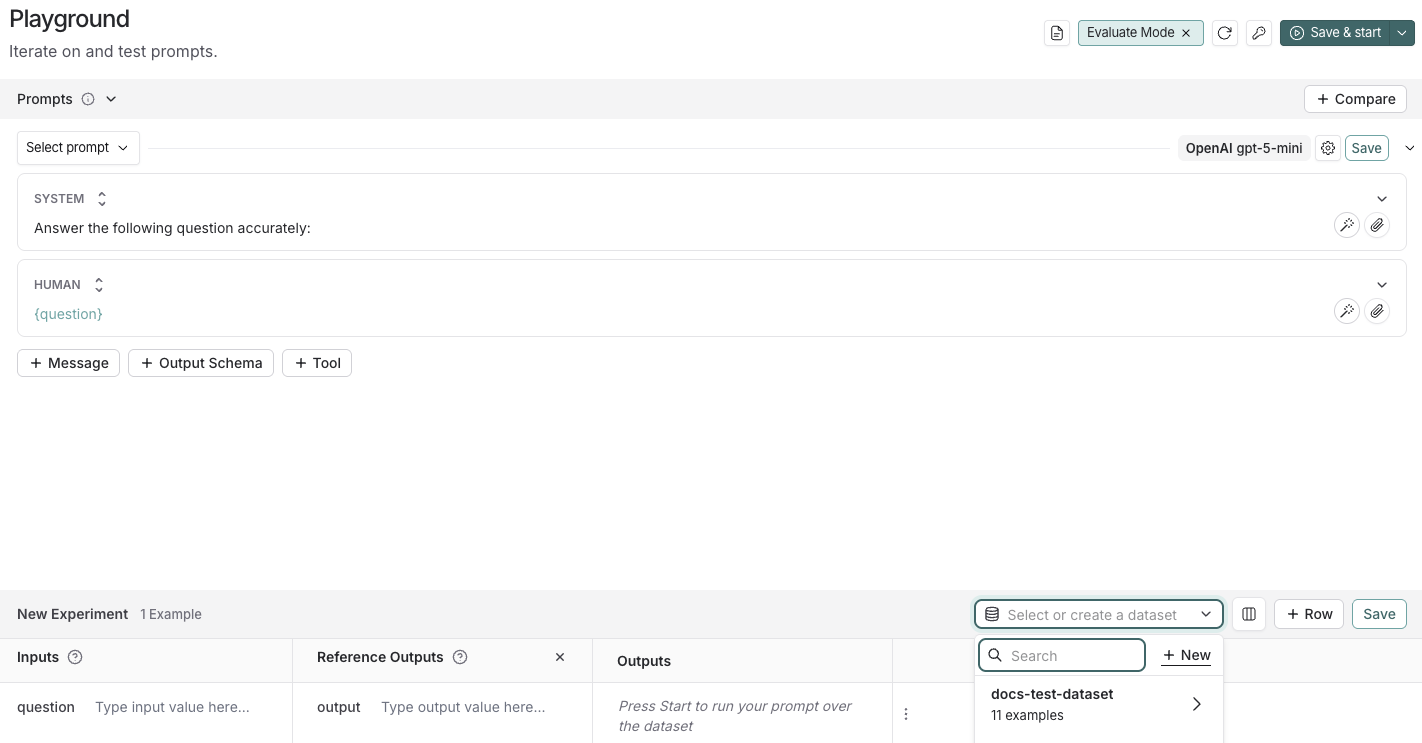
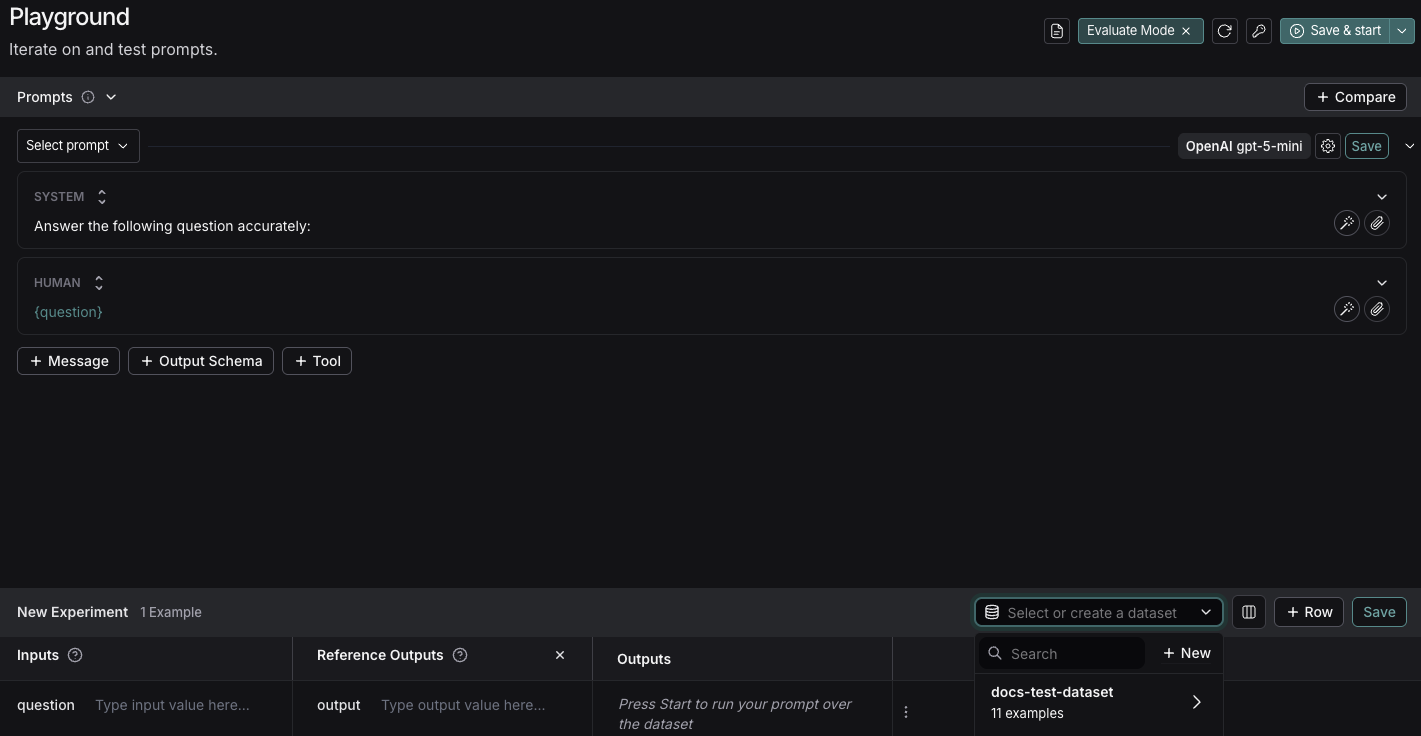
Add the following examples to the dataset:
| Inputs | Reference Outputs |
|---|---|
| question: Which country is Mount Kilimanjaro located in? | output: Mount Kilimanjaro is located in Tanzania. |
| question: What is Earth’s lowest point? | output: Earth’s lowest point is The Dead Sea. |
- Click Save and enter a name to save your newly created dataset.
4. Add an evaluator#
- Click + Evaluator and select Correctness from the Pre-built Evaluator options.
- In the Correctness panel, click Save.
5. Run your evaluation#
Select
Start on the top right to run your evaluation. This will create an experiment with a preview in the New Experiment table. You can view in full by clicking the experiment name. 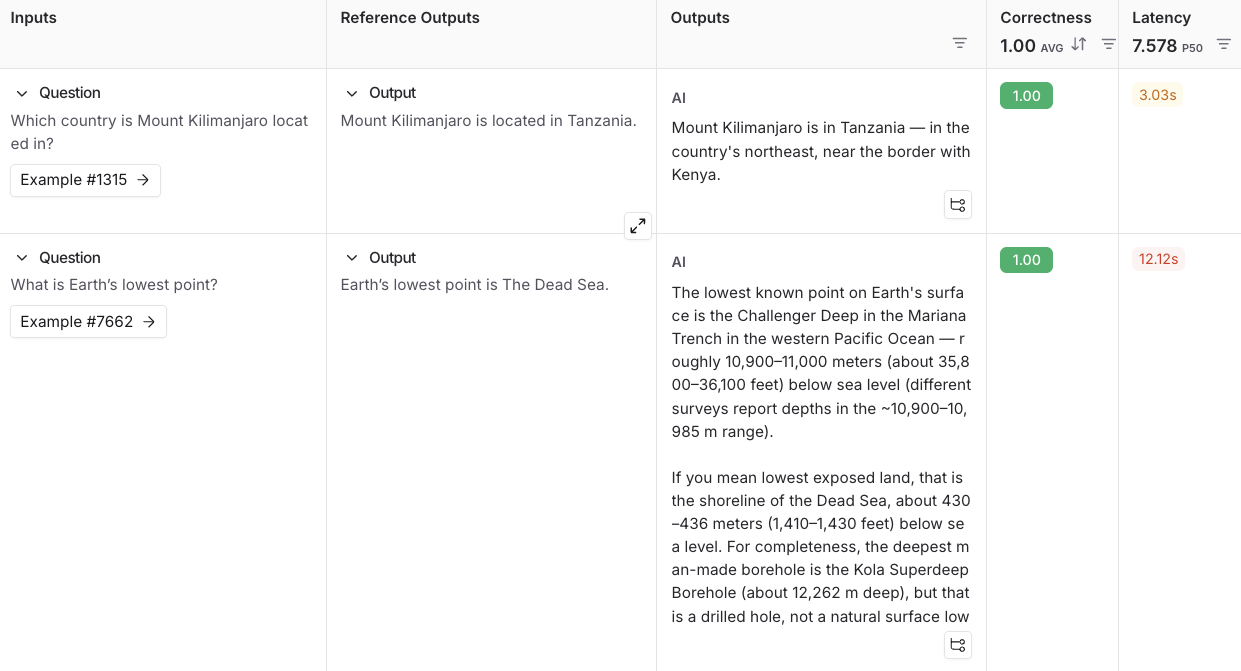
Next steps#
To learn more about running experiments in LangSmith, read the evaluation conceptual guide.
For more details on evaluations, refer to the Evaluation documentation.
Learn how to create and manage datasets in the UI.
Learn how to run an evaluation from the prompt playground.
This guide uses prebuilt LLM-as-judge evaluators from the open-source
openevalspackage. OpenEvals includes a set of commonly used evaluators and is a great starting point if you’re new to evaluations. If you want greater flexibility in how you evaluate your apps, you can also define completely custom evaluators.
1. Install dependencies#
In your terminal, create a directory for your project and install the dependencies in your environment:
    mkdir ls-evaluation-quickstart && cd ls-evaluation-quickstart
    python -m venv .venv && source .venv/bin/activate
    python -m pip install --upgrade pip
    pip install -U langsmith openevals openai
    ```

```bash
    mkdir ls-evaluation-quickstart-ts && cd ls-evaluation-quickstart-ts
    npm init -y
    npm install langsmith openevals openai
    npx tsc --init
    ```


<span class="callout-start" data-callout-type="info"></span>
If you are using `yarn` as your package manager, you will also need to manually install `@langchain/core` as a peer dependency of `openevals`. This is not required for LangSmith evals in general, you may define evaluators [using arbitrary custom code](/langsmith/code-evaluator-ui).
<span class="callout-end"></span>

## 2. Set up environment variables

Set the following environment variables:

* `LANGSMITH_TRACING`
* `LANGSMITH_API_KEY`
* `OPENAI_API_KEY` (or your LLM provider's API key)
* (optional) `LANGSMITH_WORKSPACE_ID`: If your LangSmith API key is linked to multiple [workspaces](/langsmith/administration-overview#workspaces), set this variable to specify which workspace to use.

```bash
  export LANGSMITH_TRACING=true
  export LANGSMITH_API_KEY="<your-langsmith-api-key>"
  export OPENAI_API_KEY="<your-openai-api-key>"
  export LANGSMITH_WORKSPACE_ID="<your-workspace-id>"
  ```

<span class="callout-start" data-callout-type="note"></span>
If you're using Anthropic, use the [Anthropic wrapper](/langsmith/trace-anthropic) to trace your calls. For other providers, use [the traceable wrapper](/langsmith/annotate-code#use-%40traceable-%2F-traceable).
<span class="callout-end"></span>

## 3. Create a dataset

1. Create a file and add the following code, which will:

 * Import the `Client` to connect to LangSmith.
 * Create a dataset.
 * Define example [*inputs* and *outputs*](/langsmith/evaluation-concepts#examples).
 * Associate the input and output pairs with that dataset in LangSmith so they can be used in evaluations.


   ```python
       # dataset.py
       from langsmith import Client

       def main():
           client = Client()

           # Programmatically create a dataset in LangSmith
           dataset = client.create_dataset(
               dataset_name="Sample dataset",
               description="A sample dataset in LangSmith."
           )

           # Create examples
           examples = [
               {
                   "inputs": {"question": "Which country is Mount Kilimanjaro located in?"},
                   "outputs": {"answer": "Mount Kilimanjaro is located in Tanzania."},
               },
               {
                   "inputs": {"question": "What is Earth's lowest point?"},
                   "outputs": {"answer": "Earth's lowest point is The Dead Sea."},
               },
           ]

           # Add examples to the dataset
           client.create_examples(dataset_id=dataset.id, examples=examples)
           print("Created dataset:", dataset.name)

       if __name__ == "__main__":
           main()

       ```

   ```typescript
       // dataset.ts
       import { Client } from "langsmith";

       async function main() {
       const client = new Client();

       const dataset = await client.createDataset(
           "Sample dataset",
           { description: "A sample dataset in LangSmith." }
       );

       // Define examples
       const inputs = [
           { question: "Which country is Mount Kilimanjaro located in?" },
           { question: "What is Earth's lowest point?" },
       ];
       const outputs = [
           { answer: "Mount Kilimanjaro is located in Tanzania." },
           { answer: "Earth's lowest point is The Dead Sea." },
       ];

       await client.createExamples({
           datasetId: dataset.id,
           inputs,
           outputs,
       });

       console.log("Created dataset:", dataset.name);
       }

       if (require.main === module) {
       main().catch((e) => {
           console.error(e);
           process.exit(1);
       });
       }
       ```


2. In your terminal, run the `dataset` file to create the datasets you'll use to evaluate your app:


   ```bash
       python dataset.py
       ```

   ```bash
       npx ts-node dataset.ts
       ```


 You'll see the following output:

 ```bash
     Created dataset: Sample dataset
     ```

## 4. Create your target function

Define a [target function](/langsmith/define-target-function) that contains what you're evaluating. In this guide, you'll define a target function that contains a single LLM call to answer a question.

Add the following to an `eval` file:


```python
    # eval.py
    from langsmith import Client, wrappers
    from openai import OpenAI

    # Wrap the OpenAI client for LangSmith tracing
    openai_client = wrappers.wrap_openai(OpenAI())

    # Define the application logic you want to evaluate inside a target function
    # The SDK will automatically send the inputs from the dataset to your target function
    def target(inputs: dict) -> dict:
        response = openai_client.chat.completions.create(
            model="gpt-5-mini",
            messages=[
                {"role": "system", "content": "Answer the following question accurately"},
                {"role": "user", "content": inputs["question"]},
            ],
        )
        return {"answer": response.choices[0].message.content.strip()}
    ```

```typescript
    // eval.ts
    import { evaluate } from "langsmith/evaluation";
    import { wrapOpenAI } from "langsmith/wrappers/openai";
    import OpenAI from "openai";

    const openaiClient = wrapOpenAI(new OpenAI());

    async function target(inputs: Record<string, any>): Promise<Record<string, any>> {
      const question = String(inputs.question ?? "");
      const resp = await openaiClient.chat.completions.create({
        model: "gpt-5-mini",
        messages: [
          { role: "system", content: "Answer the following question accurately" },
          { role: "user", content: question },
        ],
      });
      return { answer: resp.choices[0].message.content?.trim() ?? "" };
    }
    ```


## 5. Define an evaluator

In this step, you’re telling LangSmith how to grade the answers your app produces.

Import a prebuilt evaluation prompt (`CORRECTNESS_PROMPT`) from [`openevals`](https://github.com/langchain-ai/openevals) and a helper that wraps it into an [*LLM-as-judge evaluator*](/langsmith/evaluation-concepts#llm-as-judge), which will score the application's output.

<span class="callout-start" data-callout-type="info"></span>
`CORRECTNESS_PROMPT` is just an f-string with variables for `"inputs"`, `"outputs"`, and `"reference_outputs"`. See [here](https://github.com/langchain-ai/openevals#customizing-prompts) for more information on customizing OpenEvals prompts.
<span class="callout-end"></span>

The evaluator compares:

* `inputs`: what was passed into your target function (e.g., the question text).
* `outputs`: what your target function returned (e.g., the model’s answer).
* `reference_outputs`: the ground truth answers you attached to each dataset example in [Step 3](#3-create-a-dataset).

Add the following highlighted code to your `eval` file:


```python
    from langsmith import Client, wrappers
    from openai import OpenAI
    from openevals.llm import create_llm_as_judge
    from openevals.prompts import CORRECTNESS_PROMPT

    # Wrap the OpenAI client for LangSmith tracing
    openai_client = wrappers.wrap_openai(OpenAI())

    # Define the application logic you want to evaluate inside a target function
    # The SDK will automatically send the inputs from the dataset to your target function
    def target(inputs: dict) -> dict:
        response = openai_client.chat.completions.create(
            model="gpt-5-mini",
            messages=[
                {"role": "system", "content": "Answer the following question accurately"},
                {"role": "user", "content": inputs["question"]},
            ],
        )
        return {"answer": response.choices[0].message.content.strip()}

    def correctness_evaluator(inputs: dict, outputs: dict, reference_outputs: dict):
        evaluator = create_llm_as_judge(
            prompt=CORRECTNESS_PROMPT,
            model="openai:o3-mini",
            feedback_key="correctness",
        )
        return evaluator(
            inputs=inputs,
            outputs=outputs,
            reference_outputs=reference_outputs
        )
    ```

```typescript
    import { evaluate } from "langsmith/evaluation";
    import { wrapOpenAI } from "langsmith/wrappers/openai";
    import OpenAI from "openai";
    import { createLLMAsJudge, CORRECTNESS_PROMPT } from "openevals";

    const openaiClient = wrapOpenAI(new OpenAI());

    async function target(inputs: Record<string, any>): Promise<Record<string, any>> {
      const question = String(inputs.question ?? "");
      const resp = await openaiClient.chat.completions.create({
        model: "gpt-5-mini",
        messages: [
          { role: "system", content: "Answer the following question accurately" },
          { role: "user", content: question },
        ],
      });
      return { answer: resp.choices[0].message.content?.trim() ?? "" };
    }

    const judge = createLLMAsJudge({
      prompt: CORRECTNESS_PROMPT,
      model: "openai:o3-mini",
      feedbackKey: "correctness",
    });

    async function correctnessEvaluator(run: {
      inputs: Record<string, any>;
      outputs: Record<string, any>;
      referenceOutputs?: Record<string, any>;
    }) {
      return judge({
        inputs: run.inputs,
        outputs: run.outputs,
        // OpenEvals expects snake_case here:
        reference_outputs: run.referenceOutputs,
      });
    }
    ```


## 6. Run and view results

To run the evaluation experiment, you'll call `evaluate(...)`, which:

* Pulls example from the dataset you created in [Step 3](#3-create-a-dataset).
* Sends each example's inputs to your target function from [Step 4](#4-add-an-evaluator).
* Collects the outputs (the model's answers).
* Passes the outputs along with the `reference_outputs` to your evaluator from [Step 5](#5-define-an-evaluator).
* Records all results in LangSmith as an experiment, so you can view them in the UI.

1. Add the highlighted code to your `eval` file:


   ```python
       from langsmith import Client, wrappers
       from openai import OpenAI
       from openevals.llm import create_llm_as_judge
       from openevals.prompts import CORRECTNESS_PROMPT

       # Wrap the OpenAI client for LangSmith tracing
       openai_client = wrappers.wrap_openai(OpenAI())

       # Define the application logic you want to evaluate inside a target function
       # The SDK will automatically send the inputs from the dataset to your target function
       def target(inputs: dict) -> dict:
           response = openai_client.chat.completions.create(
               model="gpt-5-mini",
               messages=[
                   {"role": "system", "content": "Answer the following question accurately"},
                   {"role": "user", "content": inputs["question"]},
               ],
           )
           return {"answer": response.choices[0].message.content.strip()}

       def correctness_evaluator(inputs: dict, outputs: dict, reference_outputs: dict):
           evaluator = create_llm_as_judge(
               prompt=CORRECTNESS_PROMPT,
               model="openai:o3-mini",
               feedback_key="correctness",
           )
           return evaluator(
               inputs=inputs,
               outputs=outputs,
               reference_outputs=reference_outputs
           )

       # After running the evaluation, a link will be provided to view the results in langsmith
       def main():
           client = Client()
           experiment_results = client.evaluate(
               target,
               data="Sample dataset",
               evaluators=[
                   correctness_evaluator,
                   # can add multiple evaluators here
               ],
               experiment_prefix="first-eval-in-langsmith",
               max_concurrency=2,
           )
           print(experiment_results)

       if __name__ == "__main__":
           main()
       ```

   ```typescript
       import { evaluate } from "langsmith/evaluation";
       import { wrapOpenAI } from "langsmith/wrappers/openai";   // helper to wrap OpenAI client
       import OpenAI from "openai";                              // model provider
       import { createLLMAsJudge, CORRECTNESS_PROMPT } from "openevals"; // evaluator tools

       const openaiClient = wrapOpenAI(new OpenAI());

       async function target(inputs: Record<string, any>): Promise<Record<string, any>> {
       const question = String(inputs.question ?? "");
       const resp = await openaiClient.chat.completions.create({
           model: "gpt-5-mini",
           messages: [
           { role: "system", content: "Answer the following question accurately" },
           { role: "user", content: question },
           ],
       });
       return { answer: resp.choices[0].message.content?.trim() ?? "" };
       }

       const judge = createLLMAsJudge({
       prompt: CORRECTNESS_PROMPT,
       model: "openai:o3-mini",
       feedbackKey: "correctness",
       });

       async function correctnessEvaluator(run: {
       inputs: Record<string, any>;
       outputs: Record<string, any>;
       referenceOutputs?: Record<string, any>;
       }) {
       return judge({
           inputs: run.inputs,
           outputs: run.outputs,
           // OpenEvals expects snake_case here:
           reference_outputs: run.referenceOutputs,
       });
       }

       async function main() {
       const datasetName = process.env.DATASET_NAME ?? "Sample dataset";

       const results = await evaluate(target, {
           data: datasetName,
           evaluators: [correctnessEvaluator],
           experimentPrefix: "first-eval-in-langsmith",
           maxConcurrency: 2,
       });

       console.log(results);
       }

       if (require.main === module) {
       main().catch((e) => {
           console.error(e);
           process.exit(1);
       });
       }
       ```


2. Run your evaluator:


   ```bash
       python eval.py
       ```

   ```bash
       npx ts-node eval.ts
       ```


3. You'll receive a link to view the evaluation results and metadata for the experiment results:
View the evaluation results for experiment: 'first-eval-in-langsmith-00000000' at: https://smith.langchain.com/o/6551f9c4-2685-4a08-86b9-1b29643deb3d/datasets/e5fde557-c274-4e49-b39d-000000000000/compare?selectedSessions=70b11778-6a28-4cdb-be81-000000000000
<ExperimentResults first-eval-in-langsmith-00000000>
```
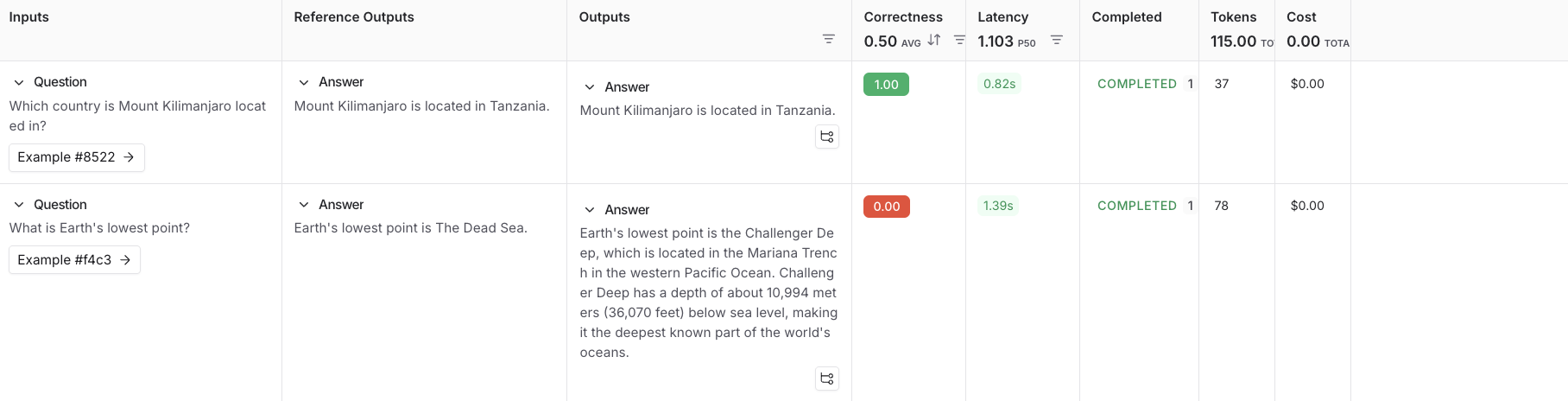
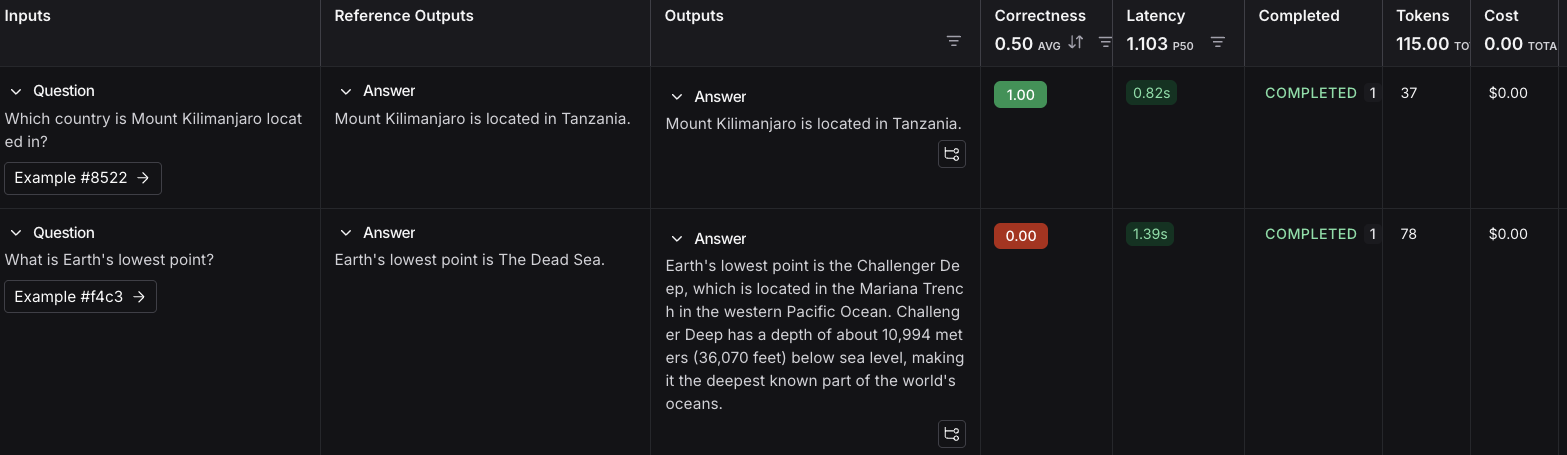
Follow the link in the output of your evaluation run to access the Datasets & Experiments page in the LangSmith UI, and explore the results of the experiment. This will direct you to the created experiment with a table showing the Inputs, Reference Output, and Outputs. You can select a dataset to open an expanded view of the results.
Next steps#
Here are some topics you might want to explore next:
- Evaluation concepts provides descriptions of the key terminology for evaluations in LangSmith.
- OpenEvals README to see all available prebuilt evaluators and how to customize them.
- Define custom evaluators.
- Python or TypeScript SDK references for comprehensive descriptions of every class and function.
Edit this page on GitHub or file an issue.
Connect these docs to Claude, VSCode, and more via MCP for real-time answers.