Set up the LLM auth proxy ↗
noOriginal Documentation
Documentation Index#
Fetch the complete documentation index at: https://docs.langchain.com/llms.txt Use this file to discover all available pages before exploring further.
Deploy an Envoy-based auth proxy that validates LangSmith-signed JWTs and routes LLM requests to your upstream provider or gateway.
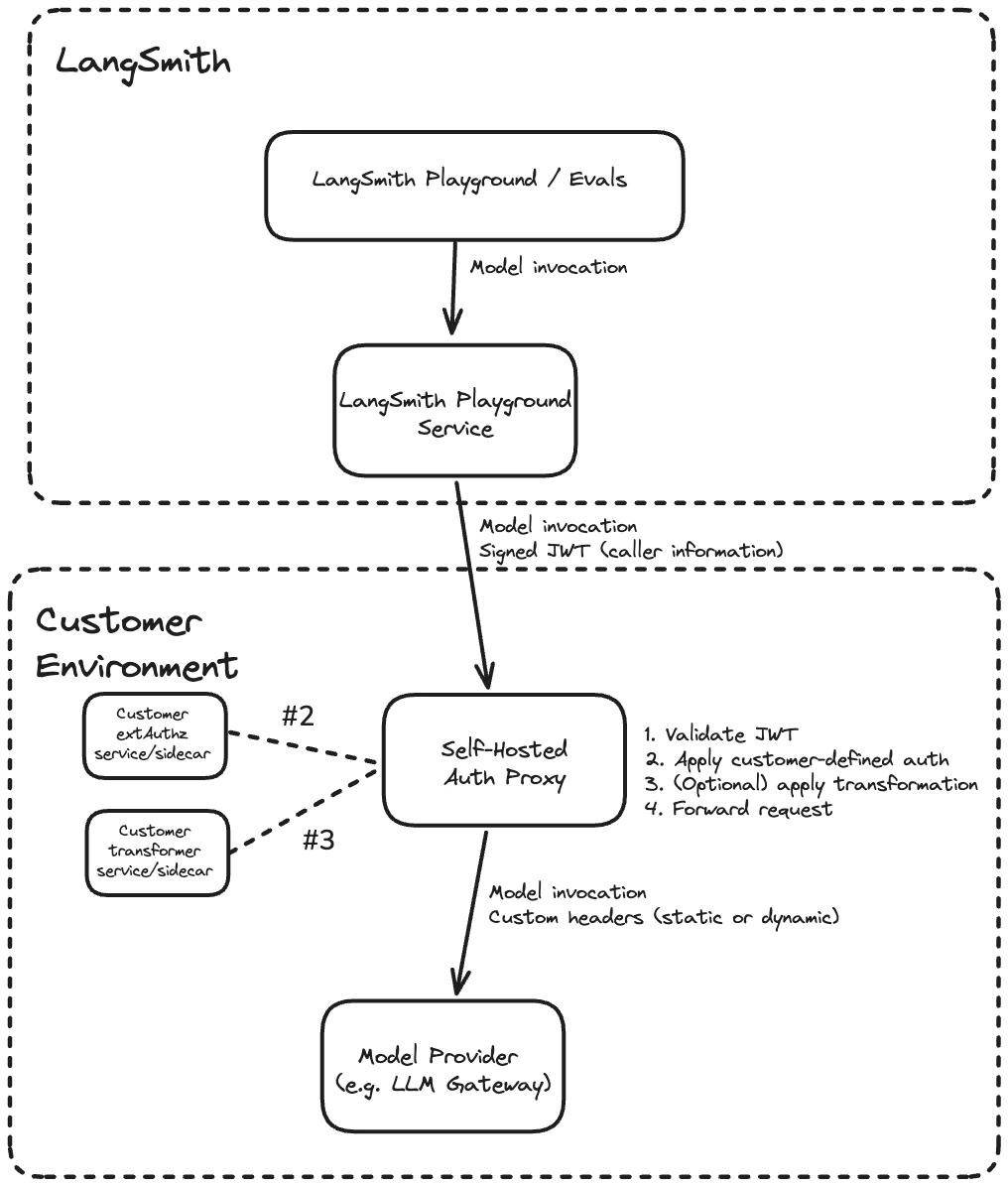
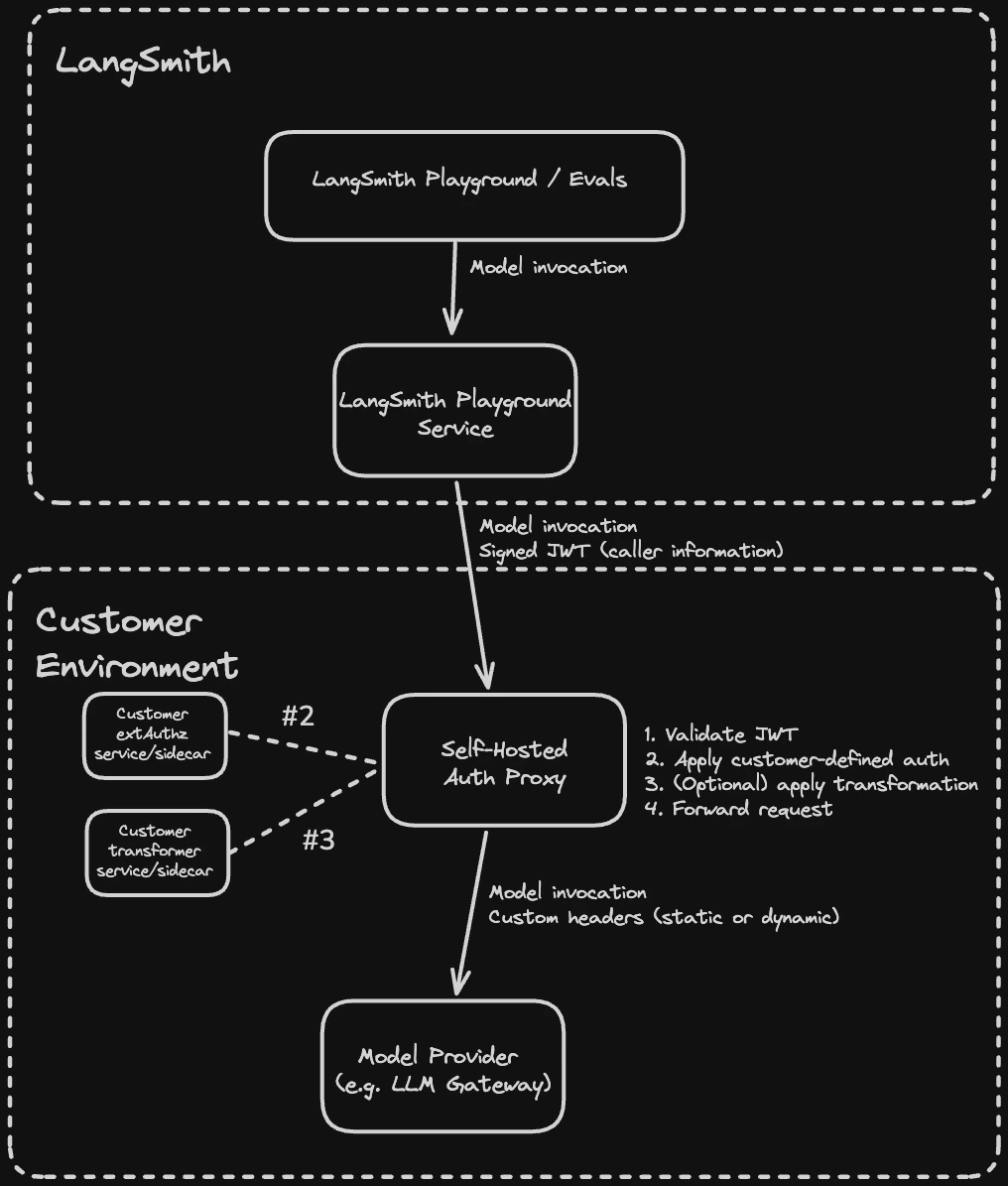
The LLM auth proxy is an Envoy-based proxy that runs in your environment and sits between LangSmith and your upstream LLM provider or gateway (such as OpenAI, Anthropic, or an internal LLM gateway like LiteLLM). LangSmith signs every request with a short-lived JWT (JSON Web Token). The proxy validates the JWT, optionally injects provider credentials or transforms request and response bodies, then forwards the request upstream. It is available to both SaaS and self-hosted LangSmith customers.
The LLM auth proxy requires a LangSmith Enterprise plan. For more details, refer to Pricing or contact our sales team.
Use the LLM auth proxy when you need to:
- Authenticate Playground or LLM-as-judge evaluation requests against your own provider gateway.
- Inject provider-specific API keys or auth headers without exposing them to end users.
- Transform request or response bodies (for example, converting between OpenAI format and a custom gateway format).
How it works#
Each request from LangSmith passes through the following steps in the proxy:
- Validate the JWT (signature, issuer, audience)
- Call your
ext_authzservice, which receives the validated JWT and returns the provider credentials to inject as headers - Optionally call your
ext_proctransformer, which can rewrite request and response bodies (for example, converting between OpenAI format and a custom gateway format) - Forward the request with custom headers (static or dynamic) to the upstream provider
Both the ext_authz service and the transformer are customer-deployed components that run alongside the proxy in your environment. Either or both can be enabled depending on your use case.
Prerequisites#
- LangSmith Enterprise plan (SaaS or self-hosted on version 0.13.33+)
- Kubernetes cluster with Helm 3
- Envoy v1.37 or later (the Helm chart defaults to
envoyproxy/envoy:v1.37-latest) - The URL of your upstream LLM provider or gateway (the destination the proxy will forward requests to)
The auth proxy currently supports the Playground, Evals, and Fleet features.
1. Configure JWT signing (self-hosted LangSmith only)#
Skip this step for LangSmith SaaS. JWT signing is already configured.
Generate an Ed25519 key pair using step CLI (or an internal process if you prefer). Ed25519 is the signing algorithm LangSmith uses to sign JWTs. The private key signs each request; the auth proxy verifies the signature using only the public key.
TMPDIR_KEYS="$(mktemp -d)"
step crypto keypair "$TMPDIR_KEYS/pub.pem" "$TMPDIR_KEYS/priv.pem" \
  --kty OKP --crv Ed25519 --no-password --insecure
PRIV_JWK=$(step crypto key format --jwk < "$TMPDIR_KEYS/priv.pem")
SIGNING_JWKS=$(echo "$PRIV_JWK" | jq -c '{keys: [. + {use: "sig", alg: "EdDSA"}]}')
echo "$SIGNING_JWKS"
Store the JWKS in a Kubernetes secret:
kubectl create secret generic langsmith-signing-jwks \
  --namespace <namespace> \
  --from-literal=LANGSMITH_SIGNING_JWKS="$SIGNING_JWKS"
A JWKS (JSON Web Key Set) is a standard JSON format for publishing cryptographic keys. LANGSMITH_SIGNING_JWKS contains the Ed25519 private key and is stored as a Kubernetes secret. It is never exposed. LangSmith automatically extracts the corresponding public key and serves it at /.well-known/jwks.json. The auth proxy fetches this public endpoint to verify JWT signatures without ever needing the private key.
Reference the secret in your LangSmith values.yaml:
platformBackend:
  deployment:
    extraEnv:
      - name: LLM_AUTH_PROXY_ISSUER
        value: "langsmith"        # must match jwtIssuer in the auth proxy chart
      - secretRef:
          name: langsmith-signing-jwks
LLM_AUTH_PROXY_ISSUER sets the iss claim in signed JWTs. Use langsmith to match the SaaS default, or a custom identifier like langsmith:self-hosted:<short_identifier> to distinguish your installation. The value must match jwtIssuer in the auth proxy chart in Step 4).
2. Enable LLM Auth Proxy for your organization#
Option A: Enable for a specific organization:
In the LangSmith UI, navigate to the Settings page, copy the organization ID at the top left next to Organizations.
Run the following against your LangSmith PostgreSQL database:
    UPDATE organizations
    SET config = config || '{"can_use_llm_auth_proxy": true}'
    WHERE id = '<organization_id>';
    ```

**Option B:** Enable for all organizations in an installation:

Add the following to `commonEnv` in your [LangSmith `values.yaml`](https://github.com/langchain-ai/helm/blob/main/charts/langsmith/values.yaml):

```yaml
    commonEnv:
      DEFAULT_ORG_FEATURE_CAN_USE_LLM_AUTH_PROXY: "true"
    ```

<span class="callout-start" data-callout-type="note"></span>
  This setting has no effect on Personal organizations.
<span class="callout-end"></span>
  <span class="tab-end"></span>

  <span class="tab-start" data-tab-title="SaaS"></span>
Contact [LangChain support](mailto:support@langchain.dev) to enable LLM Auth Proxy for your organization.
  <span class="tab-end"></span>
<span class="tab-group-end"></span>

## 3. Configure organization settings in LangSmith

In the LangSmith UI, navigate to **Settings** > **General**, configure the following:

1. **JWT audience:** the `aud` claim value the proxy will validate (for example, `my-audience`). This must match `jwtAudiences` in the auth proxy chart in [Step 4](#4-install-the-auth-proxy-helm-chart).
2. **Enable LLM auth proxy:** toggle on for your organization.

<img src="https://mintcdn.com/langchain-5e9cc07a/P0dgApy5uvIpggEa/langsmith/images/llm-auth-proxy-settings-dark.png?fit=max&auto=format&n=P0dgApy5uvIpggEa&q=85&s=b1e23ca1842d6a497adc5c2a3bac9e33" alt="Organization Settings page in LangSmith showing the Enable LLM auth proxy checkbox and JWT audience field." width="1678" height="856" data-path="langsmith/images/llm-auth-proxy-settings-dark.png" />

## 4. Install the auth proxy Helm chart

Add the LangChain Helm repository:

```bash
helm repo add langchain https://langchain-ai.github.io/helm/
helm repo update
Create a values.yaml with the upstream URL and JWT validation settings. There are two options for JWKS configuration:
jwksUri(recommended): Point to your LangSmith instance’s/.well-known/jwks.jsonendpoint. Envoy fetches and caches the public keys automatically, supporting seamless key rotation.jwksJson(inline): Paste the JWKS JSON directly intovalues.yaml. Use this for testing or air-gapped environments where the auth proxy has no outbound network access to LangSmith. Requires a chart update to rotate keys. Include only the public key components; omit thedfield (the private key).
If both are set, jwksUri takes precedence.
authProxy:
  upstream: "https://gateway.example.com"
  jwtIssuer: "langsmith" # must match LLM_AUTH_PROXY_ISSUER in LangSmith values.yaml
  jwtAudiences:
    - "my-audience" # must match the org setting in LangSmith

  # Option A: remote JWKS (recommended for production)
  # Envoy fetches and caches public keys from LangSmith's /.well-known/jwks.json.
  jwksUri: "https://langsmith.example.com/.well-known/jwks.json"       # self-hosted
  # jwksUri: "https://api.smith.langchain.com/.well-known/jwks.json"   # SaaS
  jwksCacheDurationSeconds: 300

  # Option B: inline JWKS (testing or air-gapped environments only)
  # Omit the "d" field (private key); include public key components only.
  # jwksJson: '{"keys": [{"kty": "OKP", "crv": "Ed25519", "x": "<base64url-public-key>", "use": "sig", "alg": "EdDSA"}]}'
Install the chart:
helm install langsmith-auth-proxy langchain/langsmith-auth-proxy \
  --namespace <your-namespace> \
  -f values.yaml
Write an ext_authz service#
Use ext_authz when you need to add, remove, or edit authorization headers, for example, to inject a provider API key based on the identity in the JWT. Your service receives the validated JWT and optionally the request body, and returns the headers to inject upstream. This uses Envoy’s HTTP ext_authz filter (not gRPC).
Enable it in values.yaml:
authProxy:
  extAuthz:
    enabled: true
    serviceUrl: "http://my-auth-service:8080"
    timeout: "10s"
How it works#
Before forwarding each request, Envoy calls your service at <serviceUrl>/check<original_path> using the same HTTP method as the original request. Your service receives the validated JWT in the x-langsmith-llm-auth header.
Your service returns a plain HTTP response:
2xx: allow the request. Any headers matchingallowedUpstreamHeaderspatterns (default:authorizationandx-*) are injected into the upstream request. To strip the JWT before forwarding, includex-envoy-auth-headers-to-remove: x-langsmith-llm-authin your response.- Non-
2xx: deny the request. The status code and any headers matchingallowedClientHeaderspatterns (default:www-authenticateandx-*) are returned to the client.
Deployment options#
Your ext_authz service can run in two ways:
- Sidecar: run the service in the same pod as the proxy. Add the container under
authProxy.deployment.sidecarsand any required volumes underauthProxy.deployment.volumesinvalues.yaml. Use alocalhostURL, for examplehttp://localhost:10002. - Separate deployment: deploy the service independently and point
extAuthz.serviceUrlat it. Use the in-cluster DNS name, for examplehttp://my-auth-service.my-namespace.svc.cluster.local:8080, or an external HTTPS URL if the service has its own ingress.
Sample deployment#
The example below is a minimal Python ext_authz service that performs an OAuth2 client credentials token exchange. On each request, it returns a cached Authorization header with a fresh access token, refreshing it from the configured token endpoint before it expires. See e2e/oauth/ in the chart repository for the full example.
Runs as a sidecar (or standalone service) alongside the main auth-proxy component. On each ext_authz check request it returns a cached OAuth access token, refreshing it from the configured token endpoint when expired.
Environment variables: OAUTH_TOKEN_URL – Token endpoint (e.g. https://login.example.com/oauth/token) OAUTH_CLIENT_ID – Client ID for the credentials grant OAUTH_CLIENT_SECRET– Client secret for the credentials grant OAUTH_SCOPE – (optional) Space-separated scopes to request LISTEN_PORT – (optional) Port to listen on, default 10002 """
from http.server import HTTPServer, BaseHTTPRequestHandler import json import os import sys import threading import time import urllib.request import urllib.parse
—————————————————————————#
Configuration#
—————————————————————————#
TOKEN_URL = os.environ[“OAUTH_TOKEN_URL”] CLIENT_ID = os.environ[“OAUTH_CLIENT_ID”] CLIENT_SECRET = os.environ[“OAUTH_CLIENT_SECRET”] SCOPE = os.environ.get(“OAUTH_SCOPE”, “”) LISTEN_PORT = int(os.environ.get(“LISTEN_PORT”, “10002”))
Refresh the token this many seconds before it actually expires.#
EXPIRY_BUFFER_SECONDS = 30
—————————————————————————#
Token cache (thread-safe)#
—————————————————————————#
_lock = threading.Lock() _cached_token: str | None = None _token_expiry: float = 0 # epoch seconds
def _fetch_token() -> tuple[str, float]: “““Perform a client_credentials grant and return (access_token, expiry_epoch).””” data = urllib.parse.urlencode({ “grant_type”: “client_credentials”, “client_id”: CLIENT_ID, “client_secret”: CLIENT_SECRET, **({“scope”: SCOPE} if SCOPE else {}), }).encode()
  req = urllib.request.Request(
      TOKEN_URL,
      data=data,
      headers={"Content-Type": "application/x-www-form-urlencoded"},
      method="POST",
  )
  with urllib.request.urlopen(req, timeout=10) as resp:
      body = json.loads(resp.read())

  access_token = body["access_token"]
  expires_in = int(body.get("expires_in", 3600))
  expiry = time.time() + expires_in - EXPIRY_BUFFER_SECONDS
  return access_token, expiry
def get_token() -> str: “““Return a valid access token, refreshing if necessary.””” global _cached_token, _token_expiry with _lock: if _cached_token and time.time() < _token_expiry: return _cached_token # Fetch outside the lock so other requests aren’t blocked on I/O. token, expiry = _fetch_token() with _lock: _cached_token = token _token_expiry = expiry print(f"Refreshed OAuth token (expires in {int(expiry - time.time())}s)", flush=True) return token
—————————————————————————#
ext_authz HTTP handler#
—————————————————————————#
class Handler(BaseHTTPRequestHandler): def do_any(self): try: token = get_token() except Exception as exc: print(f"OAuth token fetch failed: {exc}", flush=True) self.send_response(500) self.send_header(“Content-Type”, “text/plain”) self.end_headers() self.wfile.write(b"OAuth token exchange failed") return
      self.send_response(200)
      # Replace the header name as needed - this header will be forwarded to the upstream LLM provider / gateway.
      self.send_header("Authorization", f"Bearer {token}")
      self.end_headers()

  # Handle every method Envoy might send for ext_authz checks.
  do_GET = do_POST = do_PUT = do_DELETE = do_PATCH = do_HEAD = do_OPTIONS = do_any

  def log_message(self, format, *args):
      # Quieter logs — only print errors.
      pass
if name == “main”:
server = HTTPServer((“0.0.0.0”, LISTEN_PORT), Handler)
print(f"ext-authz-oauth listening on :{LISTEN_PORT}", flush=True)
print(f" token_url={TOKEN_URL} client_id=
</Accordion>

For the full list of `extAuthz` parameters, see the [Helm chart README](https://github.com/langchain-ai/helm/tree/main/charts/langsmith-auth-proxy#readme).

## Write an `ext_proc` transformer

Use `ext_proc` when you need to rewrite request or response bodies, for example, to convert between OpenAI format and a custom gateway format, or to inject additional fields into the request payload. This uses Envoy's [`ext_proc` filter](https://www.envoyproxy.io/docs/envoy/latest/configuration/http/http_filters/ext_proc_filter).

Unlike `ext_authz` (HTTP), `ext_proc` uses a bidirectional gRPC stream. Envoy sends your transformer service one message per processing phase (request headers, request body, response headers, response body), and your service replies with mutations for each phase. Your transformer must implement the `envoy.service.ext_proc.v3.ExternalProcessor` gRPC service. See [e2e/transformer/](https://github.com/langchain-ai/helm/tree/main/charts/langsmith-auth-proxy/e2e/transformer) in the chart repository for a sample Go implementation.

### When to use `ext_proc` vs `ext_authz`

| Capability              | `ext_authz` | `ext_proc` |
| ----------------------- | ----------- | ---------- |
| Modify request headers  | Yes         | Yes        |
| Modify response headers | No          | Yes        |
| Modify request body     | No          | Yes        |
| Modify response body    | No          | Yes        |
| Protocol                | HTTP        | gRPC       |

Use `ext_authz` if you only need to inject auth headers, for example, for API keys. Use `ext_proc` if you need to rewrite bodies. Both can be enabled simultaneously.

Enable `ext_proc` in `values.yaml`:

```yaml
authProxy:
transformer:
  enabled: true
  serviceUrl: "grpc://my-transformer:50051"
  timeout: "10s"
  failureModeAllow: false
  processingMode:
    requestHeaderMode: "SEND"
    requestBodyMode: "BUFFERED"
    responseHeaderMode: "SKIP"
    responseBodyMode: "NONE"
Set failureModeAllow: true to allow requests through if the transformer is unavailable. The default (false) rejects the request.
Processing modes#
Control which phases are sent to your transformer via processingMode. Only enable the phases you need, as disabling unused phases reduces latency.
| Field | Options | Description |
|---|---|---|
requestHeaderMode | SEND, SKIP, DEFAULT | Whether to forward request headers. |
responseHeaderMode | SEND, SKIP, DEFAULT | Whether to forward response headers. |
requestBodyMode | NONE, BUFFERED, STREAMED, BUFFERED_PARTIAL | How to send the request body. |
responseBodyMode | NONE, BUFFERED, STREAMED, BUFFERED_PARTIAL | How to send the response body. |
requestTrailerMode | SEND, SKIP | Whether to forward request trailers. |
responseTrailerMode | SEND, SKIP | Whether to forward response trailers. |
- Use
BUFFEREDfor request body rewriting: buffers the full body before sending, simplest for JSON rewriting. - Use
STREAMEDfor streaming LLM response body rewriting: sends chunks as they arrive, lower latency but more complex to implement. - Use
NONEto skip a phase entirely.
When mutating the body, your ext_proc service must also update the content-length header to match the new body size via HeaderMutation. Envoy rejects responses where content-length does not match the mutated body.
Request flow#
Example with ext_proc enabled for header injection and body rewriting:
curl -H "X-LangSmith-LLM-Auth: <JWT>" -d '{"model":"gpt-4",...}'
  -> Envoy(:10000)
  -> built-in Envoy JWT filter (validate sig, iss, aud)
  -> `ext_proc` filter -> transformer:50051 (gRPC)
    <- phase 1: request_headers -> mutate headers (inject Authorization)
    <- phase 2: request_body   -> mutate body (rewrite JSON) + update content-length
  -> upstream LLM provider or gateway
Sample deployment#
The example below deploys a minimal Go transformer as a Kubernetes Deployment. It reads the JWT from request headers, injects an Authorization header, and rewrites the request body from OpenAI format to a custom format.
  import (
      "encoding/json"
      "fmt"
      "io"
      "log"
      "net"
      "strings"

      core "github.com/envoyproxy/go-control-plane/envoy/config/core/v3"
      ext_proc "github.com/envoyproxy/go-control-plane/envoy/service/ext_proc/v3"
      "google.golang.org/grpc"
  )

  type server struct {
      ext_proc.UnimplementedExternalProcessorServer
  }

  func (s *server) Process(stream ext_proc.ExternalProcessor_ProcessServer) error {
      for {
          req, err := stream.Recv()
          if err == io.EOF {
              return nil
          }
          if err != nil {
              return err
          }

          var resp *ext_proc.ProcessingResponse
          switch v := req.Request.(type) {
          case *ext_proc.ProcessingRequest_RequestHeaders:
              resp = handleRequestHeaders(v.RequestHeaders)
          case *ext_proc.ProcessingRequest_RequestBody:
              resp = handleRequestBody(v.RequestBody)
          default:
              resp = &ext_proc.ProcessingResponse{}
          }

          if err := stream.Send(resp); err != nil {
              return err
          }
      }
  }

  func handleRequestHeaders(headers *ext_proc.HttpHeaders) *ext_proc.ProcessingResponse {
      var jwtValue string
      for _, h := range headers.Headers.Headers {
          if strings.EqualFold(h.Key, "x-langsmith-llm-auth") {
              if len(h.RawValue) > 0 {
                  jwtValue = string(h.RawValue)
              } else {
                  jwtValue = h.Value
              }
              break
          }
      }

      resp := &ext_proc.ProcessingResponse{
          Response: &ext_proc.ProcessingResponse_RequestHeaders{
              RequestHeaders: &ext_proc.HeadersResponse{},
          },
      }

      if jwtValue != "" {
          // TODO: Replace with your auth logic, e.g. exchange JWT for a
          // provider-specific token, call a secrets manager, etc.
          providerKey := "Bearer your-provider-key"

          headerResp := resp.GetRequestHeaders()
          headerResp.Response = &ext_proc.CommonResponse{
              HeaderMutation: &ext_proc.HeaderMutation{
                  SetHeaders: []*core.HeaderValueOption{
                      {
                          Header: &core.HeaderValue{
                              Key:      "Authorization",
                              RawValue: []byte(providerKey),
                          },
                      },
                  },
              },
          }
      }
      return resp
  }

  func handleRequestBody(body *ext_proc.HttpBody) *ext_proc.ProcessingResponse {
      resp := &ext_proc.ProcessingResponse{
          Response: &ext_proc.ProcessingResponse_RequestBody{
              RequestBody: &ext_proc.BodyResponse{},
          },
      }

      var original map[string]interface{}
      if err := json.Unmarshal(body.Body, &original); err != nil {
          log.Printf("Body parse failed, passing through: %v", err)
          return resp
      }

      // TODO: Replace with your transformation logic.
      // This example wraps the OpenAI-format body in a custom envelope.
      transformed := map[string]interface{}{
          "custom_model":    original["model"],
          "custom_messages": original["messages"],
          "metadata":        map[string]string{"source": "langsmith"},
      }

      newBody, err := json.Marshal(transformed)
      if err != nil {
          log.Printf("Body marshal failed, passing through: %v", err)
          return resp
      }

      // IMPORTANT: update content-length to match the new body size.
      bodyResp := resp.GetRequestBody()
      bodyResp.Response = &ext_proc.CommonResponse{
          Status: ext_proc.CommonResponse_CONTINUE_AND_REPLACE,
          HeaderMutation: &ext_proc.HeaderMutation{
              SetHeaders: []*core.HeaderValueOption{
                  {
                      Header: &core.HeaderValue{
                          Key:      "content-length",
                          RawValue: []byte(fmt.Sprintf("%d", len(newBody))),
                      },
                  },
              },
          },
          BodyMutation: &ext_proc.BodyMutation{
              Mutation: &ext_proc.BodyMutation_Body{
                  Body: newBody,
              },
          },
      }
      return resp
  }

  func main() {
      lis, err := net.Listen("tcp", ":50051")
      if err != nil {
          log.Fatalf("failed to listen: %v", err)
      }
      s := grpc.NewServer()
      ext_proc.RegisterExternalProcessorServer(s, &server{})
      log.Println("transformer listening on :50051")
      if err := s.Serve(lis); err != nil {
          log.Fatalf("failed to serve: %v", err)
      }
  }
go.mod: |
  module transformer

  go 1.23

  require (
      github.com/envoyproxy/go-control-plane/envoy v1.32.4
      google.golang.org/grpc v1.72.1
  )
</Accordion>

<Accordion title="transformer-deployment.yaml">
```yaml
apiVersion: apps/v1
kind: Deployment
metadata:
  name: transformer
  labels:
    app: transformer
spec:
  replicas: 1
  selector:
    matchLabels:
      app: transformer
  template:
    metadata:
      labels:
        app: transformer
    spec:
      initContainers:
        - name: build
          image: golang:1.23
          command: ["sh", "-c"]
          args:
            - |
              cp /src/main.go /src/go.mod /build/ &&
              cd /build &&
              go mod tidy &&
              CGO_ENABLED=0 go build -o /build/transformer ./main.go
          volumeMounts:
            - name: source
              mountPath: /src
              readOnly: true
            - name: binary
              mountPath: /build
      containers:
        - name: transformer
          image: gcr.io/distroless/static-debian12:nonroot
          command: ["/app/transformer"]
          ports:
            - containerPort: 50051
          volumeMounts:
            - name: binary
              mountPath: /app
              readOnly: true
      volumes:
        - name: source
          configMap:
            name: transformer-source
        - name: binary
          emptyDir: {}
---
apiVersion: v1
kind: Service
metadata:
  name: transformer
  labels:
    app: transformer
spec:
  selector:
    app: transformer
  ports:
    - port: 50051
      targetPort: 50051
      protocol: TCP
For production, pre-build a container image instead of compiling in an init container. See e2e/transformer/Dockerfile in the Helm chart repository for an example multi-stage build.
Additional configuration#
HTTP proxy#
Envoy does not respect HTTP_PROXY, HTTPS_PROXY, or NO_PROXY environment variables. Configure an HTTP proxy explicitly:
authProxy:
  httpProxy:
    enabled: true
    host: "proxy.example.com"
    port: 3128
    noProxy:
      - "internal.corp"
      - ".internal.corp"
Other options#
For ingress, autoscaling, resource limits, and other configuration options, see the Helm chart README.
For production reliability, set authProxy.autoscaling.hpa.minReplicas to at least 3.
Full configuration example#
authProxy:
  upstream: "https://gateway.example.com"   # your LLM gateway or provider
  jwtIssuer: "langsmith"                    # must match LLM_AUTH_PROXY_ISSUER on LangSmith
  jwtAudiences:
    - "my-audience"                         # must match org setting in LangSmith

  # Option A: remote JWKS (recommended for production)
  # Envoy fetches and caches public keys from LangSmith's /.well-known/jwks.json endpoint.
  jwksUri: "https://langsmith.example.com/.well-known/jwks.json"   # self-hosted
  # jwksUri: "https://api.smith.langchain.com/.well-known/jwks.json"  # SaaS
  jwksCacheDurationSeconds: 300             # how long Envoy caches the JWKS (default 5 min)

  # Option B: inline JWKS (testing or air-gapped environments only)
  # jwksJson: '{"keys": [...]}'

  # ext_authz: header-only auth logic (include only if needed)
  # Use this to inject, remove, or modify authorization headers.
  # Your service receives an HTTP request at /check with the validated JWT
  # in the x-langsmith-llm-auth header and responds with headers to inject upstream.
  extAuthz:
    enabled: true
    serviceUrl: "http://localhost:10002"    # sidecar URL
    # serviceUrl: "http://ext-authz.<namespace>.svc.cluster.local:10002"  # separate deployment
    sendBody: false                         # set true to include request body

  # transformer: request/response body transformation (include only if needed)
  # Use this when you need to rewrite request or response bodies (e.g. OpenAI -> custom format).
  # Can be enabled alongside ext_authz.
  transformer:
    enabled: true
    serviceUrl: "grpc://transformer.<namespace>.svc.cluster.local:50051"
    timeout: "10s"
    failureModeAllow: false                 # reject if transformer is unavailable
    processingMode:
      requestHeaderMode: "SEND"             # forward request headers (read JWT, inject auth)
      responseHeaderMode: "SKIP"            # skip response headers
      requestBodyMode: "BUFFERED"           # buffer full body for JSON rewriting
      responseBodyMode: "NONE"              # skip response body
      requestTrailerMode: "SKIP"
      responseTrailerMode: "SKIP"
JWT claims reference#
LangSmith signs JWTs using Ed25519 (EdDSA). Public keys are served at /.well-known/jwks.json and fetched automatically by the proxy. The auth proxy validates signatures using these public keys.
| Claim | Description |
|---|---|
iat, exp, jti, nbf | Standard JWT claims (issued-at, expiry, JWT ID, not-before) |
iss | Issuer. langsmith for SaaS; set via LLM_AUTH_PROXY_ISSUER for self-hosted |
aud | Audience. Matches the JWT audience in LangSmith organization settings |
sub | Actor identifier (user ID, evaluator ID, assistant ID, or API key ID) |
actor_type | One of: user, evaluator, agent-builder, api_key |
workspace_id | Workspace ID |
organization_id | Organization ID |
request_id | Request correlation ID |
ls_user_id | LangSmith user ID (present only when actor_type is user) |
The JWT is passed to your ext_authz or transformer service in the x-langsmith-llm-auth request header.
FAQ#
Helm chart reference#
For the full list of configurable values, see the Helm chart README.
Edit this page on GitHub or file an issue.
Connect these docs to Claude, VSCode, and more via MCP for real-time answers.