Dedicated Read Nodes ↗
noOriginal Documentation
Documentation Index#
Fetch the complete documentation index at: https://docs.pinecone.io/llms.txt Use this file to discover all available pages before exploring further.
Dedicated read nodes use provisioned hardware for read operations, providing predictable, low-latency performance at high query volumes.
This feature is in public preview.
Overview#
Pinecone indexes built on dedicated read nodes use provisioned read hardware to provide predictable, consistent performance at sustained, high query volumes. They’re designed for large-scale vector workloads such as semantic search, recommendation engines, and mission-critical services.
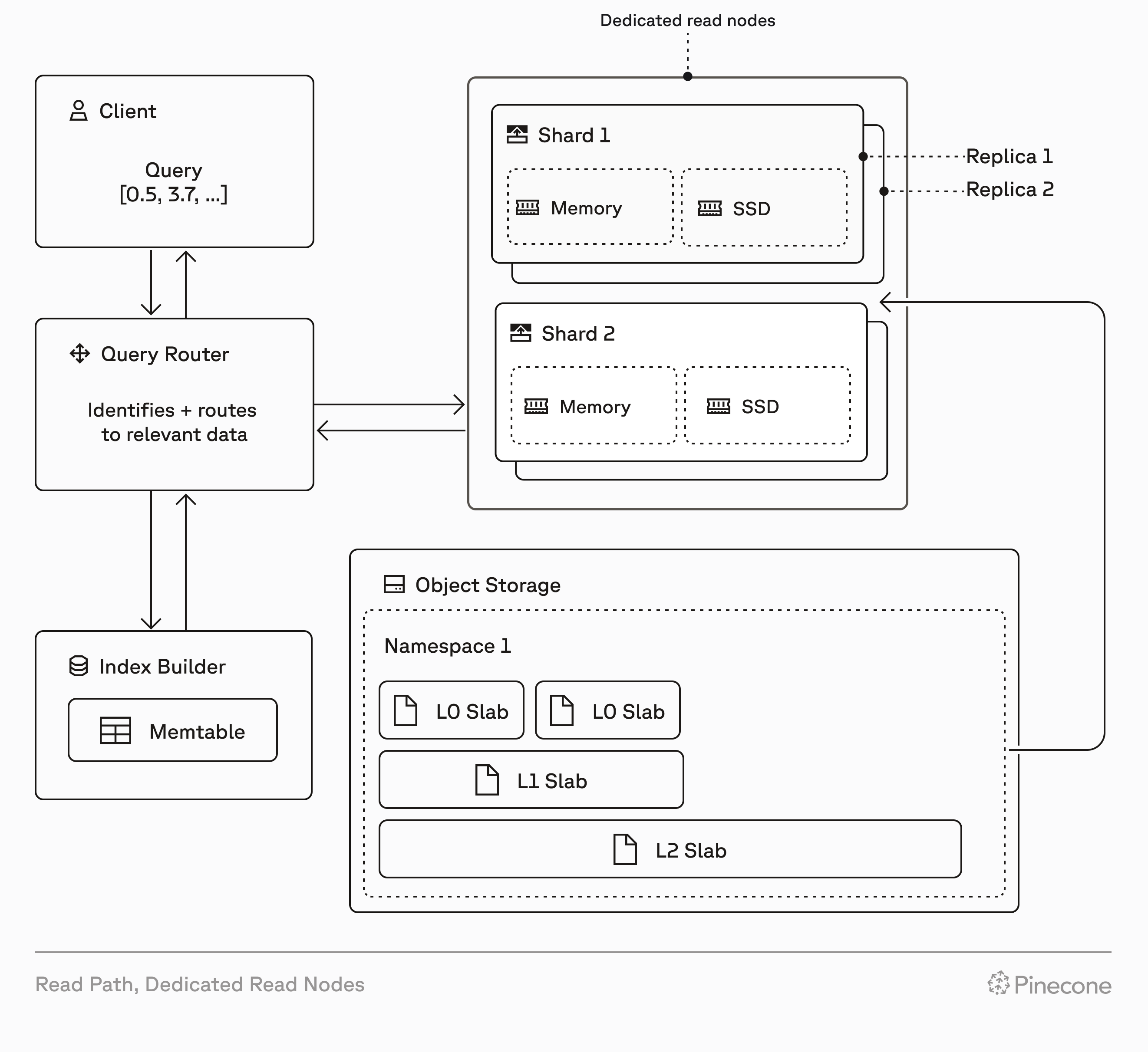
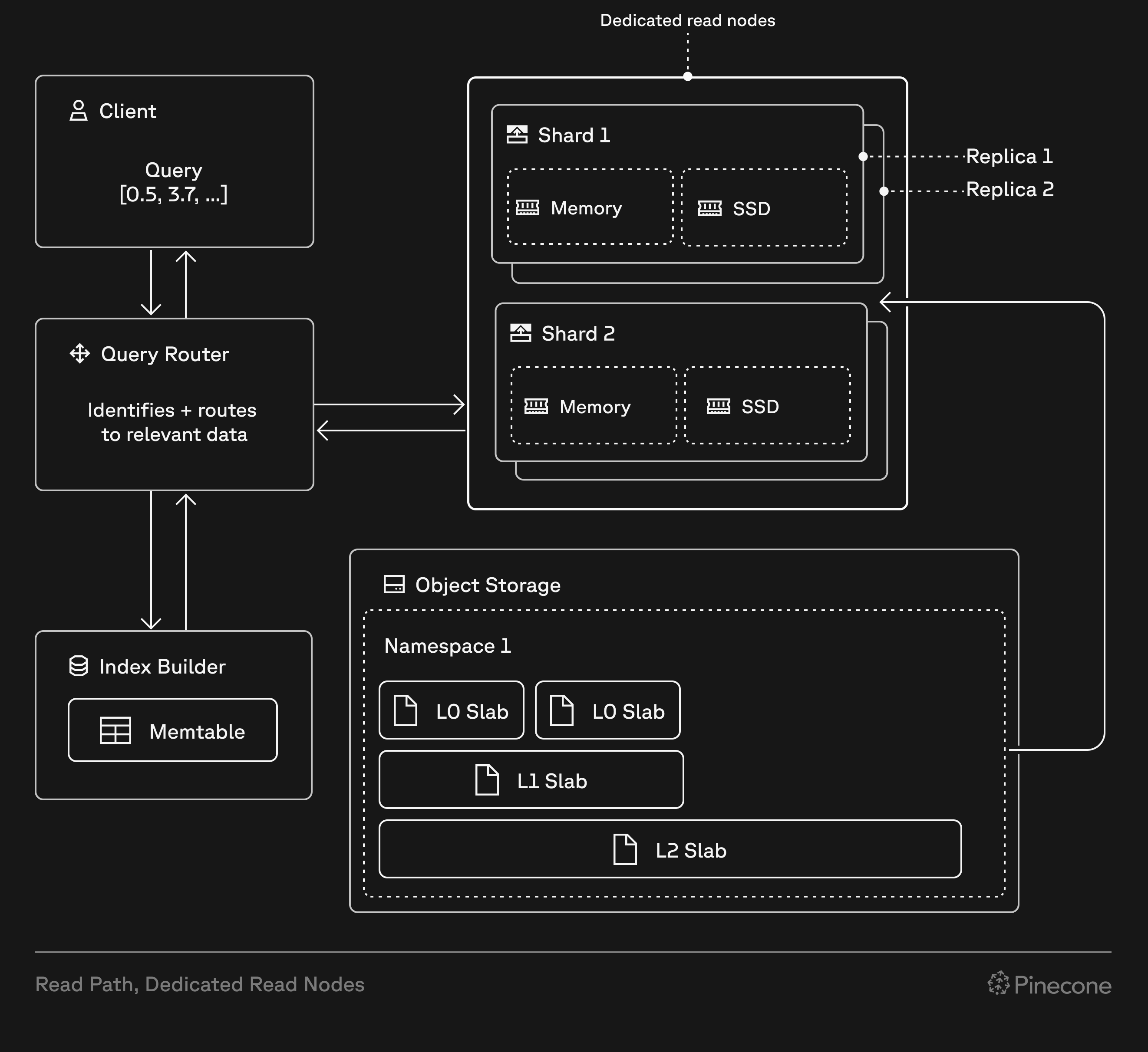
Dedicated read nodes differ from on-demand indexes in how they handle read operations. While on-demand indexes use shared, multi-tenant capacity for reads, dedicated read nodes provision exclusive hardware for reads—memory, local SSDs, and compute. Both index types use Pinecone’s serverless infrastructure for writes and storage.
When you create a dedicated read nodes index, Pinecone provisions resources based on your choice of node type, number of shards, and number of replicas. These resources include local SSDs and memory that cache all your index data, and provide dedicated query executors to handle read operations (query, fetch, list). This architecture eliminates cold starts and ensures consistent low-latency performance, even under heavy load.
Dedicated read nodes support dense, sparse, or hybrid indexes, giving you flexibility in your search and retrieval strategy. Because storage (shards) and compute (replicas) scale independently, you can optimize for your specific workload characteristics.
On-demand vs dedicated#
On-demand indexes and dedicated read nodes are both built on Pinecone’s serverless infrastructure. They use the same write path, storage layer, and data operations API.
However, every dedicated read nodes index has isolated hardware for read operations (query, fetch, list), allowing these operations to run on dedicated query executors. This affects performance, cost, and how you scale:
| Feature | On-demand | Dedicated read nodes |
|---|---|---|
| Read infrastructure | Multi-tenant compute resources shared across customers | Isolated, provisioned query executors dedicated to your index |
| Read costs | Pay per read unit (1 RU per 1 GB of namespace size per query, minimum 0.25 RU) | Fixed hourly rate for read capacity based on node type, shards, and replicas |
| Other costs | Storage and write costs based on usage | Storage and write costs based on usage (same as on-demand) |
| Caching | Best-effort; frequently accessed data is cached, but cold queries fetch from object storage | Guaranteed; all index data always warm in memory and on local SSDs |
| Read rate limits | 2,000 RUs/second per index (adjustable) | No read rate limits (only bounded by CPU capacity) |
| Scaling | Automatic; Pinecone handles capacity | Manual; add shards for storage, add replicas for throughput |
| Best for | Variable workloads, multi-tenant applications with many namespaces, low to moderate query rates | Sustained high query rates, large single-namespace workloads, predictable performance and cost |
When to use dedicated read nodes#
Dedicated read nodes are ideal for workloads with millions to billions of records and predictable query rates. They provide performance and cost benefits compared to on-demand for high-throughput workloads, and may be required when your workload exceeds on-demand rate limits.
There’s no universal formula for choosing between on-demand and dedicated read nodes—performance and cost vary by workload (vector dimensionality, metadata filtering, and query patterns). Consider the following factors when making your decision:
- Consistent low latency under heavy load.
- No cold starts (fetching data from object storage).
- Performance isolation from other workloads.
- Linear scaling by adding replicas.
- Predictable costs based on fixed hourly rates for provisioned hardware.
If predictable performance and cost are critical for your application, dedicated read nodes may be a better fit than on-demand.
A high query volume on a large index can exceed these limits. For example, a 15 GB namespace at 150 QPS requires approximately 2,250 RUs/second (15 RUs per query × 150 QPS), which exceeds the default rate limit.
Dedicated read nodes have no read rate limits and provide dedicated capacity for predictable QPS without throttling (bounded only by CPU capacity), making them better suited for high-throughput workloads.
- Consistent performance for thousands of queries per second
- Low latency for real-time recommendations
- Scalability to billion-vector datasets
- No performance degradation during traffic spikes
Similar requirements apply to other real-time use cases like semantic search at scale, personalization engines, and mission-critical services with strict performance SLOs.
Multi-namespace support is coming soon. For early access, contact us.
- RAG systems with variable query volumes
- Agentic applications with sporadic usage
- Prototypes and development environments with intermittent activity
- Scheduled jobs with infrequent, batch-style queries
Additionally, on-demand is better for indexes with many namespaces, even if you have high query volumes. Dedicated read nodes currently only support single-namespace indexes, so multi-tenant applications requiring namespace-based isolation should use on-demand until multi-namespace support is available.
For these scenarios, on-demand’s elasticity and usage-based pricing provide better cost efficiency than provisioning dedicated capacity.
Dedicated read nodes can handle predictable traffic spikes efficiently if you scale replicas proactively via the API. For example, you can provision extra replicas before a scheduled email campaign and scale back down afterward. Auto-scaling will be available in a future release.
Dedicated read nodes become cost-effective when you have predictable, sustained query volumes that make full use of your provisioned capacity. With unpredictable or low query volumes, you pay hourly rates even when your machines sit idle, making on-demand’s usage-based pricing more economical.
For detailed cost information, comparison tables, and estimation tools, see the Cost section of this guide.
For a step-by-step guide to testing, see Test your workload.
If you need guidance choosing a capacity mode (on-demand or dedicated read nodes) or sizing your index configuration, contact us.
Key concepts#
Before creating a dedicated read nodes index, understand the configuration options that determine capacity and performance.
Node types#
A node is the basic unit of compute and cache storage capacity for a dedicated read nodes index. Each shard runs on one node, so the node type you choose determines the performance characteristics and cost of your index. The total number of nodes in your index is calculated as shards × replicas. For example, an index with two shards and two replicas uses four nodes.
There are two node types: b1 and t1. Both are suitable for large-scale and demanding workloads, but they differ in processing power and memory capacity, and they cache different data.
| b1 (Balanced) | t1 (Performance) | |
|---|---|---|
| Memory caching | Vector index stored in memory | Vector index + vector projections cached in memory |
| Use case | Predictable performance for sustained query rates with balanced cost efficiency | Highest performance for the most demanding workloads with extreme query volumes and strict latency requirements |
| Storage | 250 GB per shard | 250 GB per shard |
| Compute & memory | Base-level compute and memory resources | ~4x more compute and memory than b1 |
| Cost | Lower-cost option | ~3x the cost of b1 |
Consider using t1 nodes if your performance requirements are not met by b1 nodes, or if t1 nodes are more cost-effective than b1 nodes for your workload.
When choosing a node type, remember that:
- Both types of nodes provide 250 GB of storage per shard. The difference is in compute and memory, which affects query performance.
- Because
t1nodes cache more data in memory thanb1nodes, an index may require more shards ont1than onb1(for the same data). - You can change node types after creating your index.
Shards#
Shards determine the storage capacity of an index. Each shard provides 250 GB of storage, and data is split across all the shards in an index. To respond to a query, the index gathers data from all shards as needed. To determine how many shards you need, calculate your index size and then calculate the number of shards.
It’s your responsibility to allocate enough shards to accommodate the size of your index. If your index exceeds the capacity of its shards, write operations (upsert, update, delete) are blocked, but read operations continue to work normally.
Replicas#
Replicas multiply the compute resources and data of an index, allowing for higher query throughput and availability. Each replica is a complete copy of your index data and has its own dedicated compute resources.
- Throughput scales approximately linearly with replicas. For example, if one replica handles 50 QPS at your target latency, two replicas should handle approximately 100 QPS.
- You can scale replicas up or down with no downtime using the API. See Add or remove replicas.
- Minimum: 0 replicas (pauses the index).
- For high availability, use at least two replicas. The recommended approach is to allocate
n+1replicas wherenis your minimum for throughput. Pinecone distributes replicas across availability zones (up to three per region), so if one zone fails, remaining replicas continue serving queries.
To determine how many replicas you need, test your workload and then calculate the number of replicas.
Actual performance varies based on workload characteristics (query complexity, vector dimensions, metadata characteristics), metadata filter selectivity, and node type (b1 vs t1). Always test with your specific workload.
Index fullness#
Index fullness measures how much of your index’s allocated capacity is being used. To ensure predictable performance, dedicated read nodes cache your data in memory and on local SSD.
- You can use Pinecone’s API to check index fullness. There are three metrics to monitor:
memoryFullness,storageFullness, andindexFullness.indexFullnessis the maximum ofmemoryFullnessandstorageFullness. - Usually, storage fills up first. However, memory can be the limiting factor when you have
b1nodes with many low-dimension vectors, or when you havet1nodes with high-dimension vectors and lots of metadata. - Monitor fullness regularly and add shards before your index reaches capacity. When
indexFullnessreaches 1.0 (100%), write operations (upsert, update, delete) are blocked, but read operations continue to work normally.
Add shards when index fullness reaches 70-80%, especially if you expect continued growth. Adding shards reduces storage fullness (index data is spread across shards, so each stores less) and memory fullness (with less data per shard, there’s less to cache in memory), helping you avoid write failures.
Test your workload#
To choose between on-demand and dedicated read nodes, or to optimize your dedicated read nodes configuration, test with your actual workload. Performance varies based on factors such as the size of your index,vector dimensionality, metadata characteristics, and query patterns.
Calculate the size of your index to determine how many shards it requires.
Create a dedicated read nodes index with representative data for your workload. You’ll use this index for testing.
If you don’t restore your test index from a backup, you can upsert or import your data.
If your test index is on-demand, migrate it to dedicated read nodes. To start, use a single b1 replica.
Don’t migrate your production index yet. At this point, you’re just testing your workload.
Run realistic query patterns against your test index, gradually increasing QPS. For example, start at 10 QPS for about 30 minutes, then increase by 10 QPS increments while monitoring latency. Identify the QPS where latency exceeds your target threshold.
Throughput scales approximately linearly with replicas. For example, if one replica handles 50 QPS at your target latency, two replicas should handle approximately 100 QPS. However, performance can vary based on metadata filter selectivity.
To calculate the number of replicas required for your target QPS, use this formula, rounding up:
    Minimum replicas = (Required QPS) / (QPS per replica)
    ```

For more information, see [Number of replicas](#number-of-replicas).
  <span class="step-end"></span>

  <span class="step-marker" data-step-title="Adjust and re-test"></span>
To meet your performance and cost goals, adjust your configuration as needed and re-test:

* [Add or remove shards](#add-or-remove-shards) for storage capacity
* [Add or remove replicas](#add-or-remove-replicas) for throughput
* [Change node types](#change-node-types) for different performance characteristics

Continue iterating until you meet your requirements with room for growth.
  <span class="step-end"></span>
<span class="steps-end"></span>

## Calculate the size of your index

To determine how many [shards](#shards) your index requires, calculate your index size and then use the formula in the [section](#number-of-shards) below.

### Index size

A record can include a dense vector, a sparse vector, or both. Use the formula for your index type to calculate total size:


  <span class="tab-group-start"></span>
<span class="tab-start" data-tab-title="Dense index"></span>
  A [dense index](/guides/index-data/indexing-overview#dense-indexes) contains records with one dense vector each.

  <span class="callout-start" data-callout-type="note"></span>
    Dense index records can also contain sparse vectors (when the index metric is set to `dotproduct`), which can be useful for [hybrid search](/guides/search/hybrid-search#use-a-single-hybrid-index). To learn how to calculate the size of a hybrid index, see [Hybrid index](#hybrid-index).
  <span class="callout-end"></span>

  **Calculate dense index size (assuming no sparse vectors)**
Index size = Number of records × (
ID size +
Metadata size +
Dense vector dimensions × 4 bytes
)
```
Where:
ID sizeandMetadata sizeare measured in bytes, averaged across all records.- Each
Dense vector dimensionuses 4 bytes.
Example dense index calculations
These examples assume 8-byte IDs:
| Records | Dense vector dimensions | Avg metadata size | Index size |
|---|---|---|---|
| 500,000 | 768 | 500 bytes | 1.79 GB |
| 1,000,000 | 1536 | 1,000 bytes | 7.15 GB |
| 5,000,000 | 1024 | 15,000 bytes | 95.5 GB |
| 10,000,000 | 1536 | 1,000 bytes | 71.5 GB |
Example: 500,000 records × (8-byte ID + (768 dense vector dimensions × 4 bytes) + 500 bytes of metadata) = 1.79 GB
A sparse index contains records with one sparse vector each.
Calculate sparse index size
    Index size = Number of records × (
                   ID size +
                   Metadata size +
                   Number of non-zero sparse values × 8 bytes
                 )
    ```

Where:

* `ID size` and `Metadata size` are measured in bytes, averaged across all records.
* `Number of non-zero sparse values`: Average number across all records. To find the count for a single record, check the length of the sparse vector's `indices` or `values` array. Each non-zero value uses 8 bytes.

**Example sparse index calculations**

These examples assume 8-byte IDs:

| Records    | Avg number of non-zero sparse values | Avg metadata size | Index size |
| :--------- | :----------------------------------- | :---------------- | :--------- |
| 500,000    | 10                                   | 500 bytes         | 0.29 GB    |
| 1,000,000  | 50                                   | 1,000 bytes       | 1.41 GB    |
| 5,000,000  | 100                                  | 15,000 bytes      | 79.0 GB    |
| 10,000,000 | 50                                   | 1,000 bytes       | 14.1 GB    |

<span class="callout-start" data-callout-type="note"></span>
  Example: 500,000 records × (8-byte ID + (10 non-zero sparse values × 8 bytes) + 500 bytes of metadata) = 0.29 GB
<span class="callout-end"></span>
<span class="tab-end"></span>

<span class="tab-start" data-tab-title="Hybrid index"></span>
A [hybrid index](/guides/search/hybrid-search#use-a-single-hybrid-index) contains records that each have one dense vector and an optional sparse vector.

**Calculate hybrid index size**
Index size = Number of records × (
ID size +
Metadata size +
Dense vector dimensions × 4 bytes +
Number of non-zero sparse values × 8 bytes
)
```
Where:
ID sizeandMetadata sizeare measured in bytes, averaged across all records.- Each
Dense vector dimensionuses 4 bytes. Number of non-zero sparse values: Average number across all records, including those without sparse vectors. To find the count for a single record, check the length of the sparse vector’sindicesorvaluesarray. Each non-zero value uses 8 bytes.
Example hybrid index calculations
These examples assume 8-byte IDs:
| Records | Dense vector dimensions | Avg number of non-zero sparse values | Avg metadata size | Index size |
|---|---|---|---|---|
| 500,000 | 768 | 10 | 500 bytes | 1.83 GB |
| 1,000,000 | 1536 | 50 | 1,000 bytes | 7.54 GB |
| 5,000,000 | 1024 | 100 | 15,000 bytes | 99.5 GB |
| 10,000,000 | 1536 | 50 | 1,000 bytes | 75.4 GB |
Example: 500,000 records × (8-byte ID + (768 dense vector dimensions × 4 bytes) + (10 non-zero sparse values × 8 bytes) + 500 bytes of metadata) = 1.83 GB
Number of shards#
To calculate the number of shards your index requires, divide the size of your index by 250 GB and round up:
Minimum shards = (Index size) / (250 GB per shard)To maintain optimal performance, provision additional shards to keep your index at 70-80% capacity. For example, a 500 GB index should have three shards (750 GB capacity = 67% full), not two shards (500 GB capacity = 100% full).
Example shard calculations
| Index size | Minimum shards | Recommended shards |
|---|---|---|
| ~71 GB | 1 (250 GB; 28% full) | 1 (250 GB; 28% full) |
| ~300 GB | 2 (500 GB; 60% full) | 2 (500 GB; 60% full) |
| ~400 GB | 2 (500 GB; 80% full) | 3 (750 GB; 53% full) |
Other considerations
- Every index must have at least one shard. However, you can pause an index by reducing its replicas to 0.
- After you’ve created your index, monitor its fullness. When your index approaches capacity, you can add shards.
Add shards when index fullness reaches 70-80%, especially if you expect continued growth. Adding shards reduces storage fullness (index data is spread across shards, so each stores less) and memory fullness (with less data per shard, there’s less to cache in memory), helping you avoid write failures.
Number of replicas#
To calculate the number of replicas your index requires, first test your workload to find the QPS a single replica can handle at your target latency. Then, use this formula, and round up:
Minimum replicas = (Required QPS) / (QPS per replica)For example, if one replica handles 50 QPS at your target latency and you need 150 QPS, you need three replicas.
Other considerations
- Throughput scales approximately linearly with replicas, but performance can vary based on metadata filter selectivity.
- For high availability, allocate
n+1replicas wherenis your minimum for throughput. Pinecone distributes replicas across availability zones.
Create a dedicated read nodes index#
You can create a dedicated read nodes index from scratch or from a backup of an existing index.
From scratch#
To create a new dedicated read nodes index from scratch, call Create an index. In the request body, in the spec.serverless.read_capacity object, set the following fields:
| Field | Value | Notes |
|---|---|---|
mode | Dedicated | |
dedicated.node_type | b1 or t1 | See node types |
dedicated.scaling | Manual | Currently the only option |
dedicated.manual.shards | Number of shards needed | Minimum 1 shard; each shard provides 250 GB of storage |
dedicated.manual.replicas | Number of replicas needed | Minimum 0 (this pauses the index) |
To learn how to determine the number of shards and replicas your index requires, see Calculate the size of your index.
Example
PINECONE_API_KEY="YOUR_API_KEY"

curl -X POST "https://api.pinecone.io/indexes" \
     -H "Accept: application/json" \
     -H "Content-Type: application/json" \
     -H "Api-Key: $PINECONE_API_KEY" \
     -H "X-Pinecone-Api-Version: 2025-10" \
     -d '{
           "name": "example-dedicated-index",
           "dimension": 1024,
           "metric": "cosine",
           "deletion_protection": "enabled",
           "tags": {
             "environment": "production"
           },
           "vector_type": "dense",
           "spec": {
             "serverless": {
               "cloud": "aws",
               "region": "us-east-1",
               "read_capacity": {
                 "mode": "Dedicated",
                 "dedicated": {
                   "node_type": "b1",
                   "scaling": "Manual",
                   "manual": {
                     "shards": 2,
                     "replicas": 1
                   }
                 }
               }
             }
           }
         }'
Example response:
{
  "name": "example-dedicated-index",
  "vector_type": "dense",
  "metric": "cosine",
  "dimension": 1024,
  "status": {
    "ready": false,
    "state": "Initializing"
  },
  "host": "example-dedicated-index-1c6ab6aa.svc.aped-4627-b74a.pinecone.io",
  "spec": {
    "serverless": {
      "region": "us-east-1",
      "cloud": "aws",
      "read_capacity": {
        "mode": "Dedicated",
        "dedicated": {
          "node_type": "b1",
          "scaling": "Manual",
          "manual": {
            "shards": 2, // <---- desired state
            "replicas": 1
          }
        },
        "status": {
          "state": "Migrating",
          "current_shards": null, // <---- current state
          "current_replicas": null
        }
      }
    }
  },
  "deletion_protection": "enabled",
  "tags": {
    "environment": "production"
  }
}
The response includes two status fields:
| Field | Description |
|---|---|
status.state | Overall index status (for example, Initializing, Ready, Terminating) |
spec.serverless.read_capacity.status.state | Read capacity status (Migrating, Scaling, Ready, Error) |
When creating a dedicated read nodes index, status.state transitions to Ready as soon as the index is ready for reads and writes.
However, spec.serverless.read_capacity.status.state remains Migrating until the index scales to its full read capacity, at which point it transitions to Ready.
After creating the index, upsert or import your data.
To upsert and search with text instead of vectors, you can configure your index to use a hosted embedding model. Call Configure an index and specify the embed object in the request body.
From a backup#
To create a dedicated read nodes index from a backup:
- Restore the backup. This creates a new on-demand index with the same data as the original.
- If the restored index has multiple namespaces, delete all of them except the one you want to keep. Dedicated read nodes currently only support one namespace.
- Migrate the index to dedicated read nodes.
Migrate to dedicated read nodes#
To migrate an existing on-demand index to dedicated read nodes, follow these steps:
Create a backup of your index. If you later find that on-demand is preferable, you can restore the backup to a new on-demand index or contact support to migrate back.
If your index has multiple namespaces, delete all of them except the one you want to keep. Dedicated read nodes currently only support a single namespace.
If this is a production index, be sure to make a backup before deleting namespaces. Or, if you need multiple namespaces, contact support to discuss early access to multi-namespace support for dedicated read nodes.
Calculate your index size to determine how many shards you need.
To migrate the index, call Configure an index. In the request body, in the spec.serverless.read_capacity object, set the following fields:
| Field | Value | Notes |
|---|---|---|
mode | Dedicated | |
dedicated.node_type | b1 or t1 | See node types |
dedicated.scaling | Manual | Currently the only option |
dedicated.manual.shards | Number of shards needed | Minimum 1 shard; each shard provides 250 GB of storage |
dedicated.manual.replicas | Number of replicas needed | Minimum 0 (this pauses the index) |
Example
This example migrates an index to dedicated read nodes using b1 nodes, one shard, and one replica:
PINECONE_API_KEY="YOUR_API_KEY"
INDEX_NAME="YOUR_INDEX_NAME"
curl -X PATCH "https://api.pinecone.io/indexes/$INDEX_NAME" \
-H "Accept: application/json" \
-H "Content-Type: application/json" \
-H "Api-Key: $PINECONE_API_KEY" \
-H "X-Pinecone-Api-Version: 2025-10" \
-d '{
"spec": {
"serverless": {
"read_capacity": {
"mode": "Dedicated",
"dedicated": {
"node_type": "b1",
"scaling": "Manual",
"manual": {
"shards": 1,
"replicas": 1
}
}
}
}
}
}'
```
Example response:
```jsonc
{
"name": "example-index-to-migrate",
"vector_type": "dense",
"metric": "cosine",
"dimension": 1024,
"status": {
"ready": true,
"state": "Ready"
},
"host": "example-index-to-migrate-1c6ab6aa.svc.aped-4627-b74a.pinecone.io",
"spec": {
"serverless": {
"region": "us-east-1",
"cloud": "aws",
"read_capacity": {
"mode": "Dedicated",
"dedicated": {
"node_type": "b1",
"scaling": "Manual",
"manual": {
"shards": 1, // <---- desired state
"replicas": 1
}
},
"status": {
"state": "Migrating",
"current_shards": null, //<---- current state
"current_replicas": null
}
}
}
},
"deletion_protection": "disabled",
"tags": null,
"embed": {
"model": "llama-text-embed-v2",
"field_map": {
"text": "text"
},
"dimension": 1024,
"metric": "cosine",
"write_parameters": {
"dimension": 1024,
"input_type": "passage",
"truncate": "END"
},
"read_parameters": {
"dimension": 1024,
"input_type": "query",
"truncate": "END"
},
"vector_type": "dense"
}
}
```
The response includes two status fields:
| Field | Description |
| :----------------------------------------------- | :------------------------------------------------------------------------- |
| **`status.state`** | Overall index status (for example, `Initializing`, `Ready`, `Terminating`) |
| **`spec.serverless.read_capacity.status.state`** | Read capacity status (`Migrating`, `Scaling`, `Ready`, `Error`) |
<span class="callout-start" data-callout-type="warning"></span>
If `status.state` is set to `Error`, the allocated number of shards was insufficient for the size of the index. Try again, adding more shards as needed.
<span class="callout-end"></span>
<span class="step-end"></span>
<span class="step-marker" data-step-title="Monitor the migration"></span>
[Monitor](#check-the-status-of-a-change) the status of the migration. When the migration is complete, `spec.serverless.read_capacity.status.state` is `Ready`.
<span class="step-end"></span>
<span class="step-marker" data-step-title="Monitor index performance"></span>
After migrating, monitor your index performance to verify that it meets expectations.
<span class="step-end"></span>
<span class="steps-end"></span>
## Manage your index
The following sections describe how to manage a dedicated read nodes index using version `2025-10` of the Pinecone API.
<AccordionGroup>
<Accordion title="Add a hosted embedding model">
To upsert and search with text instead of vectors, you can configure your index to use a [hosted embedding model](/guides/index-data/create-an-index#embedding-models). To do this, call [Configure an index](/reference/api/2025-10/control-plane/configure_index) and provide an `embed` object in the request body. In this object:
* For the `text` field, specify the name of the field in your data that contains the text to be embedded.
* Specify a model whose dimension requirements match the dimensions of your index.
**Example**
Example request:
```bash
PINECONE_API_KEY="YOUR_API_KEY"
INDEX_NAME="YOUR_INDEX_NAME"
curl -X PATCH "https://api.pinecone.io/indexes/$INDEX_NAME" \
-H "Content-Type: application/json" \
-H "Api-Key: $PINECONE_API_KEY" \
-H "X-Pinecone-Api-Version: 2025-10" \
-d '{
"embed": {
"field_map": {
"text": "chunk_text"
},
"model": "llama-text-embed-v2",
"read_parameters": {
"input_type": "query",
"truncate": "NONE"
},
"write_parameters": {
"input_type": "passage"
}
}
}'
```
Example response:
```json
{
"name": "example-dedicated-index",
"vector_type": "dense",
"metric": "cosine",
"dimension": 1024,
"status": {
"ready": true,
"state": "Ready"
},
"host": "example-dedicated-index-1c6ab6aa.svc.aped-4627-b74a.pinecone.io",
"spec": {
"serverless": {
"region": "us-east-1",
"cloud": "aws",
"read_capacity": {
"mode": "Dedicated",
"dedicated": {
"node_type": "b1",
"scaling": "Manual",
"manual": {
"shards": 2,
"replicas": 1
}
},
"status": {
"state": "Ready",
"current_shards": 2,
"current_replicas": 1
}
}
}
},
"deletion_protection": "enabled",
"tags": {
"environment": "testing"
},
"embed": {
"model": "llama-text-embed-v2",
"field_map": {
"text": "chunk_text"
},
"dimension": 1024,
"metric": "cosine",
"write_parameters": {
"dimension": 1024,
"input_type": "passage",
"truncate": "END"
},
"read_parameters": {
"dimension": 1024,
"input_type": "query",
"truncate": "NONE"
},
"vector_type": "dense"
}
}
```
<span class="callout-start" data-callout-type="note"></span>
You can also create a dedicated read nodes index when calling [Create an index with integrated embedding](/reference/api/2025-10/control-plane/create_for_model). In the request body, use the `read_capacity` object to configure node type, shards, and replicas for dedicated read nodes.
<span class="callout-end"></span>
</Accordion>
<Accordion title="Monitor index fullness">
To check [index fullness](#index-fullness), call [Get index stats](/reference/api/2025-10/data-plane/describeindexstats).
**Example**
Example request:
```bash
# To get the unique host for an index,
# see https://docs.pinecone.io/guides/manage-data/target-an-index
PINECONE_API_KEY="YOUR_API_KEY"
INDEX_HOST="YOUR_INDEX_HOST"
curl -X GET "https://$INDEX_HOST/describe_index_stats" \
-H "Api-Key: $PINECONE_API_KEY" \
-H "X-Pinecone-Api-Version: 2025-10"
```
Example response:
```json
{
"namespaces": {
"__default__": {
"vectorCount": 705000
}
},
"indexFullness": 0.01,
"totalVectorCount": 705000,
"dimension": 1536,
"metric": "cosine",
"vectorType": "dense",
"memoryFullness": 0.01,
"storageFullness": 0.01
}
```
In the response, `indexFullness` describes how full the index is, on a scale of 0 to 1. It's set to the greater of `memoryFullness` and `storageFullness`.
</Accordion>
<Accordion title="Add or remove shards">
To add or remove [shards](#shards), call [Configure an index](/reference/api/2025-10/control-plane/configure_index). This operation does not require downtime, but can take up to 30 minutes to complete. In the request body, set the following fields:
| Field | Value | Notes |
| :---------------------------------------------------------- | :---------------------------------- | :------------------------------------ |
| **`spec.serverless.read_capacity.mode`** | `Dedicated` | |
| **`spec.serverless.read_capacity.dedicated.scaling`** | `Manual` | |
| **`spec.serverless.read_capacity.dedicated.manual.shards`** | Desired number of [shards](#shards) | Each shard provides 250 GB of storage |
**Example**
Example request:
```bash
PINECONE_API_KEY="YOUR_API_KEY"
INDEX_NAME="YOUR_INDEX_NAME"
curl -X PATCH "https://api.pinecone.io/indexes/$INDEX_NAME" \
-H "Accept: application/json" \
-H "Content-Type: application/json" \
-H "Api-Key: $PINECONE_API_KEY" \
-H "X-Pinecone-Api-Version: 2025-10" \
-d '{
"spec": {
"serverless": {
"read_capacity": {
"mode": "Dedicated",
"dedicated": {
"scaling": "Manual",
"manual": {
"shards": 3
}
}
}
}
}
}'
```
Example response:
```jsonc
{
"name": "example-dedicated-index",
"vector_type": "dense",
"metric": "cosine",
"dimension": 1024,
"status": {
"ready": true,
"state": "Ready"
},
"host": "example-dedicated-index-1c6ab6aa.svc.aped-4627-b74a.pinecone.io",
"spec": {
"serverless": {
"region": "us-east-1",
"cloud": "aws",
"read_capacity": {
"mode": "Dedicated",
"dedicated": {
"node_type": "b1",
"scaling": "Manual",
"manual": {
"shards": 3, // <---- desired state
"replicas": 1
}
},
"status": {
"state": "Scaling",
"current_shards": 2, // <---- current state
"current_replicas": 1
}
}
}
},
"deletion_protection": "disabled",
"tags": null,
"embed": {
"model": "llama-text-embed-v2",
"field_map": {
"text": "text"
},
"dimension": 1024,
"metric": "cosine",
"write_parameters": {
"dimension": 1024,
"input_type": "passage",
"truncate": "END"
},
"read_parameters": {
"dimension": 1024,
"input_type": "query",
"truncate": "END"
},
"vector_type": "dense"
}
}
```
<span class="callout-start" data-callout-type="note"></span>
Configuration change limits:
* You can make one configuration change every ten minutes, but you can batch multiple changes (node type, shards, and replicas) in a single request.
* A new configuration change can only be initiated after the previous configuration change has completed.
* Each configuration change can take up to 30 minutes to complete.
* Read and write operations continue normally during configuration changes.
<span class="callout-end"></span>
</Accordion>
<Accordion title="Add or remove replicas">
To add or remove [replicas](#replicas), call [Configure an index](/reference/api/2025-10/control-plane/configure_index). This operation does not require downtime, but can take up to 30 minutes to complete. In the request body, set the following fields:
| Field | Value | Notes |
| :------------------------------------------------------------ | :-------------------------------------- | :---------------------------------------- |
| **`spec.serverless.read_capacity.mode`** | `Dedicated` | |
| **`spec.serverless.read_capacity.dedicated.scaling`** | `Manual` | |
| **`spec.serverless.read_capacity.dedicated.manual.replicas`** | Desired number of [replicas](#replicas) | Add replicas to increase query throughput |
**Example**
Example request:
```bash
PINECONE_API_KEY="YOUR_API_KEY"
INDEX_NAME="YOUR_INDEX_NAME"
curl -X PATCH "https://api.pinecone.io/indexes/$INDEX_NAME" \
-H "Accept: application/json" \
-H "Content-Type: application/json" \
-H "Api-Key: $PINECONE_API_KEY" \
-H "X-Pinecone-Api-Version: 2025-10" \
-d '{
"spec": {
"serverless": {
"read_capacity": {
"mode": "Dedicated",
"dedicated": {
"scaling": "Manual",
"manual": {
"replicas": 2
}
}
}
}
}
}'
```
Example response:
```jsonc
{
"name": "example-dedicated-index",
"vector_type": "dense",
"metric": "cosine",
"dimension": 1024,
"status": {
"ready": true,
"state": "Ready"
},
"host": "example-dedicated-index-1c6ab6aa.svc.aped-4627-b74a.pinecone.io",
"spec": {
"serverless": {
"region": "us-east-1",
"cloud": "aws",
"read_capacity": {
"mode": "Dedicated",
"dedicated": {
"node_type": "b1",
"scaling": "Manual",
"manual": {
"shards": 1,
"replicas": 2 // <---- desired state
}
},
"status": {
"state": "Scaling",
"current_shards": 1,
"current_replicas": 1 // <---- current state
}
}
}
},
"deletion_protection": "disabled",
"tags": null,
"embed": {
"model": "llama-text-embed-v2",
"field_map": {
"text": "text"
},
"dimension": 1024,
"metric": "cosine",
"write_parameters": {
"dimension": 1024,
"input_type": "passage",
"truncate": "END"
},
"read_parameters": {
"dimension": 1024,
"input_type": "query",
"truncate": "END"
},
"vector_type": "dense"
}
}
```
<span class="callout-start" data-callout-type="note"></span>
Configuration change limits:
* You can make one configuration change every ten minutes, but you can batch multiple changes (node type, shards, and replicas) in a single request.
* A new configuration change can only be initiated after the previous configuration change has completed.
* Each configuration change can take up to 30 minutes to complete.
* Read and write operations continue normally during configuration changes.
<span class="callout-end"></span>
</Accordion>
<Accordion title="Change node types">
You can change node types in either direction (`b1` → `t1` or `t1` → `b1`). This operation does not require downtime, but can take up to 30 minutes to complete.
<span class="callout-start" data-callout-type="note"></span>
The most predictable way to increase throughput is by increasing [replicas](#replicas).
<span class="callout-end"></span>
<span class="callout-start" data-callout-type="warning"></span>
`t1` nodes [cache more data in memory](#node-types) than `b1` nodes. Because of this, switching from `b1` to `t1` may require more shards.
If your new configuration doesn't have enough shards, the configuration change will fail with an error telling you how many shards are required. Update the request and retry.
In the meantime, your index will continue to function normally in its original configuration.
<span class="callout-end"></span>
To change node types, call [Configure an index](/reference/api/2025-10/control-plane/configure_index). In the request body, set the following fields:
| Field | Value | Notes |
| :------------------------------------------------------ | :----------- | :---------------------------- |
| **`spec.serverless.read_capacity.mode`** | `Dedicated` | |
| **`spec.serverless.read_capacity.dedicated.node_type`** | `b1` or `t1` | See [node types](#node-types) |
**Example**
Example request to change from `b1` to `t1`:
```bash
PINECONE_API_KEY="YOUR_API_KEY"
INDEX_NAME="YOUR_INDEX_NAME"
curl -X PATCH "https://api.pinecone.io/indexes/$INDEX_NAME" \
-H "Accept: application/json" \
-H "Content-Type: application/json" \
-H "Api-Key: $PINECONE_API_KEY" \
-H "X-Pinecone-Api-Version: 2025-10" \
-d '{
"spec": {
"serverless": {
"read_capacity": {
"mode": "Dedicated",
"dedicated": {
"node_type": "t1"
}
}
}
}
}'
```
Example response:
```json
{
"name": "example-dedicated-index",
"vector_type": "dense",
"metric": "cosine",
"dimension": 1024,
"status": {
"ready": true,
"state": "Ready"
},
"host": "example-dedicated-index-1c6ab6aa.svc.aped-4627-b74a.pinecone.io",
"spec": {
"serverless": {
"region": "us-east-1",
"cloud": "aws",
"read_capacity": {
"mode": "Dedicated",
"dedicated": {
"node_type": "t1",
"scaling": "Manual",
"manual": {
"shards": 1,
"replicas": 1
}
},
"status": {
"state": "Scaling",
"current_shards": 1,
"current_replicas": 1
}
}
}
},
"deletion_protection": "disabled",
"tags": null,
"embed": {
"model": "llama-text-embed-v2",
"field_map": {
"text": "text"
},
"dimension": 1024,
"metric": "cosine",
"write_parameters": {
"dimension": 1024,
"input_type": "passage",
"truncate": "END"
},
"read_parameters": {
"dimension": 1024,
"input_type": "query",
"truncate": "END"
},
"vector_type": "dense"
}
}
```
<span class="callout-start" data-callout-type="note"></span>
Configuration change limits:
* You can make one configuration change every ten minutes, but you can batch multiple changes (node type, shards, and replicas) in a single request.
* A new configuration change can only be initiated after the previous configuration change has completed.
* Each configuration change can take up to 30 minutes to complete.
* Read and write operations continue normally during configuration changes.
<span class="callout-end"></span>
</Accordion>
<Accordion title="Pause an index">
To pause an index, [set the number of replicas](#add-or-remove-replicas) to 0. This operation can take up to 30 minutes to complete.
<span class="callout-start" data-callout-type="note"></span>
While an index is paused, you cannot write to it or read from it. For a paused index, you're billed for storage, but not for node costs, reads, or writes.
<span class="callout-end"></span>
</Accordion>
<Accordion title="Check the status of a configuration change">
After making a configuration change to a dedicated read nodes index (changing shards, replicas, or node type), check the status of the change by calling [Describe an index](/reference/api/2025-10/control-plane/describe_index).
**Example**
Example request:
```bash
PINECONE_API_KEY="YOUR_API_KEY"
INDEX_NAME="YOUR_INDEX_NAME"
curl -X GET "https://api.pinecone.io/indexes/$INDEX_NAME" \
-H "Api-Key: $PINECONE_API_KEY" \
-H "X-Pinecone-Api-Version: 2025-10"
```
Example response (index scaling from one to two replicas):
```jsonc
{
"name": "example-dedicated-index",
"vector_type": "dense",
"metric": "cosine",
"dimension": 1536,
"status": {
"ready": true,
"state": "Ready"
},
"host": "example-dedicated-index-1c6ab6aa.svc.aped-4627-b74a.pinecone.io",
"spec": {
"serverless": {
"region": "us-east-1",
"cloud": "aws",
"read_capacity": {
"mode": "Dedicated",
"dedicated": {
"node_type": "b1",
"scaling": "Manual",
"manual": {
"shards": 1,
"replicas": 2 // <---- desired state
}
},
"status": {
"state": "Scaling",
"current_shards": 1,
"current_replicas": 1 // <---- current state
}
}
}
},
"deletion_protection": "enabled",
"tags": {
"tag0": "value0"
}
}
```
The response includes two status fields:
| Field | Description |
| :----------------------------------------------- | :------------------------------------------------------------------------- |
| **`status.state`** | Overall index status (for example, `Initializing`, `Ready`, `Terminating`) |
| **`spec.serverless.read_capacity.status.state`** | Read capacity status (`Migrating`, `Scaling`, `Ready`, `Error`) |
When changing node types, shards, or replicas, monitor the read capacity status (`spec.serverless.read_capacity.status.state`). Possible values:
| State | Description |
| :-------------- | :-------------------------------------------------------------------------------------------------------------------------------------------------------------------------------------------- |
| **`Ready`** | The change is complete and the index is ready to serve queries at full capacity. |
| **`Scaling`** | A change to the number of shards or replicas is in progress. |
| **`Migrating`** | A change to the node type or read capacity <Tooltip tip="Dedicated or OnDemand">mode</span> is in progress. |
| **`Error`** | The operation failed. For migrations to dedicated, this typically means you didn't allocate enough shards for your index size. Check `error_message` for details, and retry with more shards. |
<span class="callout-start" data-callout-type="note"></span>
During changes to shards, replicas, and node type, the index-level status (`status.state`) remains `Ready`. This is because the index can handle reads and writes while its dedicated read capacity scales.
<span class="callout-end"></span>
<span class="callout-start" data-callout-type="note"></span>
Configuration change limits:
* You can make one configuration change every ten minutes, but you can batch multiple changes (node type, shards, and replicas) in a single request.
* A new configuration change can only be initiated after the previous configuration change has completed.
* Each configuration change can take up to 30 minutes to complete.
* Read and write operations continue normally during configuration changes.
<span class="callout-end"></span>
</Accordion>
<Accordion title="Migrate from dedicated to on-demand">
To change a dedicated read nodes index to on-demand, [contact support](https://app.pinecone.io/organizations/-/settings/support/ticket). This can't be done with the API.
</Accordion>
</AccordionGroup>
## Limits
The following limits apply to dedicated read nodes:
<AccordionGroup>
<Accordion title="Read limits">
Dedicated read nodes indexes are not subject to [read-operation rate limits](/reference/api/database-limits#rate-limits), like on-demand indexes are. However, if your query rate exceeds the compute capacity of your index, you may observe decreased query throughput. In such cases, consider [adding replicas](#add-or-remove-replicas) to increase the compute resources of the index.
</Accordion>
<Accordion title="Write limits">
On dedicated read nodes indexes, write operations (upsert, update, delete) have the same [rate limits](/reference/api/database-limits#rate-limits) as on-demand indexes.
Writes that would cause your index to exceed its storage capacity are blocked. In such cases, consider [adding shards](#add-or-remove-shards) to increase available storage. To determine how close to the write limit you are, [check index fullness](#monitor-index-fullness).
</Accordion>
<Accordion title="Namespace limits">
Currently, dedicated read nodes indexes only support a single namespace. However, multi-namespace support is coming soon. For early access, [contact support](https://app.pinecone.io/organizations/-/settings/support/ticket).
</Accordion>
<Accordion title="Shard, replica, and node limits">
**Shards**
The minimum number of [shards](#shards) per index is 1.
**Replicas**
The minimum number of [replicas](#replicas) per index is 0, which [pauses the index](#pause-an-index).
**Nodes**
The maximum number of [nodes](#node-types) per project is 20. This is a **project** limit, not an index limit.
To calculate your total node count, multiply `shards × replicas` for each of your project's indexes, and then sum the results. This total must not exceed 20. For example, if you have two indexes that each have two shards and three replicas, your total node count is `(2 × 3) + (2 × 3) = 12` nodes.
To increase your project's node limit, [contact support](https://app.pinecone.io/organizations/-/settings/support/ticket).
<span class="callout-start" data-callout-type="note"></span>
Configuration change limits:
* You can make one configuration change every ten minutes, but you can batch multiple changes (node type, shards, and replicas) in a single request.
* A new configuration change can only be initiated after the previous configuration change has completed.
* Each configuration change can take up to 30 minutes to complete.
* Read and write operations continue normally during configuration changes.
<span class="callout-end"></span>
</Accordion>
<Accordion title="memoryFullness">
`memoryFullness` is an approximation and doesn't yet account for metadata. For more information, see [Index fullness](#index-fullness).
</Accordion>
<Accordion title="Migrating from dedicated to on-demand">
To migrate an index from dedicated to on-demand, [contact support](https://app.pinecone.io/organizations/-/settings/support/ticket). This cannot be done with the API.
</Accordion>
</AccordionGroup>
## Cost
<span class="callout-start" data-callout-type="note"></span>
For the latest pricing information, see the [Pinecone pricing page](https://www.pinecone.io/pricing/).
<span class="callout-end"></span>
The cost of an index has three components: read costs, write costs, and storage costs.
On-demand and dedicated read nodes share infrastructure for writes and storage, so these costs are the same. However, dedicated read nodes provision dedicated hardware for read operations (query, fetch, list), which changes how read costs are calculated.
| Cost component | On-demand | Dedicated read nodes |
| :---------------- | :------------------------------------------------------------------------------------------------------- | :------------------------------------------------------------------------------------------------- |
| **Read costs** | [Usage-based](/guides/manage-cost/understanding-cost#read-units): 1 RU per 1 GB namespace size per query | Fixed hourly rate: Based on [node type](#node-types), [shards](#shards), and [replicas](#replicas) |
| **Write costs** | [Usage-based](/guides/manage-cost/understanding-cost#write-units) | [Usage-based](/guides/manage-cost/understanding-cost#write-units) (same as on-demand) |
| **Storage costs** | [Usage-based](/guides/manage-cost/understanding-cost#storage) | [Usage-based](/guides/manage-cost/understanding-cost#storage) (same as on-demand) |
<span class="callout-start" data-callout-type="note"></span>
If you use a hosted model for search or reranking, there are additional [inference costs](https://www.pinecone.io/pricing).
<span class="callout-end"></span>
<AccordionGroup>
<Accordion title="Calculate dedicated read nodes costs">
To calculate the total cost of a dedicated read nodes index, use this formula:(Node rate × shards × replicas) + storage costs + write costs
```
| Term | Description |
|---|---|
| Node rate | Monthly rate for the node type (b1 or t1), which varies by cloud region. See Pinecone pricing. |
| Shards | Number of shards allocated |
| Replicas | Number of replicas allocated |
| Storage costs | Usage-based, same as on-demand |
| Write costs | Usage-based, same as on-demand |
For help estimating costs, use the Pinecone pricing calculator or contact us.
Example: If the rate for b1 nodes on aws-us-east-1 is $336.42/month ($0.46/hour), an index with two shards and two replicas would cost:
    336.42 × 2 × 2 = $1,345.68/month, plus storage and write costs
    ```
  </Accordion>
</AccordionGroup>