Implement multitenancy ↗
noOriginal Documentation
Documentation Index#
Fetch the complete documentation index at: https://docs.pinecone.io/llms.txt Use this file to discover all available pages before exploring further.
Use namespaces to isolate tenant data securely.
Multitenancy is a software architecture where a single instance of a system serves multiple customers, or tenants, while ensuring data isolation between them for privacy and security.
This page shows you how to implement multitenancy in Pinecone using a serverless index with one namespace per tenant.
For design guidance on choosing between namespaces, metadata filtering, and other approaches, see Design for multi-tenancy.
While the Standard and Enterprise plans support up to 100,000 namespaces per index, Pinecone can accommodate million-scale namespaces and beyond for specific use cases. If your application requires more than 100,000 namespaces, contact Support.
How it works#
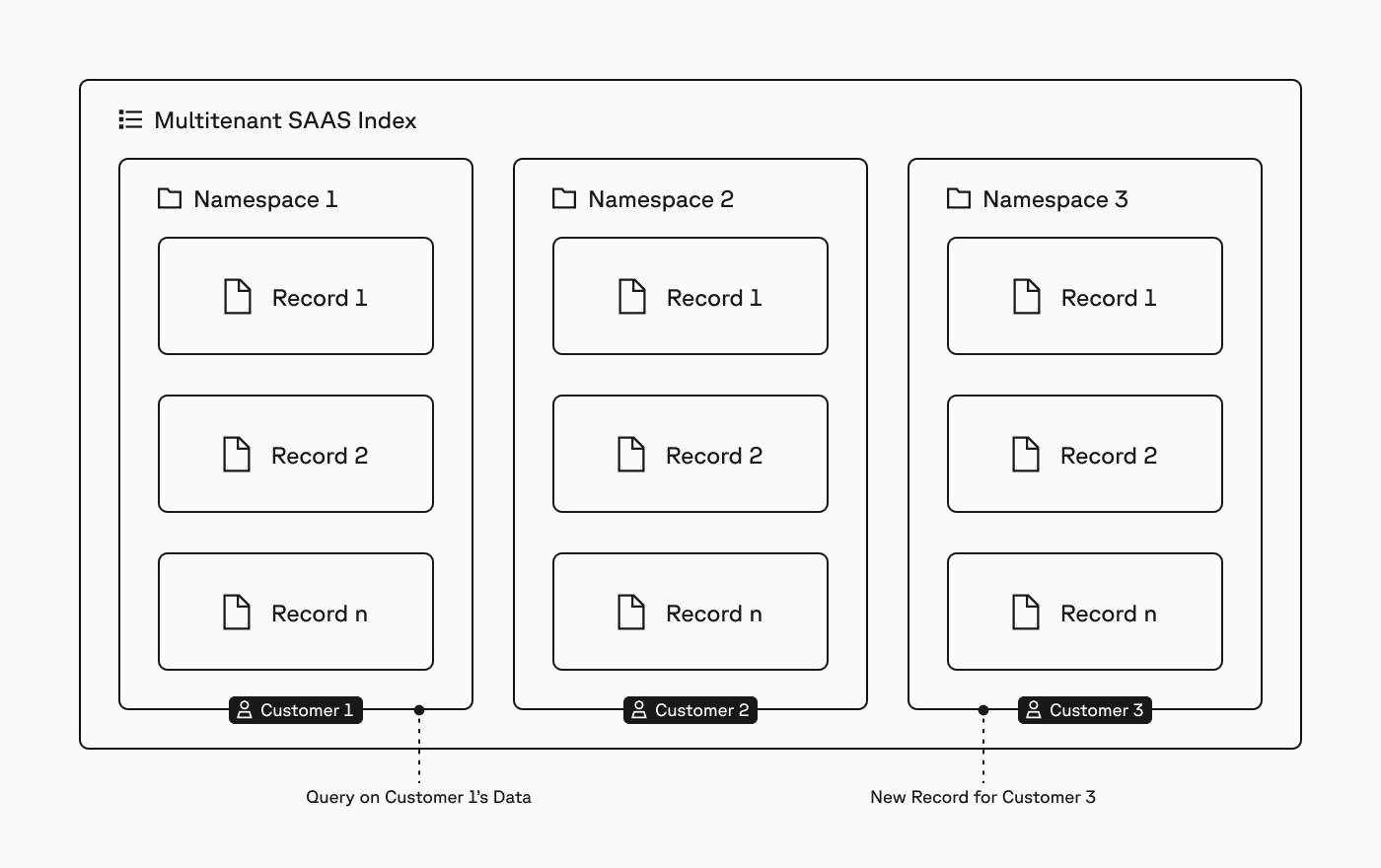
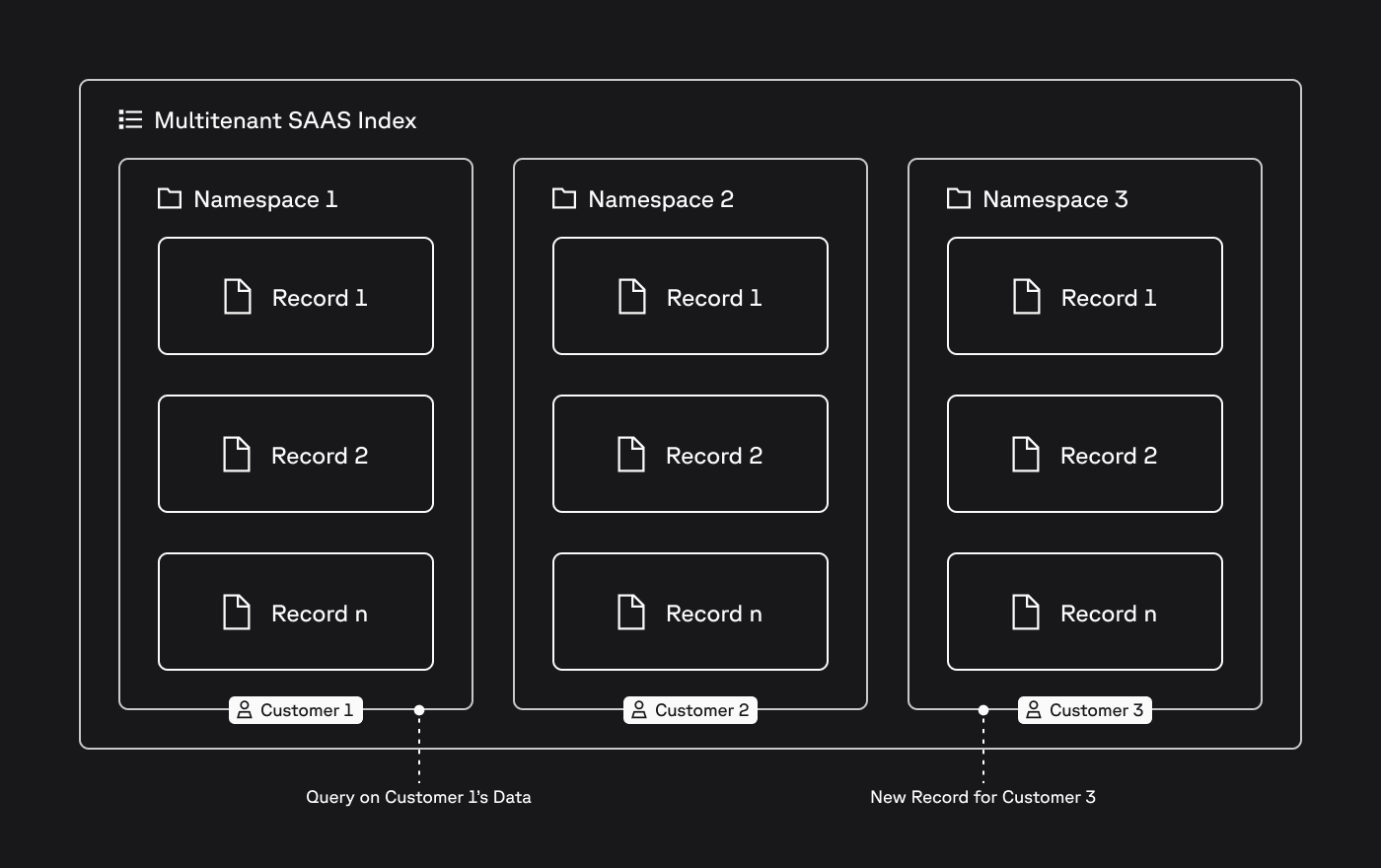
In Pinecone, an index is the highest-level organizational unit of data, where you define the dimension of vectors to be stored in the index and the measure of similarity to be used when querying the index.
Within an index, records are stored in namespaces, and all upserts, queries, and other data plane operations always target one namespace.
This structure makes it easy to implement multitenancy. For example, for an AI-powered SaaS application where you need to isolate the data of each customer, you would assign each customer to a namespace and target their writes and queries to that namespace (diagram above).
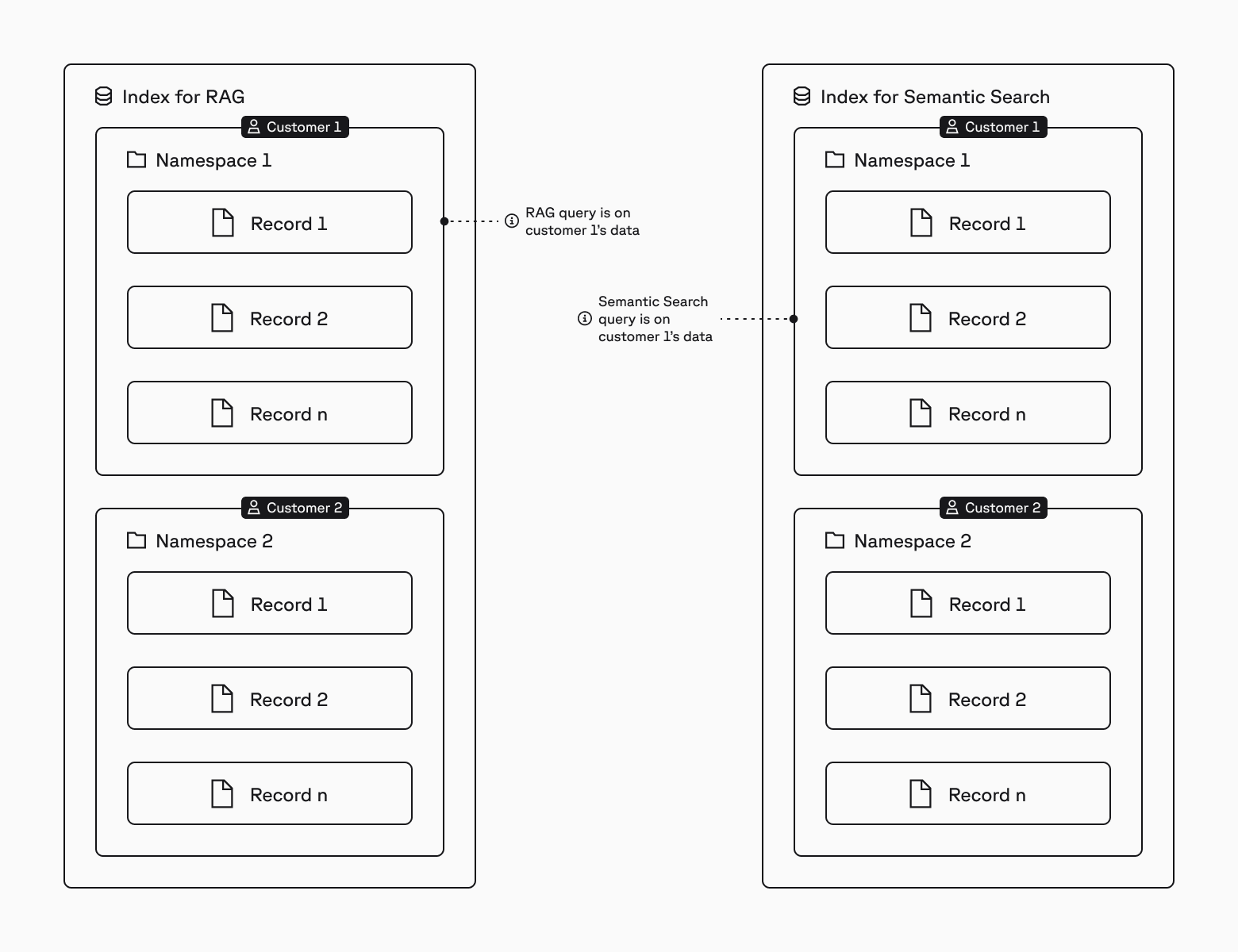
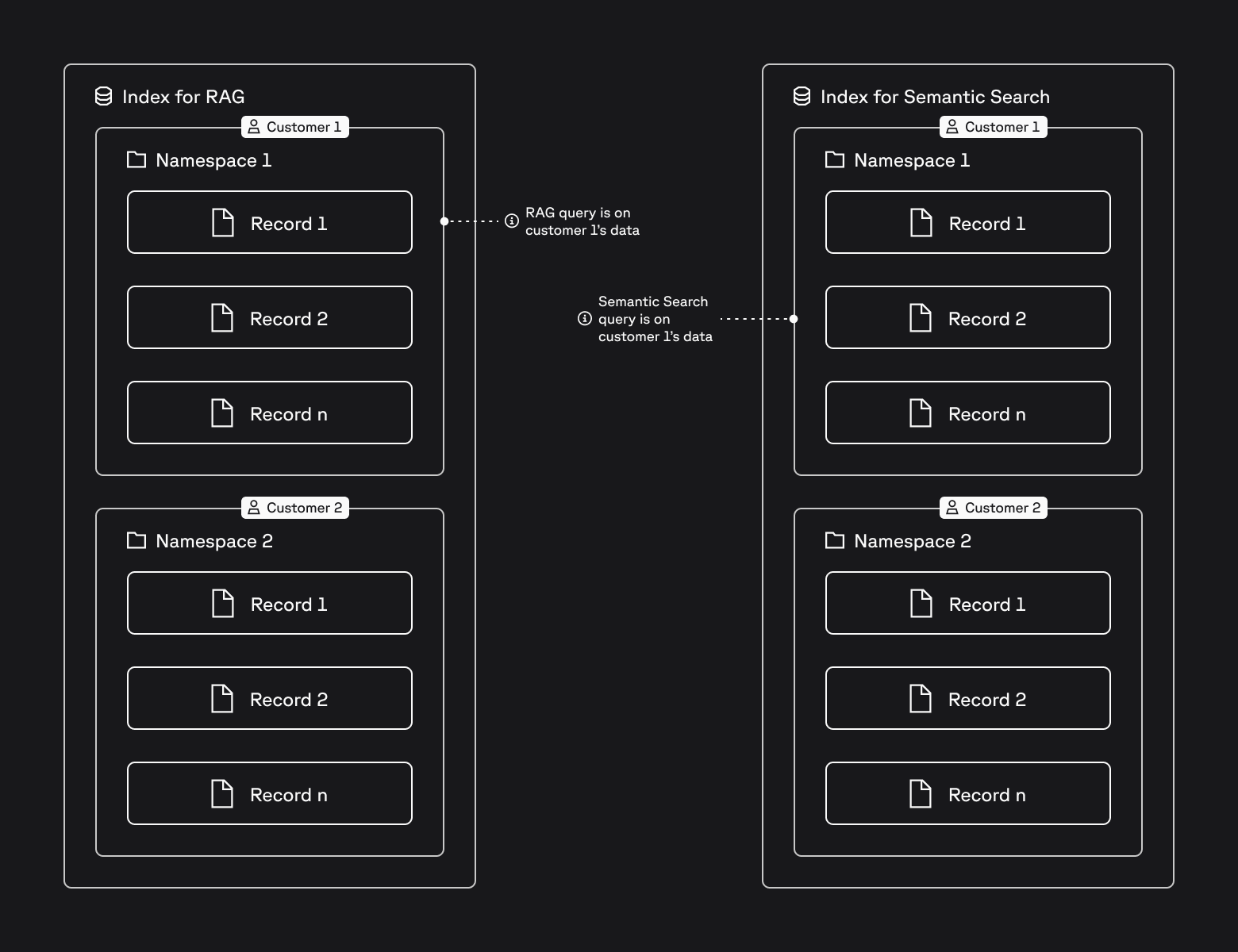
In cases where you have different workload patterns (e.g., RAG and semantic search), you would use a different index for each workload, with one namespace per customer in each index:
No noisy neighbors: Reads and writes always target a single namespace, so the behavior of one tenant/customer does not affect other tenants/customers.
No maintenance effort: Serverless indexes scale automatically based on usage; you don’t configure or manage any compute or storage resources.
Cost efficiency: Query cost is based on namespace size (1 RU per 1 GB). With 100 tenants of 1 GB each, querying one tenant’s namespace costs 1 RU. Using metadata filtering in a single 100 GB namespace would cost 100 RUs for the same query, because it scans all data regardless of filters.
Simple tenant offboarding: To offboard a tenant/customer, you just delete the relevant namespace. This is a lightweight and almost instant operation.
1. Create a serverless index#
Based on a breakthrough architecture, serverless indexes scale automatically based on usage, and you pay only for the amount of data stored and operations performed. Combined with the isolation of tenant data using namespaces (next step), serverless indexes are ideal for multitenant use cases.
To create a serverless index, use the spec parameter to define the cloud and region where the index should be deployed. For Python, you also need to import the ServerlessSpec class.
from pinecone.grpc import PineconeGRPC as Pinecone
from pinecone import ServerlessSpec

pc = Pinecone(api_key="YOUR_API_KEY")

pc.create_index(
  name="multitenant-app",
  dimension=8,
  metric="cosine",
  spec=ServerlessSpec(
    cloud="aws",
    region="us-east-1"
  )
)
import { Pinecone } from '@pinecone-database/pinecone'
const pc = new Pinecone({
apiKey: 'YOUR_API_KEY'
});
await pc.createIndex({
name: 'multitenant-app',
dimension: 8,
metric: 'cosine',
spec: {
serverless: {
cloud: 'aws',
region: 'us-east-1'
}
}
});import io.pinecone.clients.Pinecone;
public class CreateServerlessIndexExample {
public static void main(String[] args) {
Pinecone pc = new Pinecone.Builder("YOUR_API_KEY").build();
pc.createServerlessIndex("multitenant-app", "cosine", 8, "aws", "us-east-1");
}
}package main
import (
"context"
"encoding/json"
"fmt"
"log"
"github.com/pinecone-io/go-pinecone/v4/pinecone"
)
func prettifyStruct(obj interface{}) string {
bytes, _ := json.MarshalIndent(obj, "", " ")
return string(bytes)
}
func main() {
ctx := context.Background()
pc, err := pinecone.NewClient(pinecone.NewClientParams{
ApiKey: "YOUR_API_KEY",
})
if err != nil {
log.Fatalf("Failed to create Client: %v", err)
}
// Serverless index
indexName := "multi-tenant-app"
vectorType := "dense"
dimension := int32(8)
metric := pinecone.Cosine
deletionProtection := pinecone.DeletionProtectionDisabled
idx, err := pc.CreateServerlessIndex(ctx, &pinecone.CreateServerlessIndexRequest{
Name: indexName,
VectorType: &vectorType,
Dimension: &dimension,
Metric: &metric,
Cloud: pinecone.Aws,
Region: "us-east-1",
DeletionProtection: &deletionProtection,
})
if err != nil {
log.Fatalf("Failed to create serverless index: %v", err)
} else {
fmt.Printf("Successfully created serverless index: %v", idx.Name)
}
}using Pinecone;
var pinecone = new PineconeClient("YOUR_API_KEY");
var createIndexRequest = await pinecone.CreateIndexAsync(new CreateIndexRequest
{
Name = "multitenant-app",
Dimension = 8,
Metric = MetricType.Cosine,
Spec = new ServerlessIndexSpec
{
Serverless = new ServerlessSpec
{
Cloud = ServerlessSpecCloud.Aws,
Region = "us-east-1",
}
},
DeletionProtection = DeletionProtection.Disabled
});PINECONE_API_KEY="YOUR_API_KEY"
curl -s "https://api.pinecone.io/indexes" \
-H "Accept: application/json" \
-H "Content-Type: application/json" \
-H "Api-Key: $PINECONE_API_KEY" \
-H "X-Pinecone-Api-Version: 2025-10" \
-d '{
"name": "multitenant-app",
"dimension": 8,
"metric": "cosine",
"spec": {
"serverless": {
"cloud": "aws",
"region": "us-east-1"
}
}
}'2. Isolate tenant data#
In a multitenant solution, you need to isolate data between tenants. To achieve this in Pinecone, use one namespace per tenant. In the serverless architecture, each namespace is stored separately, so this approach ensures physical isolation of each tenant’s data.
To create a namespace for a tenant, specify the namespace parameter when first upserting the tenant’s records. For example, the following code upserts records for tenant1 and tenant2 into the multitenant-app index:
from pinecone.grpc import PineconeGRPC as Pinecone

pc = Pinecone(api_key="YOUR_API_KEY")
index = pc.Index("multitenant-app")

index.upsert(
  vectors=[
    {"id": "A", "values": [0.1, 0.1, 0.1, 0.1, 0.1, 0.1, 0.1, 0.1]},
    {"id": "B", "values": [0.2, 0.2, 0.2, 0.2, 0.2, 0.2, 0.2, 0.2]},
    {"id": "C", "values": [0.3, 0.3, 0.3, 0.3, 0.3, 0.3, 0.3, 0.3]},
    {"id": "D", "values": [0.4, 0.4, 0.4, 0.4, 0.4, 0.4, 0.4, 0.4]}
  ],
  namespace="tenant1"
)

index.upsert(
  vectors=[
    {"id": "E", "values": [0.5, 0.5, 0.5, 0.5, 0.5, 0.5, 0.5, 0.5]},
    {"id": "F", "values": [0.6, 0.6, 0.6, 0.6, 0.6, 0.6, 0.6, 0.6]},
    {"id": "G", "values": [0.7, 0.7, 0.7, 0.7, 0.7, 0.7, 0.7, 0.7]},
    {"id": "H", "values": [0.8, 0.8, 0.8, 0.8, 0.8, 0.8, 0.8, 0.8]}
  ],
  namespace="tenant2"
)
import { Pinecone } from '@pinecone-database/pinecone'
const pc = new Pinecone({ apiKey: "YOUR_API_KEY" });
const index = pc.index("multitenant-app");
await index.namespace("tenant1").upsert([
{
"id": "A",
"values": [0.1, 0.1, 0.1, 0.1, 0.1, 0.1, 0.1, 0.1]
},
{
"id": "B",
"values": [0.2, 0.2, 0.2, 0.2, 0.2, 0.2, 0.2, 0.2]
},
{
"id": "C",
"values": [0.3, 0.3, 0.3, 0.3, 0.3, 0.3, 0.3, 0.3]
},
{
"id": "D",
"values": [0.4, 0.4, 0.4, 0.4, 0.4, 0.4, 0.4, 0.4]
}
]);
await index.namespace("tenant2").upsert([
{
"id": "E",
"values": [0.5, 0.5, 0.5, 0.5, 0.5, 0.5, 0.5, 0.5]
},
{
"id": "F",
"values": [0.6, 0.6, 0.6, 0.6, 0.6, 0.6, 0.6, 0.6]
},
{
"id": "G",
"values": [0.7, 0.7, 0.7, 0.7, 0.7, 0.7, 0.7, 0.7]
},
{
"id": "H",
"values": [0.8, 0.8, 0.8, 0.8, 0.8, 0.8, 0.8, 0.8]
}
]);import io.pinecone.clients.Index;
import io.pinecone.clients.Pinecone;
import java.util.Arrays;
import java.util.List;
public class UpsertExample {
public static void main(String[] args) {
Pinecone pc = new Pinecone.Builder("YOUR_API_KEY").build();
String indexName = "multitenant-app";
Index index = pc.getIndexConnection(indexName);
List<Float> values1 = Arrays.asList(0.1f, 0.1f, 0.1f, 0.1f, 0.1f, 0.1f, 0.1f, 0.1f);
List<Float> values2 = Arrays.asList(0.2f, 0.2f, 0.2f, 0.2f, 0.2f, 0.2f, 0.2f, 0.2f);
List<Float> values3 = Arrays.asList(0.3f, 0.3f, 0.3f, 0.3f, 0.3f, 0.3f, 0.3f, 0.3f);
List<Float> values4 = Arrays.asList(0.4f, 0.4f, 0.4f, 0.4f, 0.4f, 0.4f, 0.4f, 0.4f);
List<Float> values5 = Arrays.asList(0.5f, 0.5f, 0.5f, 0.5f, 0.5f, 0.5f, 0.5f, 0.5f);
List<Float> values6 = Arrays.asList(0.6f, 0.6f, 0.6f, 0.6f, 0.6f, 0.6f, 0.6f, 0.6f);
List<Float> values7 = Arrays.asList(0.7f, 0.7f, 0.7f, 0.7f, 0.7f, 0.7f, 0.7f, 0.7f);
List<Float> values8 = Arrays.asList(0.8f, 0.8f, 0.8f, 0.8f, 0.8f, 0.8f, 0.8f, 0.8f);
index.upsert("A", values1, "tenant1");
index.upsert("B", values2, "tenant1");
index.upsert("C", values3, "tenant1");
index.upsert("D", values4, "tenant1");
index.upsert("E", values5, "tenant2");
index.upsert("F", values6, "tenant2");
index.upsert("G", values7, "tenant2");
index.upsert("H", values8, "tenant2");
}
}// Add to the main function:
idx, err := pc.DescribeIndex(ctx, indexName)
if err != nil {
log.Fatalf("Failed to describe index \"%v\": %v", idx.Name, err)
}
idxConnection1, err := pc.Index(pinecone.NewIndexConnParams{Host: idx.Host, Namespace: "tenant1"})
if err != nil {
log.Fatalf("Failed to create IndexConnection1 for Host %v: %v", idx.Host, err)
}
// This reuses the gRPC connection of idxConnection1 while targeting a different namespace
idxConnection2 := idxConnection1.WithNamespace("tenant2")
vectors1 := []*pinecone.Vector{
{
Id: "A",
Values: []float32{0.1, 0.1, 0.1, 0.1, 0.1, 0.1, 0.1, 0.1},
},
{
Id: "B",
Values: []float32{0.2, 0.2, 0.2, 0.2, 0.2, 0.2, 0.2, 0.2},
},
{
Id: "C",
Values: []float32{0.3, 0.3, 0.3, 0.3, 0.3, 0.3, 0.3, 0.3},
},
{
Id: "D",
Values: []float32{0.4, 0.4, 0.4, 0.4, 0.4, 0.4, 0.4, 0.4},
},
}
vectors2 := []*pinecone.Vector{
{
Id: "E",
Values: []float32{0.5, 0.5, 0.5, 0.5, 0.5, 0.5, 0.5, 0.5},
},
{
Id: "F",
Values: []float32{0.6, 0.6, 0.6, 0.6, 0.6, 0.6, 0.6, 0.6},
},
{
Id: "G",
Values: []float32{0.7, 0.7, 0.7, 0.7, 0.7, 0.7, 0.7, 0.7},
},
{
Id: "H",
Values: []float32{0.8, 0.8, 0.8, 0.8, 0.8, 0.8, 0.8, 0.8},
},
}
count1, err := idxConnection1.UpsertVectors(ctx, vectors1)
if err != nil {
log.Fatalf("Failed to upsert vectors: %v", err)
} else {
fmt.Printf("Successfully upserted %d vector(s)!\n", count1)
}
count2, err := idxConnection2.UpsertVectors(ctx, vectors2)
if err != nil {
log.Fatalf("Failed to upsert vectors: %v", err)
} else {
fmt.Printf("Successfully upserted %d vector(s)!\n", count2)
}using Pinecone;
var pinecone = new PineconeClient("YOUR_API_KEY");
var index = pinecone.Index("multitenant-app");
var upsertResponse1 = await index.UpsertAsync(new UpsertRequest {
Vectors = new[]
{
new Vector
{
Id = "A",
Values = new[] { 0.1f, 0.1f, 0.1f, 0.1f, 0.1f, 0.1f, 0.1f, 0.1f },
},
new Vector
{
Id = "B",
Values = new[] { 0.2f, 0.2f, 0.2f, 0.2f, 0.2f, 0.2f, 0.2f, 0.2f },
},
new Vector
{
Id = "C",
Values = new[] { 0.3f, 0.3f, 0.3f, 0.3f, 0.3f, 0.3f, 0.3f, 0.3f },
},
new Vector
{
Id = "D",
Values = new[] { 0.4f, 0.4f, 0.4f, 0.4f, 0.4f, 0.4f, 0.4f, 0.4f },
}
},
Namespace = "tenant1",
});
var upsertResponse2 = await index.UpsertAsync(new UpsertRequest {
Vectors = new[]
{
new Vector
{
Id = "E",
Values = new[] { 0.5f, 0.5f, 0.5f, 0.5f, 0.5f, 0.5f, 0.5f, 0.5f },
},
new Vector
{
Id = "F",
Values = new[] { 0.6f, 0.6f, 0.6f, 0.6f, 0.6f, 0.6f, 0.6f, 0.6f },
},
new Vector
{
Id = "G",
Values = new[] { 0.7f, 0.7f, 0.7f, 0.7f, 0.7f, 0.7f, 0.7f, 0.7f },
},
new Vector
{
Id = "H",
Values = new[] { 0.8f, 0.8f, 0.8f, 0.8f, 0.8f, 0.8f, 0.8f, 0.8f },
}
},
Namespace = "tenant2",
});# The `POST` requests below uses the unique endpoint for an index.
# See https://docs.pinecone.io/guides/manage-data/target-an-index for details.
PINECONE_API_KEY="YOUR_API_KEY"
INDEX_HOST="INDEX_HOST"
curl "https://$INDEX_HOST/vectors/upsert" \
-H "Api-Key: $PINECONE_API_KEY" \
-H 'Content-Type: application/json' \
-H "X-Pinecone-Api-Version: 2025-10" \
-d '{
"vectors": [
{
"id": "A",
"values": [0.1, 0.1, 0.1, 0.1, 0.1, 0.1, 0.1, 0.1]
},
{
"id": "B",
"values": [0.2, 0.2, 0.2, 0.2, 0.2, 0.2, 0.2, 0.2]
},
{
"id": "C",
"values": [0.3, 0.3, 0.3, 0.3, 0.3, 0.3, 0.3, 0.3]
},
{
"id": "D",
"values": [0.4, 0.4, 0.4, 0.4, 0.4, 0.4, 0.4, 0.4]
}
],
"namespace": "tenant1"
}'
curl "https://$INDEX_HOST/vectors/upsert" \
-H "Api-Key: $PINECONE_API_KEY" \
-H 'Content-Type: application/json' \
-H "X-Pinecone-Api-Version: 2025-10" \
-d '{
"vectors": [
{
"id": "E",
"values": [0.5, 0.5, 0.5, 0.5, 0.5, 0.5, 0.5, 0.5]
},
{
"id": "F",
"values": [0.6, 0.6, 0.6, 0.6, 0.6, 0.6, 0.6, 0.6]
},
{
"id": "G",
"values": [0.7, 0.7, 0.7, 0.7, 0.7, 0.7, 0.7, 0.7]
},
{
"id": "H",
"values": [0.8, 0.8, 0.8, 0.8, 0.8, 0.8, 0.8, 0.8]
}
],
"namespace": "tenant2"
}'When upserting additional records for a tenant, or when updating or deleting records for a tenant, specify the tenant’s namespace. For example, the following code updates the dense vector value of record A in tenant1:
from pinecone.grpc import PineconeGRPC as Pinecone

pc = Pinecone(api_key="YOUR_API_KEY")
index = pc.Index("multitenant-app")

index.update(id="A", values=[0.1, 0.2, 0.3, 0.4, 0.5, 0.6, 0.7, 0.8], namespace="tenant1")
import { Pinecone } from '@pinecone-database/pinecone'
const pc = new Pinecone({ apiKey: "YOUR_API_KEY" });
const index = pc.index("multitenant-app");
await index.namespace('tenant1').update({
id: 'A',
values: [0.1, 0.2, 0.3, 0.4, 0.5, 0.6, 0.7, 0.8]
});import io.pinecone.clients.Index;
import io.pinecone.clients.Pinecone;
import io.pinecone.proto.UpdateResponse;
import java.util.Arrays;
import java.util.List;
public class UpdateExample {
public static void main(String[] args) {
Pinecone pc = new Pinecone.Builder("YOUR_API_KEY").build();
Index index = pc.getIndexConnection("multitenant-app");
List<Float> values = Arrays.asList(0.1f, 0.2f, 0.3f, 0.4f, 0.5f, 0.6f, 0.7f, 0.8f);
UpdateResponse updateResponse = index.update("A", values, null, "tenant1", null, null);
System.out.println(updateResponse);
}
}// Add to the main function:
idxConn1.UpdateVector(ctx, &pinecone.UpdateVectorRequest{
Id: "A",
Values: []float32{0.1, 0.2, 0.3, 0.4, 0.5, 0.6, 0.7, 0.8},
})
if err != nil {
log.Fatalf("Failed to update vector with ID %v: %v", id, err)
}using Pinecone;
var pinecone = new PineconeClient("YOUR_API_KEY");
var index = pinecone.Index("multitenant-app");
var upsertResponse = await index.UpsertAsync(new UpsertRequest {
Vectors = new[]
{
new Vector
{
Id = "A",
Values = new[] { 0.1f, 0.2f, 0.3f, 0.4f, 0.5f, 0.6f, 0.7f, 0.8f },
}
},
Namespace = "tenant1",
});# The `POST` request below uses the unique endpoint for an index.
# See https://docs.pinecone.io/guides/manage-data/target-an-index for details.
PINECONE_API_KEY="YOUR_API_KEY"
INDEX_HOST="INDEX_HOST"
curl "https://$INDEX_HOST/vectors/update" \
-H "Api-Key: $PINECONE_API_KEY" \
-H 'Content-Type: application/json' \
-H "X-Pinecone-Api-Version: 2025-10" \
-d '{
"id": "A",
"values": [01., 0.2, 0.3, 0.4, 0.5, 0.6, 0.7, 0.8],
"namespace": "tenant1"
}'3. Query tenant data#
In a multitenant solution, you need to ensure that the queries of one tenant do not affect the experience of other tenants/customers. To achieve this in Pinecone, target each tenant’s queries at the namespace for the tenant.
For example, the following code queries only tenant2 for the 3 vectors that are most similar to an example query vector:
from pinecone.grpc import PineconeGRPC as Pinecone

pc = Pinecone(api_key="YOUR_API_KEY")
index = pc.Index("multitenant-app")

query_results = index.query(
    namespace="tenant2",
    vector=[0.7, 0.7, 0.7, 0.7, 0.7, 0.7, 0.7, 0.7],
    top_k=3,
    include_values=True
)

print(query_results)

# Returns:
# {'matches': [{'id': 'F',
#               'score': 1.00000012,
#               'values': [0.6, 0.6, 0.6, 0.6, 0.6, 0.6, 0.6, 0.6]},
#              {'id': 'G',
#               'score': 1.0,
#               'values': [0.7, 0.7, 0.7, 0.7, 0.7, 0.7, 0.7, 0.7]},
#              {'id': 'E',
#               'score': 1.0,
#               'values': [0.5, 0.5, 0.5, 0.5, 0.5, 0.5, 0.5, 0.5]}],
#  'namespace': 'tenant2',
#  'usage': {'read_units': 6}}
import { Pinecone } from '@pinecone-database/pinecone'
const pc = new Pinecone({ apiKey: "YOUR_API_KEY" });
const index = pc.index("multitenant-app");
const queryResponse = await index.namespace("tenant2").query({
topK: 3,
vector: [0.7, 0.7, 0.7, 0.7, 0.7, 0.7, 0.7, 0.7],
includeValues: true
});
console.log(queryResponse);
// Returns:
{
"matches": [
{
"id": "F",
"score": 1.00000012,
"values": [
0.6, 0.6, 0.6, 0.6, 0.6, 0.6, 0.6, 0.6
]
},
{
"id": "E",
"score": 1,
"values": [ 0.5, 0.5, 0.5, 0.5, 0.5, 0.5, 0.5, 0.5
]
},
{
"id": "G",
"score": 1,
"values": [
0.7, 0.7, 0.7, 0.7, 0.7, 0.7, 0.7, 0.7
]
}
],
"namespace": "tenant2",
"usage": {
"readUnits": 6
}
}import io.pinecone.clients.Index;
import io.pinecone.clients.Pinecone;
import io.pinecone.unsigned_indices_model.QueryResponseWithUnsignedIndices;
import java.util.Arrays;
import java.util.List;
public class QueryExample {
public static void main(String[] args) {
Pinecone pc = new Pinecone.Builder("YOUR_API_KEY").build();
String indexName = "multitenant-app";
Index index = pc.getIndexConnection(indexName);
List<Float> queryVector = Arrays.asList(0.7f, 0.7f, 0.7f, 0.7f, 0.7f, 0.7f, 0.7f, 0.7f);
QueryResponseWithUnsignedIndices queryResponse = index.query(3, queryVector2, null, null, null, "tenant2", null, true, false);
System.out.println(queryResponse);
}
}
// Results:
// class QueryResponseWithUnsignedIndices {
// matches: [ScoredVectorWithUnsignedIndices {
// score: 1.00000012
// id: F
// values: [0.6, 0.6, 0.6, 0.6, 0.6, 0.6, 0.6, 0.6]
// metadata:
// sparseValuesWithUnsignedIndices: SparseValuesWithUnsignedIndices {
// indicesWithUnsigned32Int: []
// values: []
// }
// }, ScoredVectorWithUnsignedIndices {
// score: 1
// id: E
// values: [0.5, 0.5, 0.5, 0.5, 0.5, 0.5, 0.5, 0.5]
// metadata:
// sparseValuesWithUnsignedIndices: SparseValuesWithUnsignedIndices {
// indicesWithUnsigned32Int: []
// values: []
// }
// }, ScoredVectorWithUnsignedIndices {
// score: 0.07999992
// id: G
// values: [0.7, 0.7, 0.7, 0.7, 0.7, 0.7, 0.7, 0.7]
// metadata:
// sparseValuesWithUnsignedIndices: SparseValuesWithUnsignedIndices {
// indicesWithUnsigned32Int: []
// values: []
// }
// }]
// namespace: tenant2
// usage: read_units: 6
// }// Add to the main function:
queryVector := []float32{0.7, 0.7, 0.7, 0.7, 0.7, 0.7, 0.7, 0.7}
res, err := idxConnection2.QueryByVectorValues(ctx, &pinecone.QueryByVectorValuesRequest{
Vector: queryVector,
TopK: 3,
IncludeValues: true,
})
if err != nil {
log.Fatalf("Error encountered when querying by vector: %v", err)
} else {
fmt.Printf(prettifyStruct(res))
}
// Returns:
// {
// "matches": [
// {
// "vector": {
// "id": "F",
// "values": [
// 0.6,
// 0.6,
// 0.6,
// 0.6,
// 0.6,
// 0.6,
// 0.6,
// 0.6
// ]
// },
// "score": 1.0000001
// },
// {
// "vector": {
// "id": "G",
// "values": [
// 0.7,
// 0.7,
// 0.7,
// 0.7,
// 0.7,
// 0.7,
// 0.7,
// 0.7
// ]
// },
// "score": 1
// },
// {
// "vector": {
// "id": "H",
// "values": [
// 0.8,
// 0.8,
// 0.8,
// 0.8,
// 0.8,
// 0.8,
// 0.8,
// 0.8
// ]
// },
// "score": 1
// }
// ],
// "usage": {
// "read_units": 6
// }
// }using Pinecone;
var pinecone = new PineconeClient("YOUR_API_KEY");
var index = pinecone.Index("multitenant-app");
var queryResponse = await index.QueryAsync(new QueryRequest {
Vector = new[] { 0.7f, 0.7f, 0.7f, 0.7f, 0.7f, 0.7f, 0.7f, 0.7f },
Namespace = "tenant2",
TopK = 3,
});
Console.WriteLine(queryRespnose);# The `POST` requests below uses the unique endpoint for an index.
# See https://docs.pinecone.io/guides/manage-data/target-an-index for details.
PINECONE_API_KEY="YOUR_API_KEY"
INDEX_HOST="INDEX_HOST"
curl "https://$INDEX_HOST/query" \
-H "Api-Key: $PINECONE_API_KEY" \
-H 'Content-Type: application/json' \
-H "X-Pinecone-Api-Version: 2025-10" \
-d '{
"namespace": "tenant2",
"vector": [0.7, 0.7, 0.7, 0.7, 0.7, 0.7, 0.7, 0.7],
"topK": 3,
"includeValues": true
}'
#
# Output:
# {
# "matches": [
# {
# "id": "F",
# "score": 1.00000012,
# "values": [0.6, 0.6, 0.6, 0.6, 0.6, 0.6, 0.6, 0.6]
# },
# {
# "id": "E",
# "score": 1,
# "values": [0.5, 0.5, 0.5, 0.5, 0.5, 0.5, 0.5, 0.5]
# },
# {
# "id": "G",
# "score": 1,
# "values": [0.7, 0.7, 0.7, 0.7, 0.7, 0.7, 0.7, 0.7]
# }
# ],
# "namespace": "tenant2",
# "usage": {"read_units": 6}
# }4. Offboard a tenant#
In a multitenant solution, you also need it to be quick and easy to offboard a tenant and delete all of its records. To achieve this in Pinecone, you just delete the namespace for the specific tenant.
For example, the following code deletes the namespace and all records for tenant1:
from pinecone.grpc import PineconeGRPC as Pinecone

pc = Pinecone(api_key="YOUR_API_KEY")
index = pc.Index("multitenant-app")

index.delete(delete_all=True, namespace='tenant1')
import { Pinecone } from '@pinecone-database/pinecone'
const pc = new Pinecone({ apiKey: "YOUR_API_KEY" });
const index = pc.index("multitenant-app");
await index.namespace('tenant1').deleteAll();import io.pinecone.clients.Index;
import io.pinecone.clients.Pinecone;
public class DeleteVectorsExample {
public static void main(String[] args) {
Pinecone pc = new Pinecone.Builder("YOUR_API_KEY").build();
Index index = pc.getIndexConnection("multitenant-app");
index.deleteAll("tenant1");
}
}// Add to the main function:
idxConnection1.DeleteAllVectorsInNamespace(ctx)
if err != nil {
log.Fatalf("Failed to delete vectors in namespace \"%v\": %v", idxConnection2.Namespace, err)
}var index = pinecone.Index("multitenant-app");
var deleteResponse = await index.DeleteAsync(new DeleteRequest {
DeleteAll = true,
Namespace = "tenant1",
});# The `POST` request below uses the unique endpoint for an index.
# See https://docs.pinecone.io/guides/manage-data/target-an-index for details.
PINECONE_API_KEY="YOUR_API_KEY"
INDEX_HOST="INDEX_HOST"
curl "https://$INDEX_HOST/vectors/delete" \
-H "Api-Key: $PINECONE_API_KEY" \
-H 'Content-Type: application/json' \
-H "X-Pinecone-Api-Version: 2025-10" \
-d '{
"deleteAll": true,
"namespace": "tenant1"
}
'Alternative: Metadata filtering#
When tenant isolation is not a strict requirement, or when you need to query across multiple tenants simultaneously, you can store all records in a single namespace and use metadata fields to assign records to tenants/customers. At query time, you can then filter by metadata.
This approach has significant performance and cost tradeoffs compared to using namespaces:
- Higher query costs: Queries scan the entire namespace regardless of filters, so you pay for scanning all tenants’ data even though results are filtered to one tenant.
- Slower performance: Large namespaces increase query latency, and large filters add network overhead on the request side.
- Filter size limits: Each
$inor$ninoperator is limited to 10,000 values. Exceeding this limit will cause requests to fail. See Metadata filter limits.
Anti-pattern: Avoid filtering by large lists of individual user IDs. Instead, use access control groups (organization, project, role), namespaces, or post-filter client-side (for semantic search).
For detailed guidance on choosing between namespaces and metadata filtering, see Design for multi-tenancy.
For more background on this approach, see Multitenancy in Vector Databases.