Migrate a pod-based index to serverless ↗
noOriginal Documentation
Documentation Index#
Fetch the complete documentation index at: https://docs.pinecone.io/llms.txt Use this file to discover all available pages before exploring further.
Migrate existing pod indexes to cost-effective serverless
This page shows you how to migrate a pod-based index to serverless. The migration process is free; the standard costs of upserting records to a new serverless index are not applied.
In most cases, migrating to serverless reduces costs significantly. For read-heavy workloads with more than 1 query per second and for indexes with many records in a single namespace, consider building your serverless indexes on dedicated read nodes.
Before migrating, contact Pinecone Support for help estimating and managing cost implications.
Limitations#
Migration is supported for pod-based indexes with less than 25 million records and 20,000 namespaces across all supported clouds (AWS, GCP, and Azure).
Also, serverless indexes do not support the following features. If you were using these features for your pod-based index, you will need to adapt your code. If you are blocked by these limitations, contact Pinecone Support.
- Because high-cardinality metadata in serverless indexes does not cause high memory utilization, this operation is not relevant.
How it works#
Migrating a pod-based index to serverless is a 2-step process:
After migration, you will have both a new serverless index and the original pod-based index. Once you’ve switched your workload to the serverless index, you can delete the pod-based index to avoid paying for unused resources.
1. Understand cost implications#
In most cases, migrating to serverless reduces costs significantly. However, costs can increase for read-heavy workloads with more than 1 query per second and for indexes with many records in a single namespace.
Before migrating, consider contacting Pinecone Support for help estimating and managing cost implications.
2. Prepare for migration#
Migrating a pod-based index to serverless can take anywhere from a few minutes to several hours, depending on the size of the index. During that time, you can continue reading from the pod-based index. However, all upserts, updates, and deletes to the pod-based index will not automatically be reflected in the new serverless index, so be sure to prepare in one of the following ways:
Pause write traffic: If downtime is acceptable, pause traffic to the pod-based index before starting migration. After migration, you will start sending traffic to the serverless index.
Log your writes: If you need to continue reading from the pod-based index during migration, send read traffic to the pod-based index, but log your writes to a temporary location outside of Pinecone (e.g., S3). After migration, you will replay the logged writes to the new serverless index and start sending all traffic to the serverless index.
3. Start migration#
In the Pinecone console, go to your pod-based index and click the ellipsis (…) menu > Migrate to serverless.
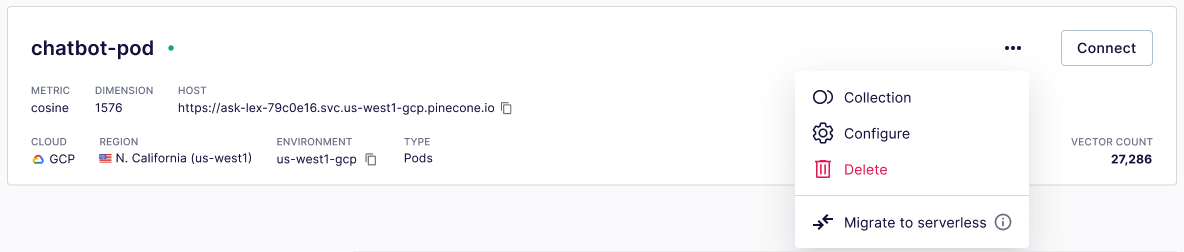
The dropdown will not display Migrate to serverless if the index has any of the listed limitations.
To save the legacy index and create a new serverless index now, follow the prompts.
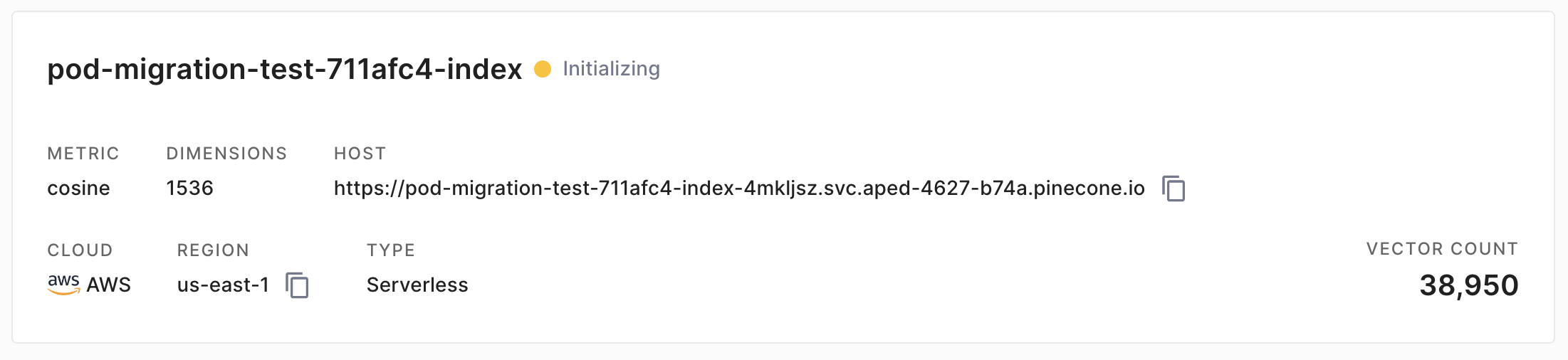
Depending on the size of the index, migration can take anywhere from a few minutes to several hours. While migration is in progress, you’ll see the yellow Initializing status:
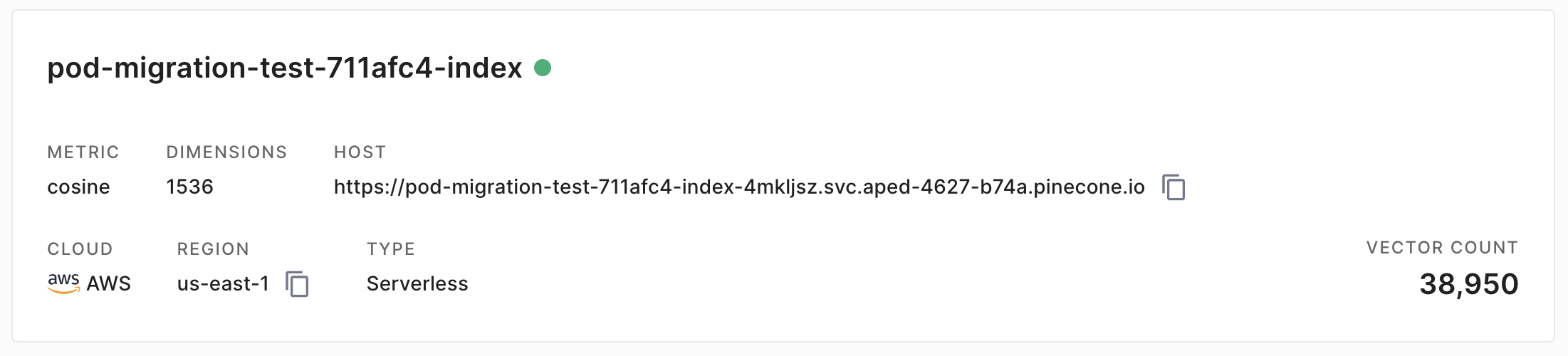
When the new serverless index is ready, the status will change to green:
Use the
create_collectionoperation to create a backup of your pod-based index:// Requires Node.js SDK v6.1.2 or later import { Pinecone } from '@pinecone-database/pinecone' const pc = new Pinecone({ apiKey: 'YOUR_API_KEY' }); await pc.createCollection({ name: "pod-collection", source: "pod-index" }); ``` ```go // Requires Go SDK v4.1.2 or later package main import ( "context" "fmt" "log" "github.com/pinecone-io/go-pinecone/v4/pinecone" ) func main() { ctx := context.Background() pc, err := pinecone.NewClient(pinecone.NewClientParams{ ApiKey: "YOUR_API_KEY", }) if err != nil { log.Fatalf("Failed to create Client: %v", err) } collection, err := pc.CreateCollection(ctx, &pinecone.CreateCollectionRequest{ Name: "pod-collection", Source: "pod-index", }) if err != nil { log.Fatalf("Failed to create collection: %v", err) } else { fmt.Printf("Successfully created collection: %v", collection.Name) } } ``` ```shell PINECONE_API_KEY="YOUR_API_KEY" curl -s POST "https://api.pinecone.io/collections" \ -H "Accept: application/json" \ -H "Content-Type: application/json" \ -H "Api-Key: $PINECONE_API_KEY" \ -H "X-Pinecone-Api-Version: 2025-10" \ -d '{ "name": "pod-collection", "source": "pod-index" }' ```Use the
create_indexoperation to create a new serverless index from the collection:Use API verison
2025-04or later. Creating a serverless index from a collection is not supported in earlier versions.Set
dimensionto the same dimension as the pod-based index. Changing the dimension is not supported.Set
cloudto the cloud where the pod-based index is hosted. Migrating to a different cloud is not supported.Set
source_collectionto the name of the collection you created in step 1.import { Pinecone } from '@pinecone-database/pinecone' const pc = new Pinecone({ apiKey: 'YOUR_API_KEY' }); await pc.createIndex({ name: 'serverless-index', vectorType: 'dense', dimension: 1536, metric: 'cosine', spec: { serverless: { cloud: 'aws', region: 'us-east-1', sourceCollection: 'pod-collection' } } }); ``` ```go package main import ( "context" "fmt" "log" "github.com/pinecone-io/go-pinecone/v4/pinecone" ) func main() { ctx := context.Background() pc, err := pinecone.NewClient(pinecone.NewClientParams{ ApiKey: "YOUR_API_KEY", }) if err != nil { log.Fatalf("Failed to create Client: %v", err) } idx, err := pc.CreateServerlessIndex(ctx, &pinecone.CreateServerlessIndexRequest{ Name: "serverless-index", VectorType: "dense", Dimension: 1536, Metric: pinecone.Cosine, Cloud: pinecone.Aws, Region: "us-east-1", SourceCollection: "pod-collection", }) if err != nil { log.Fatalf("Failed to create serverless index: %v", err) } else { fmt.Printf("Successfully created serverless index: %v", idx.Name) } } ``` ```shell PINECONE_API_KEY="YOUR_API_KEY" curl -s "https://api.pinecone.io/indexes" \ -H "Accept: application/json" \ -H "Content-Type: application/json" \ -H "Api-Key: $PINECONE_API_KEY" \ -H "X-Pinecone-Api-Version: 2025-10" \ -d '{ "name": "serverless-index", "vector_type": "dense", "dimension": 1536, "metric": "cosine", "spec": { "serverless": { "cloud": "aws", "region": "us-east-1", "source_collection": "pod-collection" } } }' ```
4. Update SDKs#
If you are using an older version of the Python, Node.js, Java, or Go SDK, you must update the SDK to work with serverless indexes.
- Check your SDK version:
    pip show pinecone
    ```

```shell
    npm list | grep @pinecone-database/pinecone
    ```

```shell
    # Check your dependency file or classpath
    ```

```shell
    go list -u -m all | grep go-pinecone
    ```


2. If your SDK version is less than 3.0.0 for [Python](https://github.com/pinecone-io/pinecone-python-client), 2.0.0 for [Node.js](https://sdk.pinecone.io/typescript/), 1.0.0 for [Java](https://github.com/pinecone-io/pinecone-java-client), or 1.0.0 for [Go](https://github.com/pinecone-io/go-pinecone), upgrade the SDK as follows:


```Python
    pip install "pinecone[grpc]" --upgrade
    ```

```JavaScript
    npm install @pinecone-database/pinecone@latest
    ```

```shell
    # Maven
    <dependency>
      <groupId>io.pinecone</groupId>
      <artifactId>pinecone-client</artifactId>
      <version>5.0.0</version>
    </dependency>

    # Gradle
    implementation "io.pinecone:pinecone-client:5.0.0"
    ```

```go
    go get -u github.com/pinecone-io/go-pinecone/v4/pinecone@latest
    ```


  If you are using the [.NET SDK](/reference/sdks/dotnet/overview), add a package reference to your project file:

  ```shell
  dotnet add package Pinecone.Client
5. Adapt existing code#
You must make some minor code changes to work with serverless indexes.
Serverless indexes do not support some features, as outlined in Limitations. If you were relying on these features for your pod-based index, you’ll need to adapt your code.
- Change how you import the Pinecone library and authenticate and initialize the client:
    from pinecone.grpc import PineconeGRPC as Pinecone
    from pinecone import ServerlessSpec, PodSpec
    # ServerlessSpec and PodSpec are required only when
    # creating serverless and pod-based indexes.
    pc = Pinecone(api_key="YOUR_API_KEY")
    ```

```JavaScript
    import { Pinecone } from '@pinecone-database/pinecone';

    const pc = new Pinecone({ apiKey: 'YOUR_API_KEY' });
    ```

```java
    import io.pinecone.clients.Pinecone;
    import org.openapitools.db_control.client.model.*;

    public class InitializeClientExample {
        public static void main(String[] args) {
            Pinecone pc = new Pinecone.Builder("YOUR_API_KEY").build();
        }
    }
    ```

```go
    package main

    import (
        "context"
        "log"

        "github.com/pinecone-io/go-pinecone/v4/pinecone"
    )

    func main() {
        ctx := context.Background()

        pc, err := pinecone.NewClient(pinecone.NewClientParams{
            ApiKey: "YOUR_API_KEY",
        })
        if err != nil {
            log.Fatalf("Failed to create Client: %v", err)
        }
    }
    ```

```csharp
    using Pinecone;

    var pinecone = new PineconeClient("YOUR_API_KEY");
    ```


2. [Listing indexes](/guides/manage-data/manage-indexes) now fetches a complete description of each index. If you were relying on the output of this operation, you'll need to adapt your code.


```Python
    from pinecone.grpc import PineconeGRPC as Pinecone

    pc = Pinecone(api_key="YOUR_API_KEY")

    index_list = pc.list_indexes()

    print(index_list)
    ```

```javascript
    import { Pinecone } from '@pinecone-database/pinecone'

    const pc = new Pinecone({ apiKey: 'YOUR_API_KEY' })

    const indexList = await pc.listIndexes();

    console.log(indexList);
    ```

```java
    import io.pinecone.clients.Pinecone;
    import org.openapitools.db_control.client.model.*;

    public class ListIndexesExample {
        public static void main(String[] args) {
            Pinecone pc = new Pinecone.Builder("YOUR_API_KEY").build();
            IndexList indexList = pc.listIndexes();
            System.out.println(indexList);
        }
    }
    ```

```go
    package main

    import (
        "context"
        "encoding/json"
        "fmt"
        "log"

        "github.com/pinecone-io/go-pinecone/v4/pinecone"
    )

    func prettifyStruct(obj interface{}) string {
        bytes, _ := json.MarshalIndent(obj, "", "  ")
        return string(bytes)
    }

    func main() {
        ctx := context.Background()

        pc, err := pinecone.NewClient(pinecone.NewClientParams{
            ApiKey: "YOUR_API_KEY",
        })
        if err != nil {
            log.Fatalf("Failed to create Client: %v", err)
        }

        idxs, err := pc.ListIndexes(ctx)
        if err != nil {
            log.Fatalf("Failed to list indexes: %v", err)
        } else {
            for _, index := range idxs {
                fmt.Printf("index: %v\n", prettifyStruct(index))
            }
        }
    }
    ```

```csharp
    using Pinecone;

    var pinecone = new PineconeClient("YOUR_API_KEY");

    var indexList = await pinecone.ListIndexesAsync();

    Console.WriteLine(indexList);
    ```

```shell
    PINECONE_API_KEY="YOUR_API_KEY"

    curl -i -X GET "https://api.pinecone.io/indexes" \
    -H "Api-Key: $PINECONE_API_KEY" \
    -H "X-Pinecone-Api-Version: 2025-10"
    ```


  The `list_indexes` operation now returns a response like the following:


```python
    [{
        "name": "docs-example-sparse",
        "metric": "dotproduct",
        "host": "docs-example-sparse-govk0nt.svc.aped-4627-b74a.pinecone.io",
        "spec": {
            "serverless": {
                "cloud": "aws",
                "region": "us-east-1"
            }
        },
        "status": {
            "ready": true,
            "state": "Ready"
        },
        "vector_type": "sparse",
        "dimension": null,
        "deletion_protection": "disabled",
        "tags": {
            "environment": "development"
        }
    }, {
        "name": "docs-example-dense",
        "metric": "cosine",
        "host": "docs-example-dense-govk0nt.svc.aped-4627-b74a.pinecone.io",
        "spec": {
            "serverless": {
                "cloud": "aws",
                "region": "us-east-1"
            }
        },
        "status": {
            "ready": true,
            "state": "Ready"
        },
        "vector_type": "dense",
        "dimension": 1536,
        "deletion_protection": "disabled",
        "tags": {
            "environment": "development"
        }
    }]
    ```

```javascript
    {
      indexes: [
        {
          name: 'docs-example-sparse',
          dimension: undefined,
          metric: 'dotproduct',
          host: 'docs-example-sparse-govk0nt.svc.aped-4627-b74a.pinecone.io',
          deletionProtection: 'disabled',
          tags: { environment: 'development', example: 'tag' },
          embed: undefined,
          spec: { pod: undefined, serverless: { cloud: 'aws', region: 'us-east-1' } },
          status: { ready: true, state: 'Ready' },
          vectorType: 'sparse'
        },
        {
          name: 'docs-example-dense',
          dimension: 1536,
          metric: 'cosine',
          host: 'docs-example-dense-govk0nt.svc.aped-4627-b74a.pinecone.io',
          deletionProtection: 'disabled',
          tags: { environment: 'development', example: 'tag' },
          embed: undefined,
          spec: { pod: undefined, serverless: { cloud: 'aws', region: 'us-east-1' } },
          status: { ready: true, state: 'Ready' },
          vectorType: 'dense'
        }
      ]
    }
    ```

```java
    class IndexList {
        indexes: [class IndexModel {
            name: docs-example-sparse
            dimension: null
            metric: dotproduct
            host: docs-example-sparse-govk0nt.svc.aped-4627-b74a.pinecone.io
            deletionProtection: disabled
            tags: {environment=development}
            embed: null
            spec: class IndexModelSpec {
                pod: null
                serverless: class ServerlessSpec {
                    cloud: aws
                    region: us-east-1
                    additionalProperties: null
                }
                additionalProperties: null
            }
            status: class IndexModelStatus {
                ready: true
                state: Ready
                additionalProperties: null
            }
            vectorType: sparse
            additionalProperties: null
        }, class IndexModel {
            name: docs-example-dense
            dimension: 1536
            metric: cosine
            host: docs-example-dense-govk0nt.svc.aped-4627-b74a.pinecone.io
            deletionProtection: disabled
            tags: {environment=development}
            embed: null
            spec: class IndexModelSpec {
                pod: null
                serverless: class ServerlessSpec {
                    cloud: aws
                    region: us-east-1
                    additionalProperties: null
                }
                additionalProperties: null
            }
            status: class IndexModelStatus {
                ready: true
                state: Ready
                additionalProperties: null
            }
            vectorType: dense
            additionalProperties: null
        }]
        additionalProperties: null
    }
    ```

```go
    index: {
      "name": "docs-example-sparse",
      "host": "docs-example-sparse-govk0nt.svc.aped-4627-b74a.pinecone.io",
      "metric": "dotproduct",
      "vector_type": "sparse",
      "deletion_protection": "disabled",
      "dimension": null,
      "spec": {
        "serverless": {
          "cloud": "aws",
          "region": "us-east-1"
        }
      },
      "status": {
        "ready": true,
        "state": "Ready"
      },
      "tags": {
        "environment": "development"
      }
    }
    index: {
      "name": "docs-example-dense",
      "host": "docs-example-dense-govk0nt.svc.aped-4627-b74a.pinecone.io",
      "metric": "cosine",
      "vector_type": "dense",
      "deletion_protection": "disabled",
      "dimension": 1536,
      "spec": {
        "serverless": {
          "cloud": "aws",
          "region": "us-east-1"
        }
      },
      "status": {
        "ready": true,
        "state": "Ready"
      },
      "tags": {
        "environment": "development"
      }
    }
    ```

```csharp
    {
      "indexes": [
        {
          "name": "docs-example-sparse",
          "metric": "dotproduct",
          "host": "docs-example-sparse-govk0nt.svc.aped-4627-b74a.pinecone.io",
          "deletion_protection": "disabled",
          "tags": {
            "environment": "development"
          },
          "spec": {
            "serverless": {
              "cloud": "aws",
              "region": "us-east-1"
            }
          },
          "status": {
            "ready": true,
            "state": "Ready"
          },
          "vector_type": "sparse"
        },
        {
          "name": "docs-example-dense",
          "dimension": 1536,
          "metric": "cosine",
          "host": "docs-example-dense-govk0nt.svc.aped-4627-b74a.pinecone.io",
          "deletion_protection": "disabled",
          "tags": {
            "environment": "development"
          },
          "spec": {
            "serverless": {
              "cloud": "aws",
              "region": "us-east-1"
            }
          },
          "status": {
            "ready": true,
            "state": "Ready"
          },
          "vector_type": "dense"
        }
      ]
    }
    ```

```json
    {
      "indexes": [
        {
          "name": "docs-example-sparse",
          "vector_type": "sparse",
          "metric": "dotproduct",
          "dimension": null,
          "status": {
            "ready": true,
            "state": "Ready"
          },
          "host": "docs-example-sparse-govk0nt.svc.aped-4627-b74a.pinecone.io",
          "spec": {
            "serverless": {
              "region": "us-east-1",
              "cloud": "aws"
            }
          },
          "deletion_protection": "disabled",
          "tags": {
            "environment": "development"
          }
        },
        {
          "name": "docs-example-dense",
          "vector_type": "dense",
          "metric": "cosine",
          "dimension": 1536,
          "status": {
            "ready": true,
            "state": "Ready"
          },
          "host": "docs-example-dense-govk0nt.svc.aped-4627-b74a.pinecone.io",
          "spec": {
            "serverless": {
              "region": "us-east-1",
              "cloud": "aws"
            }
          },
          "deletion_protection": "disabled",
          "tags": {
            "environment": "development"
          }
        }
      ]
    }
    ```


3. [Describing an index](/guides/manage-data/manage-indexes) now returns a description of an index in a different format. It also returns the index host needed to run data plane operations against the index. If you were relying on the output of this operation, you'll need to adapt your code.


```Python
    from pinecone.grpc import PineconeGRPC as Pinecone

    pc = Pinecone(api_key="YOUR_API_KEY")

    pc.describe_index(name="docs-example")
    ```

```JavaScript
    import { Pinecone } from '@pinecone-database/pinecone';

    const pc = new Pinecone({ apiKey: 'YOUR_API_KEY' });

    await pc.describeIndex('docs-example');
    ```

```java
    import io.pinecone.clients.Pinecone;
    import org.openapitools.db_control.client.model.*;

    public class DescribeIndexExample {
        public static void main(String[] args) {
            Pinecone pc = new Pinecone.Builder("YOURE_API_KEY").build();
            IndexModel indexModel = pc.describeIndex("docs-example");
            System.out.println(indexModel);
        }
    }
    ```

```go
    package main

    import (
        "context"
        "encoding/json"
        "fmt"
        "log"

        "github.com/pinecone-io/go-pinecone/v4/pinecone"
    )

    func prettifyStruct(obj interface{}) string {
        bytes, _ := json.MarshalIndent(obj, "", "  ")
        return string(bytes)
    }

    func main() {
        ctx := context.Background()

        pc, err := pinecone.NewClient(pinecone.NewClientParams{
            ApiKey: "YOUR_API_KEY",
        })
        if err != nil {
            log.Fatalf("Failed to create Client: %v", err)
        }

        idx, err := pc.DescribeIndex(ctx, "docs-example")
        if err != nil {
            log.Fatalf("Failed to describe index \"%v\": %v", idx.Name, err)
        } else {
            fmt.Printf("index: %v\n", prettifyStruct(idx))
        }
    }
    ```

```csharp
    using Pinecone;

    var pinecone = new PineconeClient("YOUR_API_KEY");

    var indexModel = await pinecone.DescribeIndexAsync("docs-example");

    Console.WriteLine(indexModel);
    ```

```bash
    PINECONE_API_KEY="YOUR_API_KEY"

    curl -i -X GET "https://api.pinecone.io/indexes/docs-example" \
        -H "Api-Key: $PINECONE_API_KEY" \
        -H "X-Pinecone-Api-Version: 2025-10"
    ```


## 6. Use your new index

When you're ready to cutover to your new serverless index:

1. Your new serverless index has a different name and unique endpoint than your pod-based index. Update your code to target the new serverless index:


```Python
    index = pc.Index("YOUR_SERVERLESS_INDEX_NAME")
    ```

```JavaScript
    const index = pc.index("YOUR_SERVERLESS_INDEX_NAME");
    ```

```java
    import io.pinecone.clients.Index;
    import io.pinecone.clients.Pinecone;

    public class TargetIndexExample {
        public static void main(String[] args) {
            Pinecone pc = new Pinecone.Builder("YOUR_API_KEY").build();
            Index index = pc.getIndexConnection("YOUR_SERVERLESS_INDEX_NAME");
    ```

```go
    package main

    import (
        "context"
        "log"

        "github.com/pinecone-io/go-pinecone/v4/pinecone"
    )

    func main() {

        ctx := context.Background()

        pc, err := pinecone.NewClient(pinecone.NewClientParams{
            ApiKey: "YOUR_API_KEY",
        })
        if err != nil {
            log.Fatalf("Failed to create Client: %v", err)
        }

        idx, err := pc.DescribeIndex(ctx, "YOUR_SERVERLESS_INDEX_NAME")
        if err != nil {
            log.Fatalf("Failed to describe index \"%v\": %v", idx.Name, err)
        }

        idxConnection, err := pc.Index(pinecone.NewIndexConnParams{Host: idx.Host, Namespace: "example-namespace"})
        if err != nil {
            log.Fatalf("Failed to create IndexConnection for Host %v: %v", idx.Host, err)
        }
    }
    ```

```csharp
    using Pinecone;

    var pinecone = new PineconeClient("YOUR_API_KEY");

    var index = pinecone.Index("YOUR_SERVERLESS_INDEX_NAME");
    ```

```bash
    # When using the API directly, you need the unique endpoint for your new serverless index.
    # See https://docs.pinecone.io/guides/manage-data/target-an-index for details.
    PINECONE_API_KEY="YOUR_API_KEY"
    INDEX_HOST="INDEX_HOST"

    curl -X POST "https://$INDEX_HOST/describe_index_stats" \
        -H "Api-Key: $PINECONE_API_KEY" \
        -H "X-Pinecone-Api-Version: 2025-10"
    ```


2. Reinitialize your clients.

3. If you logged writes to the pod-based index during migration, replay the logged writes to your serverless index.

4. [Delete the pod-based index](/guides/manage-data/manage-indexes#delete-an-index) to avoid paying for unused resources.

  <span class="callout-start" data-callout-type="warning"></span>
It is not possible to save a serverless index as a collection, so if you want to retain the option to recreate your pod-based index, be sure to keep the collection you created earlier.
  <span class="callout-end"></span>

## See also

* [Limits](/reference/api/database-limits)
* [Serverless architecture](/guides/get-started/database-architecture)
* [Understanding serverless cost](/guides/manage-cost/understanding-cost)