Hugging Face Diffusers ↗
noOriginal Documentation
Documentation Index#
Fetch the complete documentation index at: https://docs.wandb.ai/llms.txt Use this file to discover all available pages before exploring further.
export const ColabLink = ({url}) => Try in Colab ;
Hugging Face Diffusers is the go-to library for state-of-the-art pre-trained diffusion models for generating images, audio, and even 3D structures of molecules. The W&B integration adds rich, flexible experiment tracking, media visualization, pipeline architecture, and configuration management to interactive centralized dashboards without compromising that ease of use.
Next-level logging in just two lines#
Log all the prompts, negative prompts, generated media, and configs associated with your experiment by simply including 2 lines of code. Here are the 2 lines of code to begin logging:
# import the autolog function
from wandb.integration.diffusers import autolog

# call the autolog before calling the pipeline
autolog(init=dict(project="diffusers_logging"))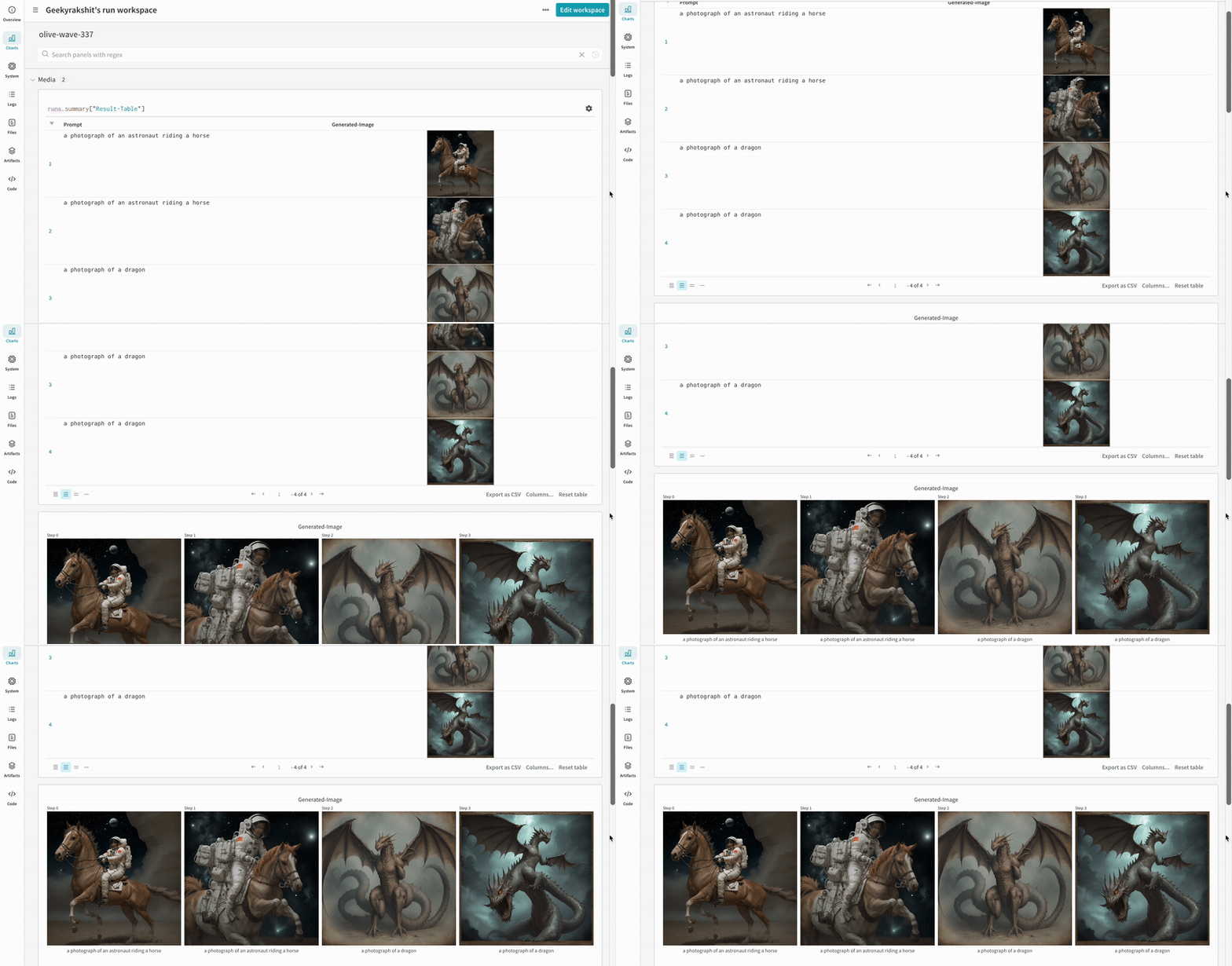
Get started#
Install
diffusers,transformers,accelerate, andwandb.- Command line:
    pip install --upgrade diffusers transformers accelerate wandb
    ```

  * Notebook:

```bash
    !pip install --upgrade diffusers transformers accelerate wandb
    ```

2. Use `autolog` to initialize a W\&B Run and automatically track the inputs and the outputs from [all supported pipeline calls](https://github.com/wandb/wandb/blob/main/wandb/integration/diffusers/autologger.py#L12-L72).

  You can call the `autolog()` function with the `init` parameter, which accepts a dictionary of parameters required by [`wandb.init()`](/models/ref/python/functions/init).

  When you call `autolog()`, it initializes a W\&B Run and automatically tracks the inputs and the outputs from [all supported pipeline calls](https://github.com/wandb/wandb/blob/main/wandb/integration/diffusers/autologger.py#L12-L72).

  * Each pipeline call is tracked into its own [table](/models/tables/) in the workspace, and the configs associated with the pipeline call is appended to the list of workflows in the configs for that run.
  * The prompts, negative prompts, and the generated media are logged in a [`wandb.Table`](/models/tables/).
  * All other configs associated with the experiment including seed and the pipeline architecture are stored in the config section for the run.
  * The generated media for each pipeline call are also logged in [media panels](/models/track/log/media/) in the run.

  <span class="callout-start" data-callout-type="note"></span>
You can find a [list of supported pipeline calls](https://github.com/wandb/wandb/blob/main/wandb/integration/diffusers/autologger.py#L12-L72). In case, you want to request a new feature of this integration or report a bug associated with it, open an issue on the [W\&B GitHub issues page](https://github.com/wandb/wandb/issues).
  <span class="callout-end"></span>

## Examples

### Autologging

Here is a brief end-to-end example of the autolog in action:

<span class="tab-group-start"></span>
 <span class="tab-start" data-tab-title="Script"></span>
```python
   import torch
   from diffusers import DiffusionPipeline

   # import the autolog function
   from wandb.integration.diffusers import autolog

   # call the autolog before calling the pipeline
   autolog(init=dict(project="diffusers_logging"))

   # Initialize the diffusion pipeline
   pipeline = DiffusionPipeline.from_pretrained(
       "stabilityai/stable-diffusion-2-1", torch_dtype=torch.float16
   ).to("cuda")

   # Define the prompts, negative prompts, and seed.
   prompt = ["a photograph of an astronaut riding a horse", "a photograph of a dragon"]
   negative_prompt = ["ugly, deformed", "ugly, deformed"]
   generator = torch.Generator(device="cpu").manual_seed(10)

   # call the pipeline to generate the images
   images = pipeline(
       prompt,
       negative_prompt=negative_prompt,
       num_images_per_prompt=2,
       generator=generator,
   )
   ```
 <span class="tab-end"></span>

 <span class="tab-start" data-tab-title="Notebook"></span>
```python
   import torch
   from diffusers import DiffusionPipeline

   import wandb

   # import the autolog function
   from wandb.integration.diffusers import autolog

   run = wandb.init()

   # call the autolog before calling the pipeline
   autolog(init=dict(project="diffusers_logging"))

   # Initialize the diffusion pipeline
   pipeline = DiffusionPipeline.from_pretrained(
       "stabilityai/stable-diffusion-2-1", torch_dtype=torch.float16
   ).to("cuda")

   # Define the prompts, negative prompts, and seed.
   prompt = ["a photograph of an astronaut riding a horse", "a photograph of a dragon"]
   negative_prompt = ["ugly, deformed", "ugly, deformed"]
   generator = torch.Generator(device="cpu").manual_seed(10)

   # call the pipeline to generate the images
   images = pipeline(
       prompt,
       negative_prompt=negative_prompt,
       num_images_per_prompt=2,
       generator=generator,
   )

   # Finish the experiment
   run.finish()
   ```
 <span class="tab-end"></span>
<span class="tab-group-end"></span>

* The results of a single experiment:


<img src="https://mintcdn.com/wb-21fd5541/mVjDwbx0mC8gYx-b/images/integrations/diffusers-autolog-2.gif?s=288200006de1764692a7677c7c5dd080" alt="Experiment results logging" data-og-width="900" width="900" data-og-height="508" height="508" data-path="images/integrations/diffusers-autolog-2.gif" data-optimize="true" data-opv="3" />


* The results of multiple experiments:


<img src="https://mintcdn.com/wb-21fd5541/mVjDwbx0mC8gYx-b/images/integrations/diffusers-autolog-1.gif?s=b7de1bfc84eb2c624c3e1d79c5a1f371" alt="Experiment results logging" data-og-width="888" width="888" data-og-height="448" height="448" data-path="images/integrations/diffusers-autolog-1.gif" data-optimize="true" data-opv="3" />


* The config of an experiment:


<img src="https://mintcdn.com/wb-21fd5541/mVjDwbx0mC8gYx-b/images/integrations/diffusers-autolog-3.gif?s=1080de61acd06bc726162af38844eeba" alt="Experiment config logging" data-og-width="600" width="600" data-og-height="683" height="683" data-path="images/integrations/diffusers-autolog-3.gif" data-optimize="true" data-opv="3" />


<span class="callout-start" data-callout-type="note"></span>
 You need to explicitly call [`wandb.Run.finish()`](/models/ref/python/functions/finish) when executing the code in IPython notebook environments after calling the pipeline. This is not necessary when executing python scripts.
<span class="callout-end"></span>

### Tracking multi-pipeline workflows

This section demonstrates the autolog with a typical [Stable Diffusion XL + Refiner](https://huggingface.co/docs/diffusers/using-diffusers/sdxl#base-to-refiner-model) workflow, in which the latents generated by the [`StableDiffusionXLPipeline`](https://huggingface.co/docs/diffusers/api/pipelines/stable_diffusion/stable_diffusion_xl) is refined by the corresponding refiner.

<span class="tab-group-start"></span>
 <span class="tab-start" data-tab-title="Python Script"></span>
```python
   import torch
   from diffusers import StableDiffusionXLImg2ImgPipeline, StableDiffusionXLPipeline
   from wandb.integration.diffusers import autolog

   # initialize the SDXL base pipeline
   base_pipeline = StableDiffusionXLPipeline.from_pretrained(
       "stabilityai/stable-diffusion-xl-base-1.0",
       torch_dtype=torch.float16,
       variant="fp16",
       use_safetensors=True,
   )
   base_pipeline.enable_model_cpu_offload()

   # initialize the SDXL refiner pipeline
   refiner_pipeline = StableDiffusionXLImg2ImgPipeline.from_pretrained(
       "stabilityai/stable-diffusion-xl-refiner-1.0",
       text_encoder_2=base_pipeline.text_encoder_2,
       vae=base_pipeline.vae,
       torch_dtype=torch.float16,
       use_safetensors=True,
       variant="fp16",
   )
   refiner_pipeline.enable_model_cpu_offload()

   prompt = "a photo of an astronaut riding a horse on mars"
   negative_prompt = "static, frame, painting, illustration, sd character, low quality, low resolution, greyscale, monochrome, nose, cropped, lowres, jpeg artifacts, deformed iris, deformed pupils, bad eyes, semi-realistic worst quality, bad lips, deformed mouth, deformed face, deformed fingers, deformed toes standing still, posing"

   # Make the experiment reproducible by controlling randomness.
   # The seed would be automatically logged to WandB.
   seed = 42
   generator_base = torch.Generator(device="cuda").manual_seed(seed)
   generator_refiner = torch.Generator(device="cuda").manual_seed(seed)

   # Call WandB Autolog for Diffusers. This would automatically log
   # the prompts, generated images, pipeline architecture and all
   # associated experiment configs to W&B, thus making your
   # image generation experiments easy to reproduce, share and analyze.
   autolog(init=dict(project="sdxl"))

   # Call the base pipeline to generate the latents
   image = base_pipeline(
       prompt=prompt,
       negative_prompt=negative_prompt,
       output_type="latent",
       generator=generator_base,
   ).images[0]

   # Call the refiner pipeline to generate the refined image
   image = refiner_pipeline(
       prompt=prompt,
       negative_prompt=negative_prompt,
       image=image[None, :],
       generator=generator_refiner,
   ).images[0]
   ```
 <span class="tab-end"></span>

 <span class="tab-start" data-tab-title="Notebook"></span>
```python
   import torch
   from diffusers import StableDiffusionXLImg2ImgPipeline, StableDiffusionXLPipeline

   import wandb
   from wandb.integration.diffusers import autolog

   run = wandb.init()

   # initialize the SDXL base pipeline
   base_pipeline = StableDiffusionXLPipeline.from_pretrained(
       "stabilityai/stable-diffusion-xl-base-1.0",
       torch_dtype=torch.float16,
       variant="fp16",
       use_safetensors=True,
   )
   base_pipeline.enable_model_cpu_offload()

   # initialize the SDXL refiner pipeline
   refiner_pipeline = StableDiffusionXLImg2ImgPipeline.from_pretrained(
       "stabilityai/stable-diffusion-xl-refiner-1.0",
       text_encoder_2=base_pipeline.text_encoder_2,
       vae=base_pipeline.vae,
       torch_dtype=torch.float16,
       use_safetensors=True,
       variant="fp16",
   )
   refiner_pipeline.enable_model_cpu_offload()

   prompt = "a photo of an astronaut riding a horse on mars"
   negative_prompt = "static, frame, painting, illustration, sd character, low quality, low resolution, greyscale, monochrome, nose, cropped, lowres, jpeg artifacts, deformed iris, deformed pupils, bad eyes, semi-realistic worst quality, bad lips, deformed mouth, deformed face, deformed fingers, deformed toes standing still, posing"

   # Make the experiment reproducible by controlling randomness.
   # The seed would be automatically logged to WandB.
   seed = 42
   generator_base = torch.Generator(device="cuda").manual_seed(seed)
   generator_refiner = torch.Generator(device="cuda").manual_seed(seed)

   # Call WandB Autolog for Diffusers. This would automatically log
   # the prompts, generated images, pipeline architecture and all
   # associated experiment configs to W&B, thus making your
   # image generation experiments easy to reproduce, share and analyze.
   autolog(init=dict(project="sdxl"))

   # Call the base pipeline to generate the latents
   image = base_pipeline(
       prompt=prompt,
       negative_prompt=negative_prompt,
       output_type="latent",
       generator=generator_base,
   ).images[0]

   # Call the refiner pipeline to generate the refined image
   image = refiner_pipeline(
       prompt=prompt,
       negative_prompt=negative_prompt,
       image=image[None, :],
       generator=generator_refiner,
   ).images[0]

   # Finish the experiment
   run.finish()
   ```
 <span class="tab-end"></span>
<span class="tab-group-end"></span>

* Example of a Stable Diffisuion XL + Refiner experiment:

<img src="https://mintcdn.com/wb-21fd5541/mVjDwbx0mC8gYx-b/images/integrations/diffusers-autolog-6.gif?s=17cbafa1416ec671cc78dd36f60915fa" alt="Stable Diffusion XL experiment tracking" data-og-width="800" width="800" data-og-height="418" height="418" data-path="images/integrations/diffusers-autolog-6.gif" data-optimize="true" data-opv="3" />


## More resources

* [A Guide to Prompt Engineering for Stable Diffusion](https://wandb.ai/geekyrakshit/diffusers-prompt-engineering/reports/A-Guide-to-Prompt-Engineering-for-Stable-Diffusion--Vmlldzo1NzY4NzQ3)
* [PIXART-α: A Diffusion Transformer Model for Text-to-Image Generation](https://wandb.ai/geekyrakshit/pixart-alpha/reports/PIXART-A-Diffusion-Transformer-Model-for-Text-to-Image-Generation--Vmlldzo2MTE1NzM3)