W&B Quickstart ↗
noOriginal Documentation
Documentation Index#
Fetch the complete documentation index at: https://docs.wandb.ai/llms.txt Use this file to discover all available pages before exploring further.
W&B Quickstart
export const GitHubLink = ({url}) => GitHub source ;
export const ColabLink = ({url}) => Try in Colab ;
Install W&B to track, visualize, and manage machine learning experiments of any size.
Are you looking for information on W&B Weave? See the Weave Python SDK quickstart or Weave TypeScript SDK quickstart.
Sign up and create an API key#
To authenticate your machine with W&B, you need an API key.
To create an API key, select the Personal API key or Service Account API key tab for details.
To create a personal API key owned by your user ID:
- Log in to W&B, click your user profile icon, then click User Settings.
- Click Create new API key.
- Provide a descriptive name for your API key.
- Click Create.
- Copy the displayed API key immediately and store it securely.
To create an API key owned by a service account:
- Navigate to the Service Accounts tab in your team or organization settings.
- Find the service account in the list.
- Click the action menu (
...), then click Create API key. - Provide a name for the API key, then click Create.
- Copy the displayed API key immediately and store it securely.
- Click Done.
You can create multiple API keys for a single service account to support different environments or workflows.
The full API key is only shown once at creation time. After you close the dialog, you cannot view the full API key again. Only the key ID (first part of the key) is visible in your settings. If you lose the full API key, you must create a new API key.
For secure storage options, see Store API keys securely.
This quickstart is also available as a Colab notebook:
Install the wandb library and log in#
Set the
WANDB_API_KEYenvironment variable.export WANDB_API_KEY=<your_api_key> ```Install the
wandblibrary and log in.pip install wandb wandb login ```
    pip install wandb
    ```

```python
    import wandb

    wandb.login()
    ```
  <span class="tab-end"></span>

  <span class="tab-start" data-tab-title="Python notebook"></span>
```notebook
    !pip install wandb
    import wandb
    wandb.login()
    ```
  <span class="tab-end"></span>
<span class="tab-group-end"></span>

## Initialize a run and track hyperparameters

In your Python script or notebook, initialize a W\&B run object with [`wandb.init()`](/models/ref/python/experiments/run/). Use a dictionary for the `config` parameter
to specify hyperparameter names and values. Within the `with` statement, you can log metrics and other information to W\&B.

```python
import wandb

wandb.login()

# Project that the run is recorded to
project = "my-awesome-project"

# Dictionary with hyperparameters
config = {
    'epochs' : 10,
    'lr' : 0.01
}

with wandb.init(project=project, config=config) as run:
    # Training code here
    # Log values to W&B with run.log()
    run.log({"accuracy": 0.9, "loss": 0.1})
See the next section for a complete example that simulates a training run and logs accuracy and loss metrics to W&B.
A run is a core element of W&B. You use runs to track metrics, create logs, track artifacts, and more.
Create a machine learning training experiment#
This mock training script logs simulated accuracy and loss metrics to W&B. Copy and paste the following code into a Python script or notebook cell and run it:
import wandb
import random

wandb.login()

# Project that the run is recorded to
project = "my-awesome-project"

# Dictionary with hyperparameters
config = {
    'epochs' : 10,
    'lr' : 0.01
}

with wandb.init(project=project, config=config) as run:
    offset = random.random() / 5
    print(f"lr: {config['lr']}")

    # Simulate a training run
    for epoch in range(2, config['epochs']):
        acc = 1 - 2**-config['epochs'] - random.random() / config['epochs'] - offset
        loss = 2**-config['epochs'] + random.random() / config['epochs'] + offset
        print(f"epoch={config['epochs']}, accuracy={acc}, loss={loss}")
        run.log({"accuracy": acc, "loss": loss})
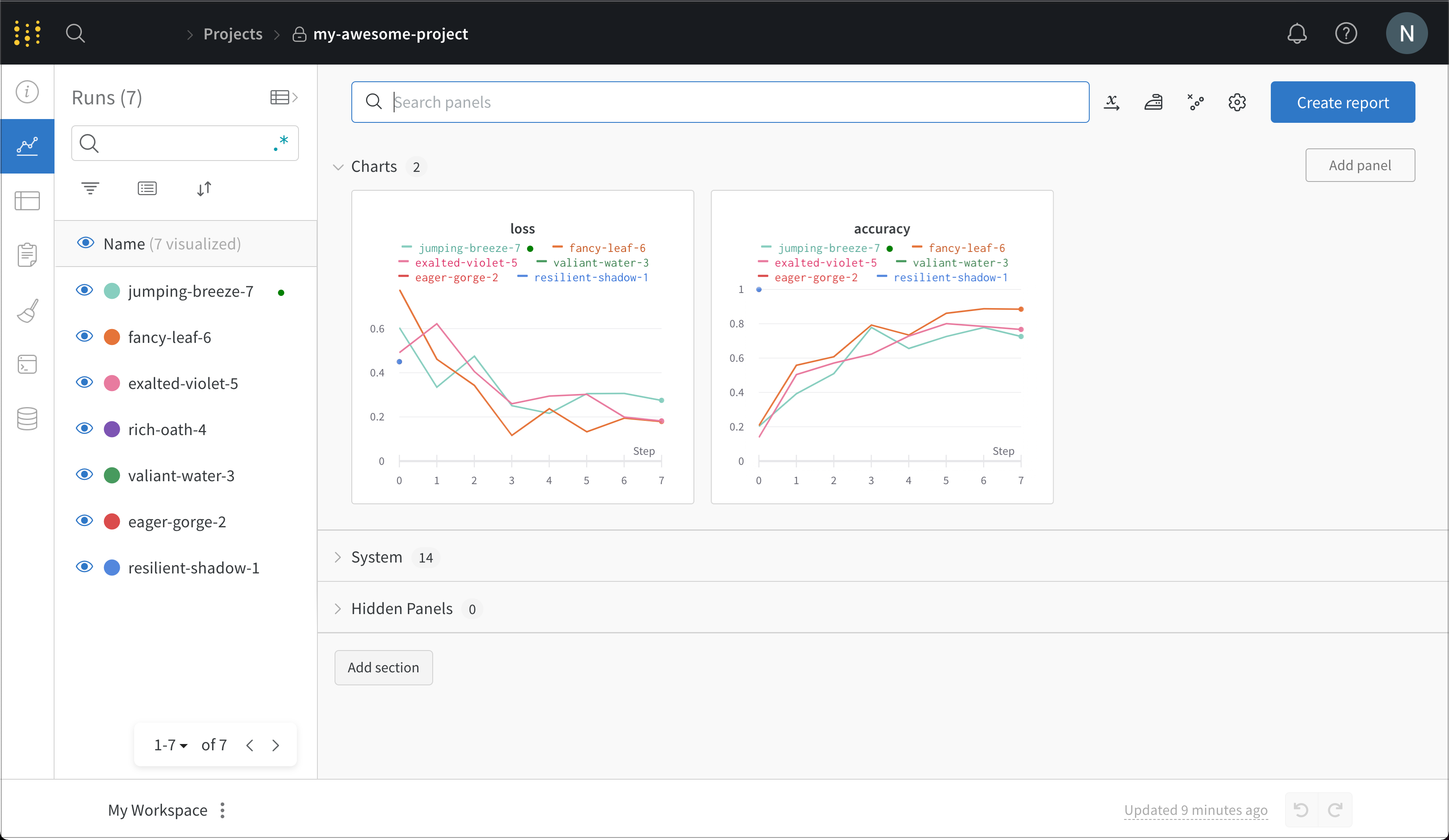
Visit wandb.ai/home to view recorded metrics such as accuracy and loss and how they changed during each training step. The following image shows the loss and accuracy tracked from each run. Each run object appears in the Runs column with generated names.
Next steps#
Explore more features of the W&B ecosystem:
- Read the W&B Integration tutorials that combine W&B with frameworks like PyTorch, libraries like Hugging Face, and services like SageMaker.
- Organize runs, automate visualizations, summarize findings, and share updates with collaborators using W&B Reports.
- Create W&B Artifacts to track datasets, models, dependencies, and results throughout your machine learning pipeline.
- Automate hyperparameter searches and optimize models with W&B Sweeps.
- Analyze runs, visualize model predictions, and share insights on a central dashboard.
- Visit W&B AI Academy to learn about LLMs, MLOps, and W&B Models through hands-on courses.
- Visit weave-docs.wandb.ai to learn how to track track, experiment with, evaluate, deploy, and improve your LLM-based applications using Weave.