Download an artifact from a registry ↗
noOriginal Documentation
Documentation Index#
Fetch the complete documentation index at: https://docs.wandb.ai/llms.txt Use this file to discover all available pages before exploring further.
Use the W&B Python SDK to download an artifact linked to a registry. To download and use an artifact, you need to know the name of the registry, the name of the collection, and the alias or index of the artifact version you want to download.
Once you know the properties of the artifact, you can construct the path to the linked artifact and download the artifact. Alternatively, you can copy and paste a pre-generated code snippet from the W&B App UI to download an artifact linked to a registry.
Construct path to linked artifact#
To download an artifact linked to a registry, you must know the path of that linked artifact. The path consists of the registry name, collection name, and the alias or index of the artifact version you want to access.
Once you have the registry, collection, and alias or index of the artifact version, you can construct the path to the linked artifact using the proceeding string template:
# Artifact name with version index specified
f"wandb-registry-{REGISTRY}/{COLLECTION}:v{INDEX}"

# Artifact name with alias specified
f"wandb-registry-{REGISTRY}/{COLLECTION}:{ALIAS}"
Replace the values within the curly braces {} with the name of the registry, collection, and the alias or index of the artifact version you want to access.
Use the wandb.Run.use_artifact() method to access the artifact and download its contents once you have the path of the linked artifact. The proceeding code snippet shows how to use and download an artifact linked to the W&B Registry. Ensure to replace values within <> with your own:
import wandb

REGISTRY = '<registry_name>'
COLLECTION = '<collection_name>'
ALIAS = '<artifact_alias>'

with wandb.init(entity = '<team_name>', project = '<project_name>')  as run:
    artifact_name = f"wandb-registry-{REGISTRY}/{COLLECTION}:{ALIAS}"
    # artifact_name = '<artifact_name>' # Copy and paste Full name specified in the W&B Registry UI
    fetched_artifact = run.use_artifact(artifact_or_name = artifact_name)
    download_path = fetched_artifact.download()
The wandb.Run.use_artifact() method both creates a run and marks the artifact you download as the input to that run.
Marking an artifact as the input to a run enables W&B to track the lineage of that artifact.
If you do not want to create a run, you can use the wandb.Api() object to access the artifact:
import wandb

REGISTRY = "<registry_name>"
COLLECTION = "<collection_name>"
VERSION = "<version>"

api = wandb.Api()
artifact_name = f"wandb-registry-{REGISTRY}/{COLLECTION}:{VERSION}"
artifact = api.artifact(name = artifact_name)
Example: Use and download an artifact linked to the W\&B Registry
The following code example shows how a user can download an artifact linked to a collection called phi3-finetuned in the Fine-tuned Models registry. The alias of the artifact version is set to production.
import wandb

TEAM_ENTITY = "product-team-applications"
PROJECT_NAME = "user-stories"

REGISTRY = "Fine-tuned Models"
COLLECTION = "phi3-finetuned"
ALIAS = 'production'

# Initialize a run inside the specified team and project
with wandb.init(entity=TEAM_ENTITY, project = PROJECT_NAME) as run:

    artifact_name = f"wandb-registry-{REGISTRY}/{COLLECTION}:{ALIAS}"

    # Access an artifact and mark it as input to your run for lineage tracking
    fetched_artifact = run.use_artifact(artifact_or_name = artifact_name)

    # Download artifact. Returns path to downloaded contents
    downloaded_path = fetched_artifact.download()
See wandb.Run.use_artifact() and Artifact.download() in the API Reference for parameters and return type.
Users with a personal entity that belong to multiple organizations
Users with a personal entity that belong to multiple organizations must also specify either the name of their organization or use a team entity when accessing artifacts linked to a registry.
import wandb

REGISTRY = "<registry_name>"
COLLECTION = "<collection_name>"
VERSION = "<version>"

# Ensure you are using your team entity to instantiate the API
api = wandb.Api(overrides={"entity": "<team-entity>"})
artifact_name = f"wandb-registry-{REGISTRY}/{COLLECTION}:{VERSION}"
artifact = api.artifact(name = artifact_name)

# Construct the path
api = wandb.Api()
artifact_name = f"wandb-registry-{REGISTRY}/{COLLECTION}:{VERSION}"
artifact = api.artifact(name = artifact_name)
Copy and paste pre-generated code snippet#
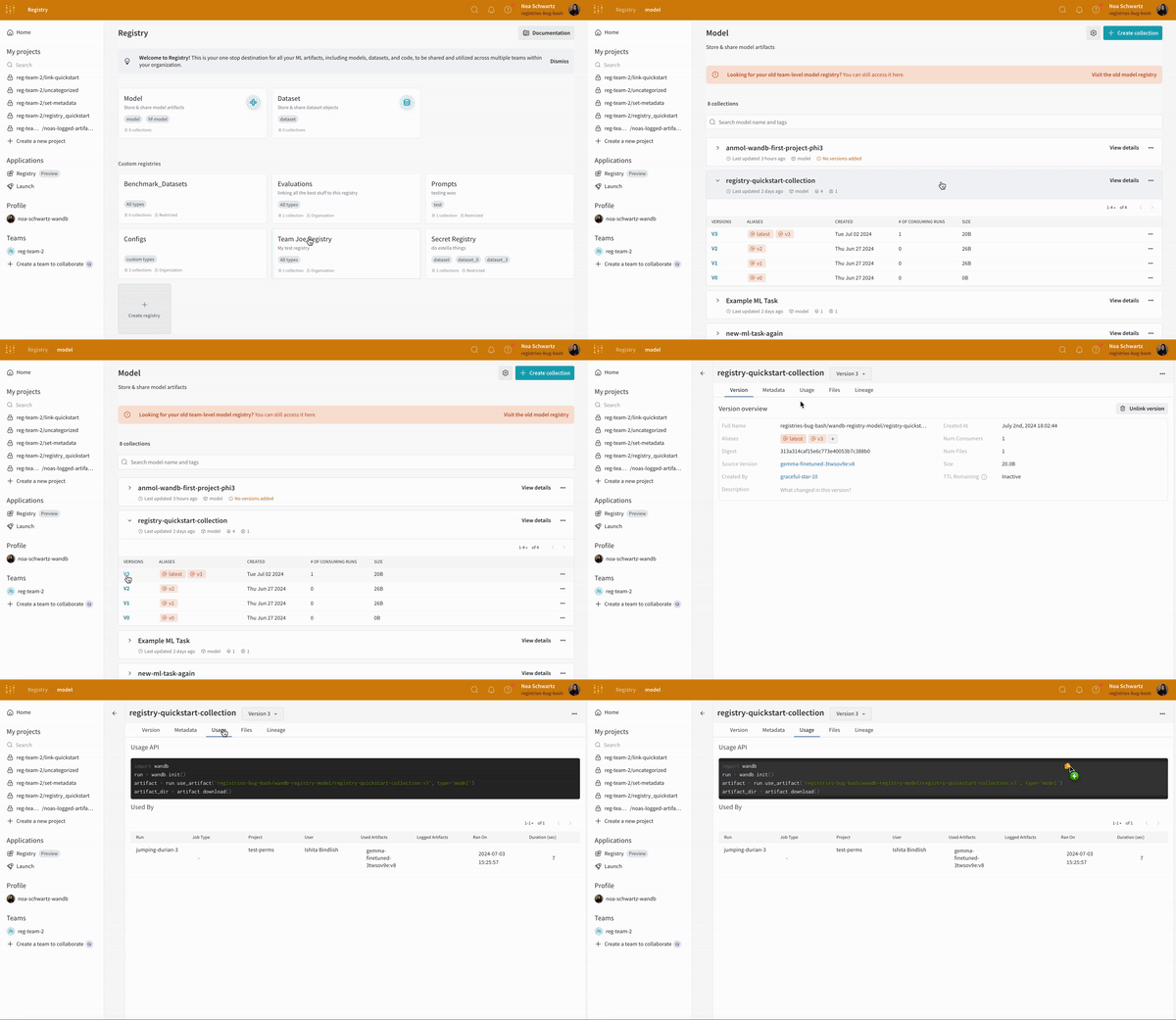
W&B creates a code snippet that you can copy and paste into your Python script, notebook, or terminal to download an artifact linked to a registry.
- Navigate to the W&B Registry.
- Select the name of the registry that contains your artifact.
- Select the name of the collection.
- From the list of artifact versions, select the version you want to access.
- Select the Usage tab.
- Copy the code snippet shown in the Usage API section.
- Paste the code snippet into your Python script, notebook, or terminal.