Anthropic ↗
noOriginal Documentation
Documentation Index#
Fetch the complete documentation index at: https://docs.wandb.ai/llms.txt Use this file to discover all available pages before exploring further.
Use Weave to automatically track and log LLM calls made via the Anthropic SDK

When you integrate Weave into your code, it automatically tracks and logs LLM calls made with the Anthropic SDK for both Python and TypeScript. Weave does this by automatically invoking Anthropic’s Messages.create method.
Traces#
Weave automatically captures traces for the Anthropic SDK when you add weave.init("your-team-name/your-project-name") to your code. If you don’t specify a team name as an argument in weave.init(), Weave logs output to your default W&B entity. If you don’t specify a project name, Weave fails to initialize.
The following examples demonstrate how to integrate Weave into a basic call to Anthropic:
    import weave
    # use the anthropic library as usual
    import os
    from anthropic import Anthropic

    weave.init("anthropic_project")

    client = Anthropic(
        api_key=os.environ.get("ANTHROPIC_API_KEY"),
    )

    message = client.messages.create(
        max_tokens=1024,
        messages=[
            {
                "role": "user",
                "content": "Tell me a joke about a dog",
            }
        ],
        model="claude-3-opus-20240229",
    )
    print(message.content)
    ```
  <span class="tab-end"></span>

  <span class="tab-start" data-tab-title="TypeScript"></span>
```typescript
    import Anthropic from '@anthropic-ai/sdk';
    import * as weave from 'weave';
    import { wrapAnthropic } from 'weave';

    await weave.init('anthropic_project');

    // Wrap the Anthropic client to enable tracing
    const client = wrapAnthropic(new Anthropic());

    const message = await client.messages.create({
        max_tokens: 1024,
        messages: [
            {
                role: 'user',
                content: 'Tell me a joke about a dog',
            }
        ],
        model: 'claude-3-opus-20240229',
    });

    console.log(message.content);
    ```
  <span class="tab-end"></span>
<span class="tab-group-end"></span>

By including `weave.init()` in the code, Weave automatically captures tracing information and outputs links. You can view the traces in the Weave UI by clicking on the links.

[<img src="https://mintcdn.com/wb-21fd5541/IuXGrpyeFw4WzHgb/weave/guides/integrations/imgs/anthropic_trace.png?fit=max&auto=format&n=IuXGrpyeFw4WzHgb&q=85&s=cbe99591b6a85d0e6e73db6e34df2599" alt="anthropic_trace.png" data-og-width="3024" width="3024" data-og-height="1594" height="1594" data-path="weave/guides/integrations/imgs/anthropic_trace.png" data-optimize="true" data-opv="3" srcset="https://mintcdn.com/wb-21fd5541/IuXGrpyeFw4WzHgb/weave/guides/integrations/imgs/anthropic_trace.png?w=280&fit=max&auto=format&n=IuXGrpyeFw4WzHgb&q=85&s=de276a3081ee4508c6eaa9952bf08473 280w, https://mintcdn.com/wb-21fd5541/IuXGrpyeFw4WzHgb/weave/guides/integrations/imgs/anthropic_trace.png?w=560&fit=max&auto=format&n=IuXGrpyeFw4WzHgb&q=85&s=3f8ae847899ba97e386b4240307ada49 560w, https://mintcdn.com/wb-21fd5541/IuXGrpyeFw4WzHgb/weave/guides/integrations/imgs/anthropic_trace.png?w=840&fit=max&auto=format&n=IuXGrpyeFw4WzHgb&q=85&s=0eef99becb1748cf478e388789633802 840w, https://mintcdn.com/wb-21fd5541/IuXGrpyeFw4WzHgb/weave/guides/integrations/imgs/anthropic_trace.png?w=1100&fit=max&auto=format&n=IuXGrpyeFw4WzHgb&q=85&s=49a94c12fd225e0a64d5d8a98e1533ab 1100w, https://mintcdn.com/wb-21fd5541/IuXGrpyeFw4WzHgb/weave/guides/integrations/imgs/anthropic_trace.png?w=1650&fit=max&auto=format&n=IuXGrpyeFw4WzHgb&q=85&s=52cb3c7d493b148b7e5d24157bb9952b 1650w, https://mintcdn.com/wb-21fd5541/IuXGrpyeFw4WzHgb/weave/guides/integrations/imgs/anthropic_trace.png?w=2500&fit=max&auto=format&n=IuXGrpyeFw4WzHgb&q=85&s=9d91fab1eae72c1e2687265174a52fd4 2500w" />](https://wandb.ai/capecape/anthropic_project/weave/calls)

## Wrapping with your own ops

Weave ops automatically version your code as you experiment, and capture its inputs and outputs. Decorated with [`@weave.op()`](https://docs.wandb.ai/weave/guides/tracking/ops) (Python) or wrapped with [`weave.op()`](/weave/reference/typescript-sdk/functions/op) (TypeScript) that calls into [`Anthropic.messages.create`](https://platform.claude.com/docs/en/build-with-claude/working-with-messages) and Weave tracks the inputs and outputs for you.

The following examples show you how to track a function:

<span class="tab-group-start"></span>
  <span class="tab-start" data-tab-title="Python"></span>
```python
    import weave
    import os
    from anthropic import Anthropic

    weave.init("anthropic_project")
    client = Anthropic(
        api_key=os.environ.get("ANTHROPIC_API_KEY"),
    )

    @weave.op()
    def call_anthropic(user_input:str, model:str) -> str:
        message = client.messages.create(
        max_tokens=1024,
        messages=[
            {
                "role": "user",
                "content": user_input,
            }
            ],
            model=model,
        )
        return message.content[0].text

    @weave.op()
    def generate_joke(topic: str) -> str:
        return call_anthropic(f"Tell me a joke about {topic}", model="claude-3-haiku-20240307")

    print(generate_joke("chickens"))
    print(generate_joke("cars"))
    ```
  <span class="tab-end"></span>

  <span class="tab-start" data-tab-title="TypeScript"></span>
```typescript
    import Anthropic from '@anthropic-ai/sdk';
    import * as weave from 'weave';
    import { wrapAnthropic } from 'weave';

    await weave.init('anthropic_project');
    const client = wrapAnthropic(new Anthropic());

    const callAnthropic = weave.op(async function callAnthropic(
        userInput: string,
        model: string
    ): Promise<string> {
        const message = await client.messages.create({
            max_tokens: 1024,
            messages: [
                {
                    role: 'user',
                    content: userInput,
                }
            ],
            model: model,
        });
        const content = message.content[0];
        return content.type === 'text' ? content.text : '';
    });

    const generateJoke = weave.op(async function generateJoke(
        topic: string
    ): Promise<string> {
        return callAnthropic(`Tell me a joke about ${topic}`, 'claude-3-haiku-20240307');
    });

    console.log(await generateJoke('chickens'));
    console.log(await generateJoke('cars'));
    ```
  <span class="tab-end"></span>
<span class="tab-group-end"></span>

By decorating or wrapping the function with `weave.op()`, Weave captures the function's code, input, and output. You can use ops to track any function you want, including nested functions.

[<img src="https://mintcdn.com/wb-21fd5541/IuXGrpyeFw4WzHgb/weave/guides/integrations/imgs/anthropic_ops.png?fit=max&auto=format&n=IuXGrpyeFw4WzHgb&q=85&s=27db880158748f4d5c7df9dec0545694" alt="anthropic_ops.png" data-og-width="2682" width="2682" data-og-height="1282" height="1282" data-path="weave/guides/integrations/imgs/anthropic_ops.png" data-optimize="true" data-opv="3" srcset="https://mintcdn.com/wb-21fd5541/IuXGrpyeFw4WzHgb/weave/guides/integrations/imgs/anthropic_ops.png?w=280&fit=max&auto=format&n=IuXGrpyeFw4WzHgb&q=85&s=6c830d5092d86eab0ef6947e9630dbca 280w, https://mintcdn.com/wb-21fd5541/IuXGrpyeFw4WzHgb/weave/guides/integrations/imgs/anthropic_ops.png?w=560&fit=max&auto=format&n=IuXGrpyeFw4WzHgb&q=85&s=f96dca4d1a8904202ed44617c6dc3350 560w, https://mintcdn.com/wb-21fd5541/IuXGrpyeFw4WzHgb/weave/guides/integrations/imgs/anthropic_ops.png?w=840&fit=max&auto=format&n=IuXGrpyeFw4WzHgb&q=85&s=7f36fdda1762380513c3648803a6ba74 840w, https://mintcdn.com/wb-21fd5541/IuXGrpyeFw4WzHgb/weave/guides/integrations/imgs/anthropic_ops.png?w=1100&fit=max&auto=format&n=IuXGrpyeFw4WzHgb&q=85&s=f1e54309bae03973a9b41b4da8db5060 1100w, https://mintcdn.com/wb-21fd5541/IuXGrpyeFw4WzHgb/weave/guides/integrations/imgs/anthropic_ops.png?w=1650&fit=max&auto=format&n=IuXGrpyeFw4WzHgb&q=85&s=623f11c747f01c9f8740387e3d8b3bfe 1650w, https://mintcdn.com/wb-21fd5541/IuXGrpyeFw4WzHgb/weave/guides/integrations/imgs/anthropic_ops.png?w=2500&fit=max&auto=format&n=IuXGrpyeFw4WzHgb&q=85&s=52a223c033bb5ef137f70f4b754d2c9a 2500w" />](https://docs.wandb.ai/weave/guides/tracking/ops)

## Create a `Model` for easier experimentation

<span class="callout-start" data-callout-type="note"></span>
  The `weave.Model` class is only available in the Weave Python SDK. For TypeScript, use the `weave.op()` wrapper to track functions with structured parameters.
<span class="callout-end"></span>

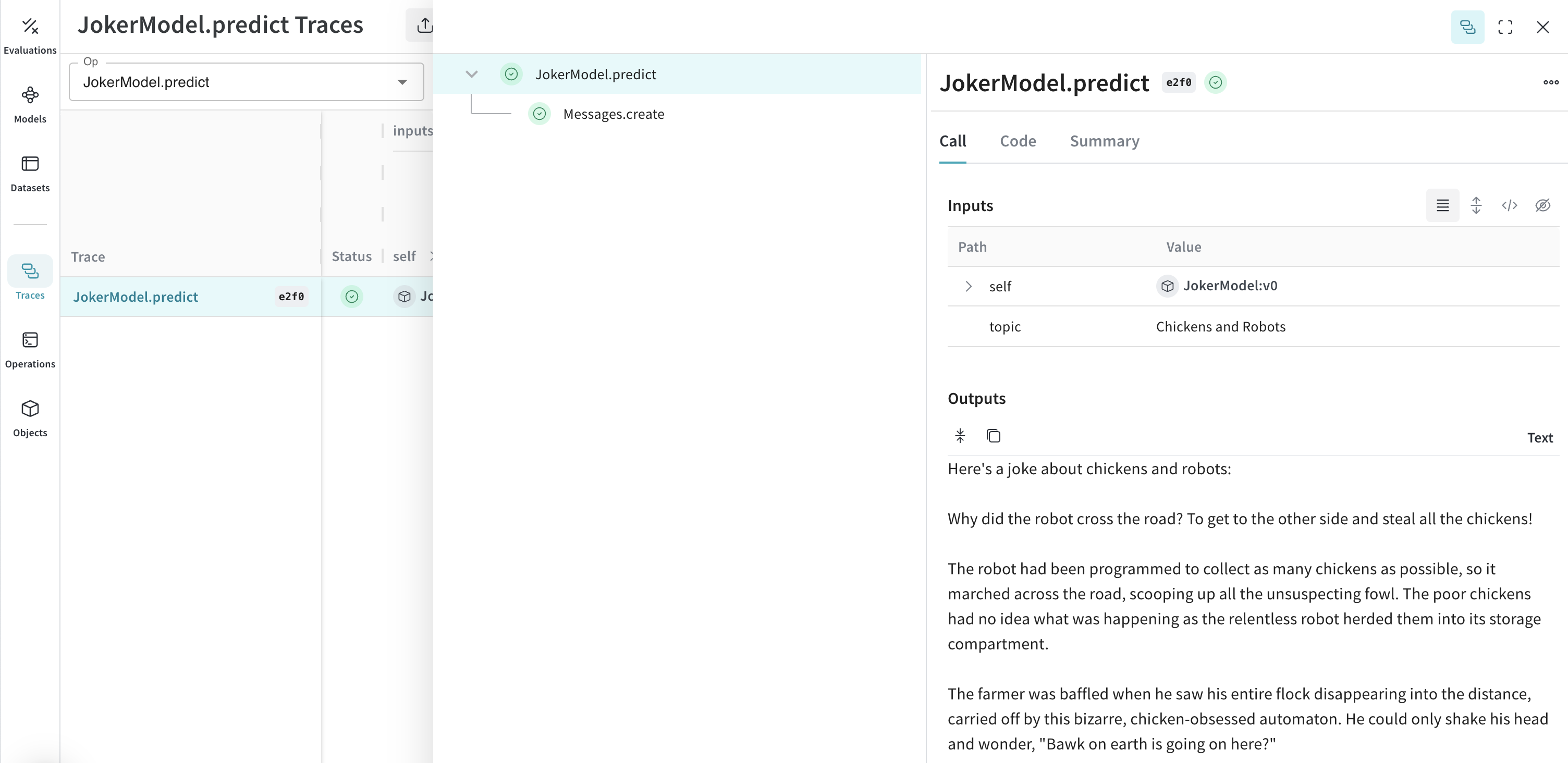
Organizing experimentation is difficult when there are many moving pieces. By using the [`Model`](/weave/guides/core-types/models) class, you can capture and organize the experimental details of your app like your system prompt or the model you're using. This helps organize and compare different iterations of your app.

In addition to versioning code and capturing inputs/outputs, [`Model`](/weave/guides/core-types/models)s capture structured parameters that control your application's behavior. This can help you find which parameters work best. You can also use Weave Models with `serve`, and [`Evaluation`](/weave/guides/core-types/evaluations)s.

In the following example, you can experiment with `model` and `temperature`:

```python
import weave
# use the anthropic library as usual
import os
from anthropic import Anthropic
weave.init('joker-anthropic')

class JokerModel(weave.Model): # Change to `weave.Model`
  model: str
  temperature: float

  @weave.op()
  def predict(self, topic): # Change to `predict`
    client = Anthropic()
    message = client.messages.create(
    max_tokens=1024,
    messages=[
        {
            "role": "user",
            "content": f"Tell me a joke about {topic}",
        }
        ],
        model=self.model,
        temperature=self.temperature
    )
    return message.content[0].text


joker = JokerModel(
    model="claude-3-haiku-20240307",
    temperature = 0.1)
result = joker.predict("Chickens and Robots")
print(result)
Every time you change one of these values, Weave creates and tracks a new version JokerModel. This allows you to associate trace data with your code changes and can help you determine which configurations work best for your use case.
Tools (function calling)#
Anthropic provides a tools interface that allows Claude to request function calls. Weave automatically tracks tool definitions, tool use requests, and tool results throughout the conversation.
The following truncated examples demonstrate an Anthropic tool configuration:
    message = client.messages.create(
        max_tokens=1024,
        messages=[
            {
                "role": "user",
                "content": "What's the weather like in San Francisco?",
            }
        ],
        tools=[
            {
                "name": "get_weather",
                "description": "Get the current weather in a given location",
                "input_schema": {
                    "type": "object",
                    "properties": {
                        "location": {
                            "type": "string",
                            "description": "The city and state, e.g. San Francisco, CA",
                        }
                    },
                    "required": ["location"],
                },
            },
        ],
        model=model,
    )

    print(message)
    ```
  <span class="tab-end"></span>

  <span class="tab-start" data-tab-title="TypeScript"></span>
```typescript
    const message = await client.messages.create({
        max_tokens: 1024,
        messages: [
            {
                role: 'user',
                content: "What's the weather like in San Francisco?",
            }
        ],
        tools: [
            {
                name: 'get_weather',
                description: 'Get the current weather in a given location',
                input_schema: {
                    type: 'object',
                    properties: {
                        location: {
                            type: 'string',
                            description: 'The city and state, e.g. San Francisco, CA',
                        }
                    },
                    required: ['location'],
                },
            },
        ],
        model: 'claude-3-opus-20240229',
    });

    console.log(message);
    ```
  <span class="tab-end"></span>
<span class="tab-group-end"></span>

Weave automatically captures the tool definitions, Claude's tool use requests, and tool results at each step of the conversation.

[<img src="https://mintcdn.com/wb-21fd5541/IuXGrpyeFw4WzHgb/weave/guides/integrations/imgs/anthropic_tool.png?fit=max&auto=format&n=IuXGrpyeFw4WzHgb&q=85&s=1eb2d47700c4be0c9a4fe86986938250" alt="anthropic_tool.png" data-og-width="2628" width="2628" data-og-height="1218" height="1218" data-path="weave/guides/integrations/imgs/anthropic_tool.png" data-optimize="true" data-opv="3" srcset="https://mintcdn.com/wb-21fd5541/IuXGrpyeFw4WzHgb/weave/guides/integrations/imgs/anthropic_tool.png?w=280&fit=max&auto=format&n=IuXGrpyeFw4WzHgb&q=85&s=8d2a0f3030596926e8183788e5615d3a 280w, https://mintcdn.com/wb-21fd5541/IuXGrpyeFw4WzHgb/weave/guides/integrations/imgs/anthropic_tool.png?w=560&fit=max&auto=format&n=IuXGrpyeFw4WzHgb&q=85&s=91ca81136e148bf9a704ba55c21b09d2 560w, https://mintcdn.com/wb-21fd5541/IuXGrpyeFw4WzHgb/weave/guides/integrations/imgs/anthropic_tool.png?w=840&fit=max&auto=format&n=IuXGrpyeFw4WzHgb&q=85&s=95192f2c70063545092babcf0d99ecb8 840w, https://mintcdn.com/wb-21fd5541/IuXGrpyeFw4WzHgb/weave/guides/integrations/imgs/anthropic_tool.png?w=1100&fit=max&auto=format&n=IuXGrpyeFw4WzHgb&q=85&s=d901004458f117677af9f884093eee1e 1100w, https://mintcdn.com/wb-21fd5541/IuXGrpyeFw4WzHgb/weave/guides/integrations/imgs/anthropic_tool.png?w=1650&fit=max&auto=format&n=IuXGrpyeFw4WzHgb&q=85&s=8771c703cc70ddb3cc171a8cf094e45d 1650w, https://mintcdn.com/wb-21fd5541/IuXGrpyeFw4WzHgb/weave/guides/integrations/imgs/anthropic_tool.png?w=2500&fit=max&auto=format&n=IuXGrpyeFw4WzHgb&q=85&s=0b86fc5587acfc020292a349bb382c45 2500w" />](https://wandb.ai/capecape/anthropic_project/weave/calls)