Update and delete Calls ↗
noSummary: Modify display names, add feedback, and delete Calls in W&B Weave
Original Documentation
Documentation Index#
Fetch the complete documentation index at: https://docs.wandb.ai/llms.txt Use this file to discover all available pages before exploring further.
Modify display names, add feedback, and delete Calls in W&B Weave
Most Call properties are immutable after creation. The following mutations are supported:
You can perform all of these mutations from the UI by navigating to the Call detail page: To update a Call in the web app:
- Navigate to wandb.ai and select your project.
- In the Weave project sidebar, click Traces.
- Find the Call you want to view in the table.
- Click on the Call to open its details page.
- Click the
Feedbacktab in the Call detail’s tab bar.
Here you can edit the display name of the Call, add feedback, or delete the Call.
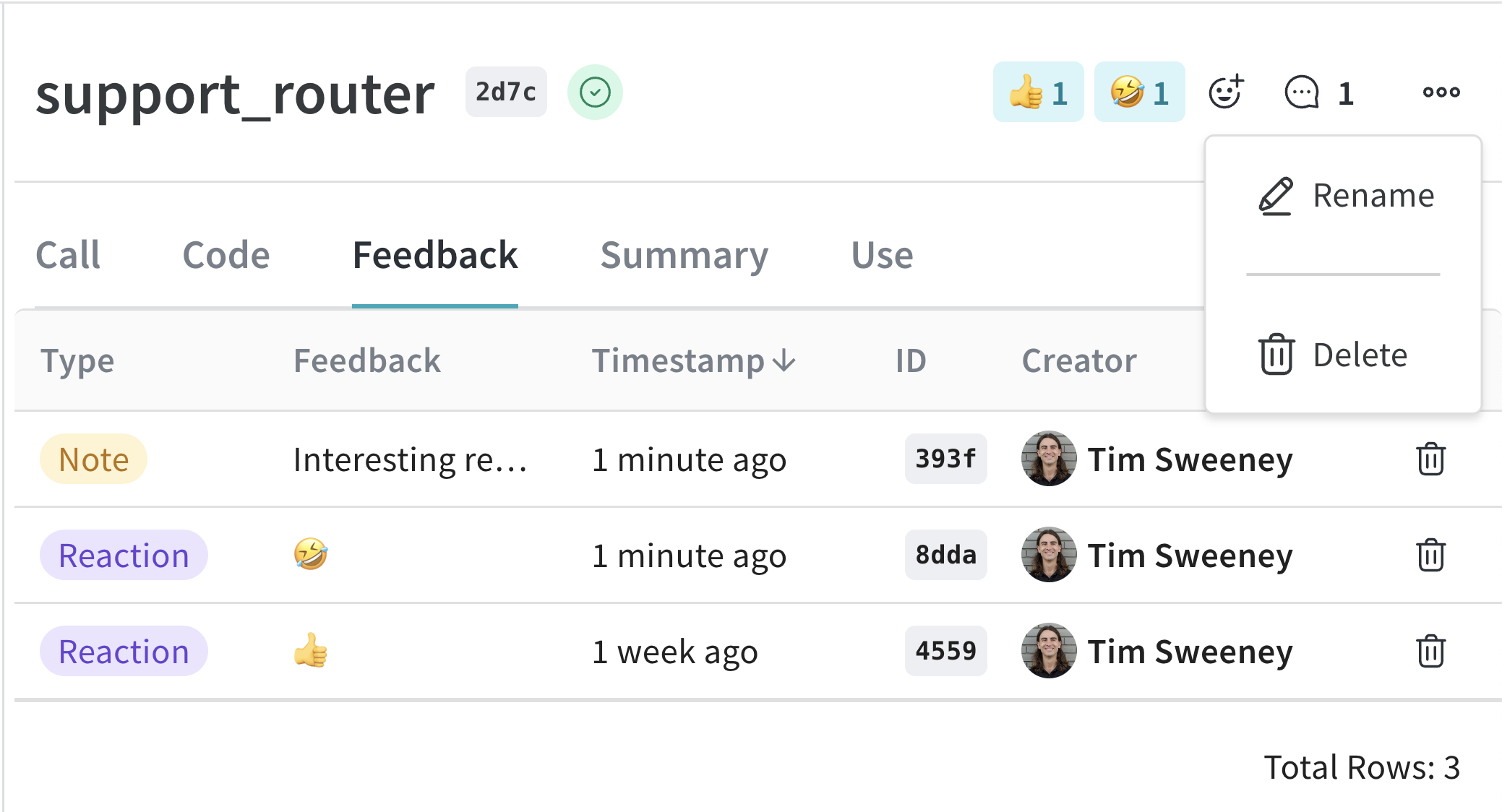
Set display name#
To set the display name of a Call, use the Call.set_display_name() method.
    import weave

    # Initialize the client
    client = weave.init("your-project-name")

    # Get a specific Call by its ID
    call = client.get_call("call-uuid-here")

    # Set the display name of the Call
    call.set_display_name("My Custom Display Name")
    ```
  <span class="tab-end"></span>

  <span class="tab-start" data-tab-title="TypeScript"></span>
To set the display name of a Call, use [`client.updateCall`](/weave/reference/typescript-sdk/classes/weaveclient#updatecall) to update by call ID directly:

```typescript
    import * as weave from 'weave'

    // Initialize the client
    const client = await weave.init('your-project-name')

    // Update the display name of a Call by its ID
    await client.updateCall('call-uuid-here', 'My Custom Display Name')
    ```
  <span class="tab-end"></span>

  <span class="tab-start" data-tab-title="HTTP API"></span>
To set the display name of a Call using the Service API, make a request to the [`/call/update`](https://docs.wandb.ai/weave/reference/service-api/calls/call-update) endpoint.

```bash
    curl -L 'https://trace.wandb.ai/call/update' \
    -H 'Content-Type: application/json' \
    -H 'Accept: application/json' \
    -d '{
        "project_id": "string",
        "call_id": "string",
        "display_name": "string",
    }'
    ```
  <span class="tab-end"></span>
<span class="tab-group-end"></span>

You can also [set a Call's display name at execution](/weave/guides/tracking/get-call-object).

### Add feedback

Please see the [Feedback Documentation](/weave/guides/tracking/feedback) for more details.

### Delete a Call

<span class="tab-group-start"></span>
  <span class="tab-start" data-tab-title="Python"></span>
To delete a Call using the Python API, use the [`Call.delete`](/weave/reference/python-sdk/trace/weave_client#method-delete) method.

```python
    import weave

    # Initialize the client
    client = weave.init("your-project-name")

    # Get a specific Call by its ID
    call = client.get_call("call-uuid-here")

    # Delete the Call
    call.delete()
    ```
  <span class="tab-end"></span>

  <span class="tab-start" data-tab-title="TypeScript"></span>
```plaintext
    This feature is not available in the TypeScript SDK yet.
    ```
  <span class="tab-end"></span>

  <span class="tab-start" data-tab-title="HTTP API"></span>
To delete a Call using the Service API, make a request to the [`/calls/delete`](https://docs.wandb.ai/weave/reference/service-api/calls/calls-delete) endpoint.

```bash
    curl -L 'https://trace.wandb.ai/calls/delete' \
    -H 'Content-Type: application/json' \
    -H 'Accept: application/json' \
    -d '{
        "project_id": "string",
        "call_ids": [
            "string"
        ],
    }'
    ```
  <span class="tab-end"></span>
<span class="tab-group-end"></span>

### Delete multiple Calls

<span class="tab-group-start"></span>
  <span class="tab-start" data-tab-title="Python"></span>
To delete batches of Calls using the Python API, pass a list of Call IDs to `delete_calls()`.

<span class="callout-start" data-callout-type="important"></span>
  * The maximum amount of Calls that can be deleted is `1000`.
  * Deleting a Call also deletes all of its children.
<span class="callout-end"></span>

```python
    import weave

    # Initialize the client
    client = weave.init("my-project")

    # Get all Calls from client
    all_calls = client.get_calls()

    # Get list of first 1000 Call objects
    first_1000_calls = all_calls[:1000]

    # Get list of first 1000 Call IDs
    first_1000_calls_ids = [c.id for c in first_1000_calls]

    # Delete first 1000 Calls by ID
    client.delete_calls(call_ids=first_1000_calls_ids)
    ```
  <span class="tab-end"></span>

  <span class="tab-start" data-tab-title="TypeScript"></span>
```plaintext
    This feature is not available in the TypeScript SDK yet.
    ```
  <span class="tab-end"></span>
<span class="tab-group-end"></span>
Link last verified
June 17, 2026.
View original ↗
Source: Weights & Biases Docs
Link last verified: 2026-04-05